


 Sign In
Refreshing the Way to Explore Your Digital Twins
The tools built into every Matterport digital twin, measure, tour, defurnish, and more, are now easier to find and use.
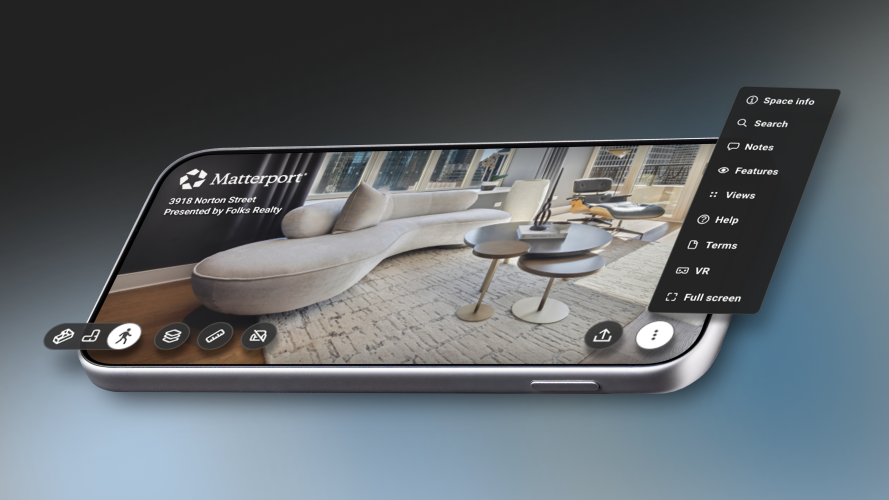
Every Matterport digital twin can do more than most people realize. You can measure a room, walk a guided tour, switch floor plans, or strip the furniture out of a space with one tap. The July 2026 update pulls those tools to the front and makes the whole viewing experience simpler to use.
You don't need to do anything to get it. The update is already live in your account, across every space you own, new and existing. The tools you rely on are all still here, just organized so they're easier to reach. A quick note on terms. When you send someone a link to a digital twin, the view they open is called Showcase, the experience anyone can explore in a browser. A few of these tools are there for every viewer automatically. Others you set up as the owner, and whatever you build is what your viewers get. We'll point out which is which as we go.
Navigate a space with ease
Every tool now lives in one toolbar at the bottom of the screen. The tools you reach for most stay in view. The rest sit one tap away in a labeled menu, so a first-time viewer can tell what each button does without guessing. Plugins extend what a twin can do right inside that same view, so the people you share with get more than a static space to click through with Minimap, Compass, Color Adjustments (beta), Business Card and Quick Link.
Work together without leaving the twin
Add custom tags and notes to mark what matters, a damaged wall, a change order, a detail a client keeps asking about, so anyone who opens the twin sees the same context you do. You create these as the owner, and they carry straight through to the people you share with. For teams building and managing projects, the twin connects to the design and build tools you already use. Free integration is fast with Autodesk Forma (formerly Autodesk Construction Cloud) and Procore, so the spatial record of a site sits next to your project data instead of in a separate system. Everyone on the project works from one accurate view of the space.
Do more with every digital twin
Compare a space side-by-side to see how a site changed between two points in time. Track construction progress week to week or document a property before and after work. Defurnish a room with an AI-powered tool that clears out the furniture so a buyer or tenant can picture the empty space. Both work for any viewer, on any twin, when an owner has enabled the functionality on their account. You can also merge models, combining separate captures into one connected twin. A large or multi-part property can be viewed as a single space instead of through unique links for different areas. Measuring is simpler too. Start a measurement and the rest of the toolbar steps aside, leaving a clean set of labeled buttons to place your points and read the distance.
Built for everyone who opens the link
Buttons now have clear shapes and visible states, so people using a screen reader or keyboard can tell what's clickable at a glance. This makes navigation and usability easier, so more of the people you share with can use the twin the way you intended.
What's different
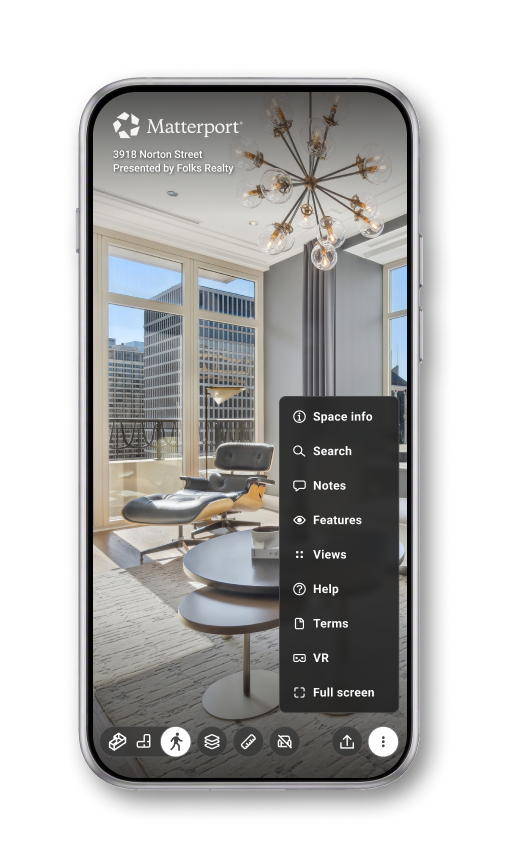
A cleaner view. The space fills the screen, with tools ready when you want them and out of the way when you don't.
Every tool in one place. Measure, tour, defurnish, and more now live in a single toolbar at the bottom. The tools you'll reach for most stay in view. The rest sit one tap away in a labeled menu.
Clear labels throughout. Every button says what it does, so anyone can navigate a twin with confidence the first time.
Easier for everyone. Buttons now have clear shapes and states you can see, so people using a screen reader or a keyboard can tell what's clickable at a glance.
A closer look at a few tools
When you start measuring, the rest of the toolbar steps aside. You get a clean set of labeled buttons, place your points, and read the distance. Nothing else competes for your attention. Any viewer can view automated measurements on any twin if the owner has provided the free feature through their account.
Defurnish now shows an "AI Enhanced" label, so it's clear the empty-room view is created by AI removing the furniture. As long as this free functionality is enabled at the account level, anyone with the link can use it.
The view options (Dollhouse, Floor Plan, Inside view) now open from a panel along the bottom instead of a side panel that used to cover other details. These are views you switch on as the owner, so people see the ones you picked.
It's already on
The update reached every existing and new digital twin in July 2026. You don't need to migrate anything, change a setting, or tell your team. It's live right now.
Open a twin and try it. Or send a link to a client or colleague and let them find the new experience on their own.


