


 Sign In
How To Manage Gray Space in Data Centers Using Digital Twins
Most conversations about data center optimization happen in the server hall. That’s where performance is easiest to see and easiest to measure.
But the real limits on uptime and growth often live behind the scenes. The infrastructure that powers, cools, and protects the server hall sets the ceiling on what the facility can deliver. That gray space plays a major role in site resilience and service-level commitments. And yet, teams still manage it with incomplete records and vague assumptions.
In this article, we’ll examine why gray space has become a primary source of operational risk in modern data centers, and how managing it with the same level of rigor as white space helps facility teams plan with confidence.
Gray space vs. white space: Key differences
In a data center, white space refers to the areas where IT equipment like servers, storage, and networking hardware is installed and operated. Its purpose is to house and support compute infrastructure while ensuring proper power delivery, cooling, airflow, and physical access for ongoing operations.
Gray space is the area that houses non-IT infrastructure such as fire suppression systems, power supplies, and cooling equipment. Their purpose is to ensure continuity in the data center by maintaining power availability, system redundancy, and operational resilience for white space infrastructure.
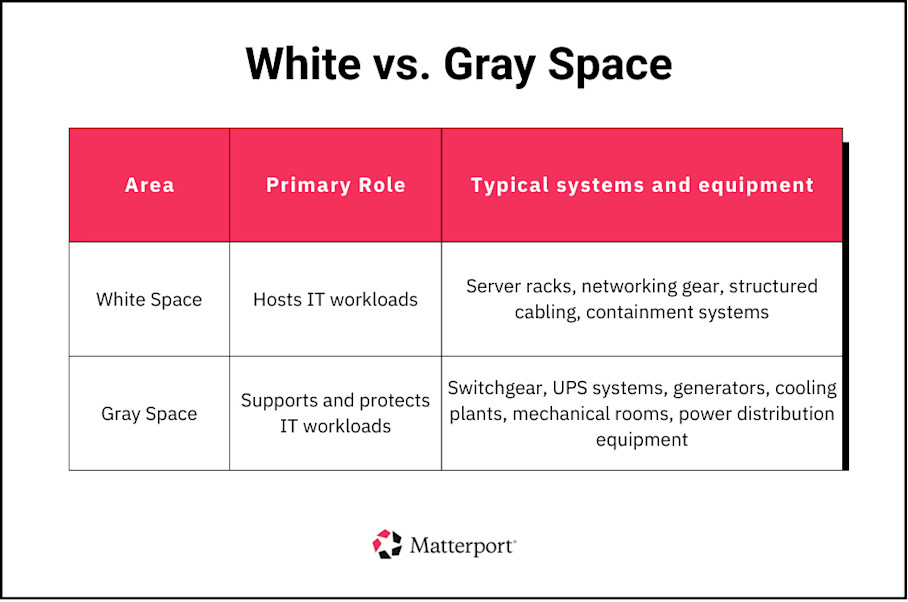
A server hall can be perfectly designed and meticulously managed, but it only runs as long as the supporting infrastructure continues to deliver power and cooling without interruption.
How gray space management dictates white space uptime
Uptime in the data hall is determined long before a server ever powers on. Every workload depends on a continuous chain of power delivery and heat removal that runs through gray space. If any part of that chain falters, availability in the white space disappears immediately, no matter how well the server hall itself is designed.
Documenting and monitoring gray space is notoriously difficult due to:
Restricted physical access
Aging drawings and outdated floor plans
Siloed knowledge among employees
High equipment density
Safety constraints
The resulting gaps in visibility impact work within the data center. Poor gray space management results in delayed equipment upgrades, workflow inefficiencies, maintenance blind spots, and planning friction.
Techniques for improving gray space management using digital twins
Digital twins give facility teams a virtual, 3D replica of gray space that’s difficult to document or monitor through traditional tools.
The sections below outline practical ways digital twins support better gray space management, from understanding cooling behavior and power dependencies to planning layouts and monitoring infrastructure health.
Centralize infrastructure documentation
Digital twins give facility teams a way to document gray space as it actually exists in one definitive source of truth.
These virtual, 3D replicas make it easy to work through plans without being on site. They can review layouts remotely and confirm whether space is usable before scheduling work. This is especially valuable in areas where access is limited or safety requirements slow down site visits.
With a digital twin built using Matterport, you can centralize gray space records and tie them directly to the physical environment:
Use Notes to document SOPs and inspection findings in the exact locations where tasks are performed.
Apply Tags to connect equipment to CMMS or EAM records so maintenance history is available in context.
Add Attachments to associate drawings, QA or QC documentation, and supporting files directly with infrastructure and rooms.
This approach keeps critical information current and location-aware, making documentation easier to trust and faster to use during planning, audits, and live operations.
Optimize cooling systems and airflow
A digital twin lets you examine cooling behavior without relying on assumptions or waiting for a site visit.
With a digital twin, you can:
Walk hot and cold aisle layouts virtually and visualize airflows
Inspect containment integrity without entering the data hall
Check whether equipment placement interferes with airflow
Review clearance around the cooling infrastructure
Overlay thermal or CFD snapshots for remote analysis
This approach gives you a clearer picture of system performance, which helps you correct issues earlier and avoid compensating with excess capacity.
Improve power chain reliability
Digital twins make the power chain easier to understand by showing how it is physically laid out in the facility.
Instead of interpreting abstract diagrams, you can visually follow power paths through rooms and equipment. You see where redundancy actually exists and where it only exists on paper. That makes it easier to validate assumptions before maintenance, upgrades, or load changes put availability at risk.
You can also use the model to document current operations. Configuration details and maintenance touchpoints stay tied to the infrastructure itself. When questions come up, you’re not reconstructing intent from memory or hunting through disconnected systems.
This visibility becomes especially valuable when you need a second set of eyes. You can walk vendors or internal reviewers through the environment remotely and resolve capacity or redundancy questions early, before work begins in a live facility.
Plan layouts for access and safety
Digital twins let you confirm whether you can carry out planned work safely before anyone enters gray space.
You can review spacing around equipment to see if access is sufficient and whether movement routes actually work in practice. This makes it easier to catch layout constraints you wouldn’t see in drawings.
You can also document how work will happen by marking things like rigging paths and electrical clearances directly in the model. Validating access and safety concerns remotely helps you resolve them proactively. Changes stay predictable, and upgrades don’t turn into last-minute redesigns or safety escalations.
Implement monitoring and predictive maintenance
Digital twins help you visualize monitoring data and engage in predictive maintenance. They can also act as the visual layer for data and enable you to:
Integrate live sensor data. View temperature shifts, power anomalies, or leak detection events in the exact location they occur.
Centralize alarms and maintenance visibility. Tie alerts, inspection history, and maintenance schedules directly to infrastructure so you understand current conditions and planned work at the same time.
Speed up triage and response. Inspect affected areas remotely and confirm access constraints before sending anyone into gray space.
Support predictive maintenance workflows. Connect observed behavior to historical performance so emerging issues are addressed early, before they escalate into downtime.
By viewing monitoring data in its physical context, you reduce investigation time and catch problems earlier.
Modernize critical systems
Digital twins help you modernize infrastructure so you can see what is feasible before committing capital or disrupting operations.
You can use a digital twin to:
Identify where modular upgrades will physically fit
Evaluate placement of higher-efficiency equipment
Assess whether existing layouts support new loads
Understand spatial constraints before design work begins
Compare upgrade options based on proximity and access
Because these decisions are grounded in real conditions, you can make upgrades more predictable and prioritize them based on potential impact.
How to avoid stranded capacity
Stranded capacity builds up when gray space is planned in pieces instead of as a connected system. Digital twins help you see how constraints interact, so growth decisions stay aligned with what the facility can actually support.
1. Visualize the balance of power, cooling, and space
Use the digital twin to understand the relationship between power delivery, cooling capability, and physical space across the facility.
Instead of reviewing these limits in separate tools, you can see where capacity exists and where it is already constrained. This makes it easier to model future growth and understand which part of the infrastructure will become the limiting factor first.
When constraints are visible early, you have more options to address them without disrupting operations.
2. Align rack additions with capacity
Before adding racks or increasing density, confirm that supporting infrastructure can sustain the load over time.
A spatial model helps you trace dependencies back to power and cooling sources so expansion decisions are based on reality, not assumptions.
This prevents situations where white space appears available but cannot be used because upstream systems are already operating at their limits.
3. Track key KPIs in context
By overlaying KPI data onto the digital twin, you can see how performance limits map to real spaces and infrastructure instead of interpreting numbers in isolation.
Key indicators to track include:
Cooling capacity factor (CCF). Measures how much cooling capacity is installed relative to the IT load it supports. A CCF around 1.2 is generally considered efficient. Higher values often indicate overprovisioned or poorly utilized cooling infrastructure.
Power usage effectiveness (PUE). Compares total facility energy use to energy consumed by IT equipment. Modern facilities typically target 1.3 or lower, depending on climate and design.
Rack-level thermal compliance. Indicates whether inlet temperatures stay within recommended operating ranges. Consistent alignment with ASHRAE-recommended ranges signals effective airflow management.
When these KPIs are visualized in the context of the physical environment, you can identify exactly where efficiency is being lost and prioritize corrective action based on impact, not averages.
Bring gray space into sharper focus with digital twins
Power paths, cooling capacity, access constraints, and safety conditions all live outside the server hall. Yet this gray space often operates with less visibility and weaker documentation.
Digital twins bring clarity to these environments by turning gray space into something you can visualize and plan around with confidence. By grounding decisions in accurate spatial data, facility teams reduce risk, surface constraints earlier, and make infrastructure changes more predictable. And a platform like Matterport makes it possible.
Get in touch with our team

