


 Sign In
How to Improve Guest Satisfaction and Reviews: 7 Strategies from Pre-Arrival to Checkout
Key takeaways
Guest satisfaction depends on how well a stay matches what the guest expected, so the most reliable way to raise scores is to set accurate expectations before booking and meet them at every touchpoint through checkout.
Rooms that don’t match the listing, unavailable amenities, and communication breakdowns are among the most common causes of low scores. Guest feedback is useful if the hotel turns its recurring themes into operational fixes.
Matterport 3D virtual tours help on both sides of the stay: guests and event planners see exactly what they’re booking before they commit, and housekeeping and maintenance get a shared visual reference for preparing each room to standard.
A guest books a "spacious king room with city views," but they arrive to a smaller room facing an air shaft. The room is spotless, the staff is friendly, but the guest leaves a three-star review.
Hotels can get the fundamentals right and still lose points because the stay doesn’t match the picture a guest formed while booking. For teams working out how to improve hotel guest satisfaction, the most reliable approach is to set accurate expectations before arrival. Then, meet those expectations consistently at every touchpoint through checkout.
This article looks at how guest satisfaction shapes reviews and revenue, then covers strategies for improving it across the guest journey.
Why are hotel guest satisfaction scores important?
Hotel guest satisfaction measures how well a stay meets guest expectations. Hotels track it through online review scores, post-stay surveys, and Net Promoter Score (NPS).
Guest satisfaction impacts four business outcomes:
Review rankings: Higher review scores lift a property's ranking on OTAs and in search results
Repeat bookings: Satisfied guests return often and engage with loyalty programs
Direct bookings: Guests who trust a hotel book directly on its website, so the hotel avoids OTA commission
RevPAR: Strong reviews give revenue managers the confidence to hold rate, which protects RevPAR
Hotel teams see three causes of low satisfaction most often:
Room doesn’t match the listing: A “spacious” room turns out smaller than pictured, or “city view” faces another building
Amenity isn’t available as shown: The pool is closed for the season, or the gym has less equipment than the photos suggest
Communication breaks down: Guests don’t get parking or check-in details before arrival, or a request made during the stay remains unaddressed
Each of these is an expectation gap, and that gap runs through every strategy below. Guests rate a hotel on how well the stay matches what they pictured, not just on how good it was.
7 strategies to improve hotel guest satisfaction from pre-arrival to checkout
The strategies below follow the guest journey in order, starting on the reservation page and ending at the front desk on departure day.
Each one targets a point where expectations are set, met, or missed. Hotel teams can work through them in sequence or start with the stage that generates the most complaints.
1. Show guests exactly what they are booking
Listing photos rely on wide-angle lenses, staged lighting, and cropped views. Rooms look larger and brighter than reality, which leads to "not as pictured" complaints, room-change requests, and refund demands.
Each room category's page should show:
Room size and layout
The actual view from each room category
Bathroom configuration
Bed arrangements
Accessibility features
With 3D virtual tours, guests can walk through the actual room before booking, so arrival feels familiar rather than uncertain. The tour’s Dollhouse and floor plan views reinforce familiarity by showing how the rooms connect, helping guests decide which room size they need.
Guests can also check exact room dimensions, including ceiling heights, which Matterport generates with Automated Measurements when it creates the digital twin behind the tour. Those numbers answer size questions before they become complaints.
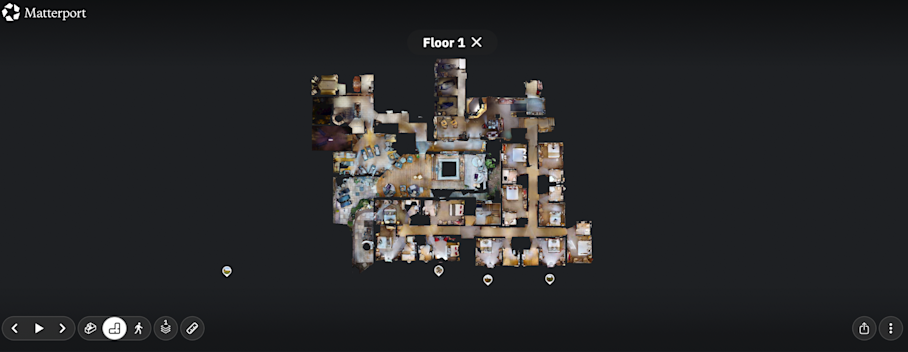
Lindner Hotels uses Matterport digital twins so guests can virtually walk through a room and decide whether an economy room has enough space or whether a suite upgrade is worth it. "We want our guests to be confident that they're booking the right room, and that can only be done if we provide detailed visual information upfront," says Oliver Stotz, Corporate Director of Marketing and Distribution.
Guests who walk through the room in advance arrive with accurate expectations, so fewer of them leave reviews saying it didn’t match the listing.
2. Make amenities, venues, and event spaces visible online
Amenity mismatches drive negative reviews from both leisure and group guests. A pool smaller than the photos suggest, a gym with less equipment than shown, or a meeting room that seats fewer than advertised leaves guests feeling misled.
Hotels should showcase the spaces beyond guest rooms that shape the stay:
Leisure amenities: Pool, spa, fitness center, restaurant, and bar
Event and group spaces: Meeting rooms, ballrooms, and outdoor event areas
A virtual tour of each space lets planners confirm layout, flow, and capacity remotely, reducing email back-and-forth and the need for in-person show-rounds.
Hotels can also add amenity details right where they apply in the tour. A pool deck can show opening hours and seasonal availability, and the spa entrance can explain how to book a treatment, all through Tags pinned to each spot.
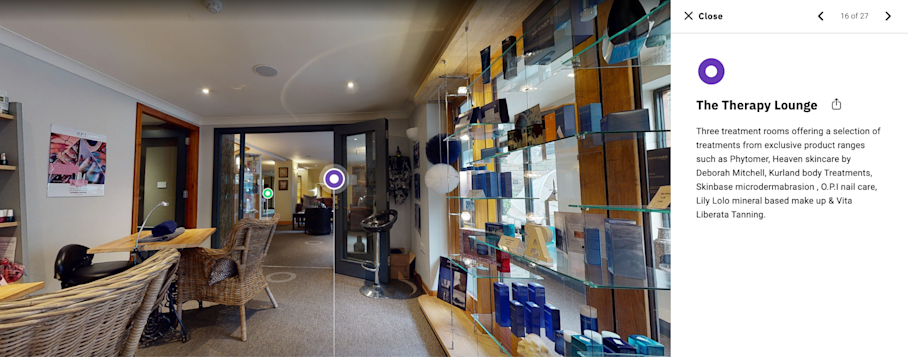
The Ivy Collection added Matterport digital twins of its 50 private dining rooms to its website, so clients who can’t visit in person can still see each room exactly as it is. “The Matterport digital twins really help us set expectations for someone who can't see the venue physically – and that ensures confidence and trust,” says Stephanie Mechanic, Head of Sales.
Since adding the tours, The Ivy’s events team no longer has to deal with mismatched client expectations on the day of an event. Show-rounds have dropped from several a day to a couple a week, and event organizers now take venue measurements directly from the tour.
Visible amenities protect leisure and group reviews, because guests and planners arrive knowing what each space offers.
3. Personalize pre-arrival communication and smooth the arrival
Two messages cover most pre-arrival needs. First, send a preferences survey 7 days out covering arrival time, special occasions, and room needs. Then follow up 48 hours out with an arrival email covering parking, entrance, and check-in details.
These tactics prevent the most common check-in complaints:
Mobile check-in and digital keys: Guests can skip the desk queue and go straight to their room
“Your room is ready” texts: Guests aren’t left waiting in the lobby, wondering when they can go up
Staffing matched to arrival peaks: The arrival times from the pre-arrival survey show when the desk needs extra hands
Clear signage for parking and entrances: Guests find their way in without circling the block or asking for directions
The physical route into the hotel shapes first impressions before anyone says hello, and signage, lobby layout, and accessible paths all play a part.
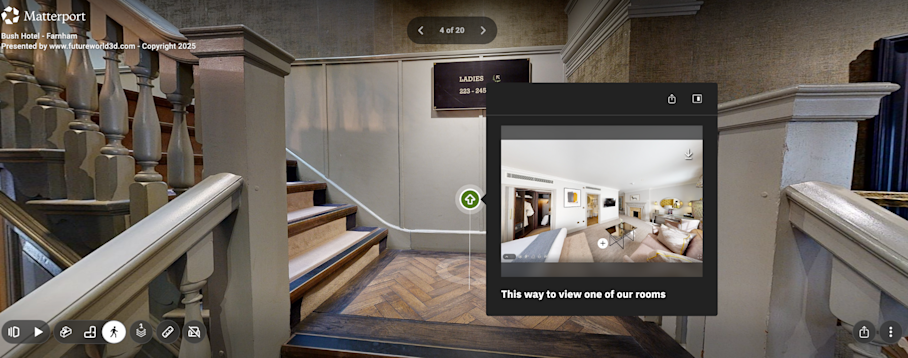
To audit the arrival flow, a manager can walk it as a first-time guest would: park, find the entrance, reach the desk, and locate a room, noting every point where they hesitate.
A smooth arrival sets the tone for the full stay and gives later interactions a positive starting point.
4. Standardize room readiness and cleanliness
Cleanliness, comfort, and maintenance are the baseline of every stay, and no amount of friendly service makes up for a stained carpet or a broken air conditioner. Inconsistent housekeeping across floors or shifts often turns into complaints right after check-in.
A simple inspection framework keeps quality steady across every floor and shift:
One checklist per room type: Every housekeeper cleans the room to the same standard
Supervisor spot-checks: A supervisor inspects a set share of rooms each shift, e.g., one in five
Sign-off before release: Rooms aren’t flagged as guest-ready until someone signs them off
The digital twin behind a virtual tour also shows what a “ready” room looks like, so each team member works from the same standard for bed setup and amenity placement. With Notes, staff can flag maintenance issues, missing items, or setup instructions in place within the 3D model.
Each Note can include photos or files, @mention the maintenance team, and be marked resolved once the fix is done. Managers can use this spatial data to monitor room conditions remotely and plan maintenance before small issues reach a guest review.
The goal of any readiness process is consistency, so each guest sees an identical result when they arrive.
5. Train and empower staff to resolve issues on the spot
Fast complaint resolution is one of the strongest drivers of review recovery, because a quick fix shows guests the hotel is paying attention, and that impression often outlasts the original issue.
Staff can follow a four-step service recovery model. Here’s how it works when a guest calls the front desk at 10 p.m. about a noisy room:
Listen: The agent hears the guest out without interrupting or jumping to a fix
Apologize: The agent acknowledges the problem without making excuses
Solve: Within 20 minutes, the guest is in a quieter room with a breakfast credit
Follow up: The next morning, the agent checks that the new room worked out
You can give frontline staff a defined spending limit for on-the-spot fixes, so they don’t have to wait for a manager’s approval to offer a room upgrade, a drink voucher, or a waived fee.
With virtual tours of guest areas and back-of-house spaces, new hires can learn the layout before their first shift and give guests accurate directions and answers from day one.
Hotel groups training staff across many properties can use Capture Services to have every location scanned the same way, so new hires learn from tours of the same quality.
Empowered staff are the fastest path from complaint to recovery, because the person who hears the problem can also fix it.
6. Use technology to keep communication open during the stay
In-stay messaging through SMS, WhatsApp, or app chat gives guests an easy way to flag problems while staff can still fix them. Many guests who would never call the front desk will reply to a text.
Send a mid-stay check-in message the morning after arrival with a single question, such as “Is everything in your room as expected?”
A one-question message takes guests seconds to answer, and any “no” should go straight to the duty manager for same-day follow-up.
Automation can take routine requests off the front desk. Set up quick replies or keyword triggers so the system answers simple questions, like restaurant hours, instantly and logs requests, like extra towels or late checkout, straight to the right time. Anything else goes to a person, so staff can focus on the issues that need judgment.
With the right messaging setup, staff answer fewer routine questions and still reach guests faster when something goes wrong.
7. Make checkout effortless
Three friction points sour an otherwise good stay at checkout, right before the guest writes a review. Each one has a simple fix:
Surprise charges: Email the folio the night before departure so guests can question the charges before they reach the desk
Slow checkout: Offer express or in-app checkout for guests who don’t need to stop at the desk
Limited late checkout: Confirm late checkout availability proactively in the same message instead of waiting for guests to ask
Close with a brief, personal farewell at the desk or by message. Thank the guest by name and reference something from the stay, such as an anniversary dinner or the conference they attended.
The last impression is the freshest one when a guest sits down to write a review, so checkout deserves as much care as arrival.
How to turn guest feedback into operational improvements
Guest feedback is the clearest signal of which operations need work, but it only improves satisfaction when it changes how the hotel runs.
The four practices below cover when to ask for feedback, where to listen, how to respond, and how to fix what keeps coming up.
Ask for reviews at the right moment
Timing and method shape both the volume and tone of reviews. Send a request within 24 hours of checkout, while the stay is still fresh, with a direct link to the preferred platform, and keep the message to two or three sentences.
When a guest shares positive feedback during the stay, staff can ask in person at checkout. A simple line works: “Would you mind sharing that in a review?” Follow up with the link by email or text the same day.
Skip incentives like discounts or upgrades in exchange for reviews, since they break most platform policies and can get the reviews removed.
Timely, simple requests keep a steady stream of recent reviews coming in, which gives future guests a current picture of the property.
Collect feedback from multiple channels
Each feedback channel catches different issues, so hotel teams should monitor all four:
Post-stay surveys
OTA and Google reviews
In-stay messages
Front desk notes
Keep the post-stay survey to five questions or fewer and send it within 48 hours of checkout. Include one NPS question, such as "How likely are you to recommend us to a friend?" Add one open-ended question, such as "What one thing would have made your stay better?"
Log every comment in one shared tracker with the date, channel, and room number, so a guest experience lead can filter by room or theme in seconds. Combining channels into one view reveals patterns that single channels don’t show on their own.
Respond to every review
Positive and negative reviews call for different replies:
In response to a positive review, thank the guest by name and mention a specific detail from their review, such as the rooftop breakfast they enjoyed.
In response to a negative review, acknowledge the issue, explain the fix without excuses, and invite the guest to contact the property directly.
Respond within 48 hours and assign a named owner for replies, usually a guest experience manager or assistant GM, with a backup for days off. Future guests read responses as a sign of how the hotel treats guests, so a thoughtful reply to a negative review can do as much for the listing as the positive one.
Find and fix recurring issues
Tag each review comment by theme, such as cleanliness, noise, check-in, room accuracy, or amenities. Review the theme counts monthly in the operations meeting and assign an owner to the top issue.
Recurring "not as pictured" comments usually mean the listing doesn’t match the property, often after a renovation or refurbishment. Updating the virtual tour whenever a space changes keeps the listing accurate.
Each digital twin also captures a room’s condition at a point in time, giving managers a clear baseline to compare against when they plan renovations or check that fixes held.
For example, a hotel notices repeated complaints about a dated bathroom in one room category. Managers use the digital twin to scope the work and schedule the renovation. Once it’s done, the team updates the virtual tour and room description so the listing matches the new room.
Each fix that reaches the listing means the next guest’s expectations are more accurate.
Guest satisfaction starts with accurate expectations
Guest satisfaction improves when hotels set accurate expectations before booking and meet them consistently through checkout. 3D virtual tours make the first part reliable, because guests see the actual room, amenity, or venue before they commit.
For hotel leaders, the practical starting point is recent feedback. Find the rooms, amenities, or event spaces with the most expectation-related complaints, and start by enriching their virtual tours with accurate dimensions and Tags.
Get started with Matterport for Travel & Hospitality


