


 Sign In
Manufacturing Process Documentation: A 6-Step Framework for Plant Teams
Key takeaways
Manufacturing process documentation is a controlled set of records that describes how a product is made so it can be produced consistently and safely.
Treat documentation as a continuous cycle with reviews triggered by every process or facility change to keep records from drifting out of sync with the floor.
Anchor manufacturing process documentation to a visual reference like a digital twin to give operators spatial context at the point of use, improving process adoption and compliance.
On a production floor, almost nothing stays still. A new product introduction shifts material flow, tooling changes, and the workstation you set up last quarter looks different today. Clear, accurate manufacturing process documentation keeps quality consistent and facilities safe. Without it, training slips, quality drifts, safety gaps open, and improvement work stalls.
Most documentation lives in shared drives, binders, and PDFs, disconnected from the equipment it describes. That makes it harder to follow at the station, harder to scale across lines and sites, and harder to keep matching a floor that keeps changing.
In this guide, we’ll lay out a practical framework for creating manufacturing process documentation that is accessible to the people on the floor, and keeps it accurate through the full life of a facility.
What is manufacturing process documentation?
Manufacturing process documentation is the controlled set of records that describes how a product is made. It captures the steps, resources, parameters, and checks needed to produce that product consistently and safely. For most plants, it is the working library the team manages day to day.
That library covers a wide range of record types, each with its own purpose and required contents. The table below breaks down the common documentation types and what should be included in each package.
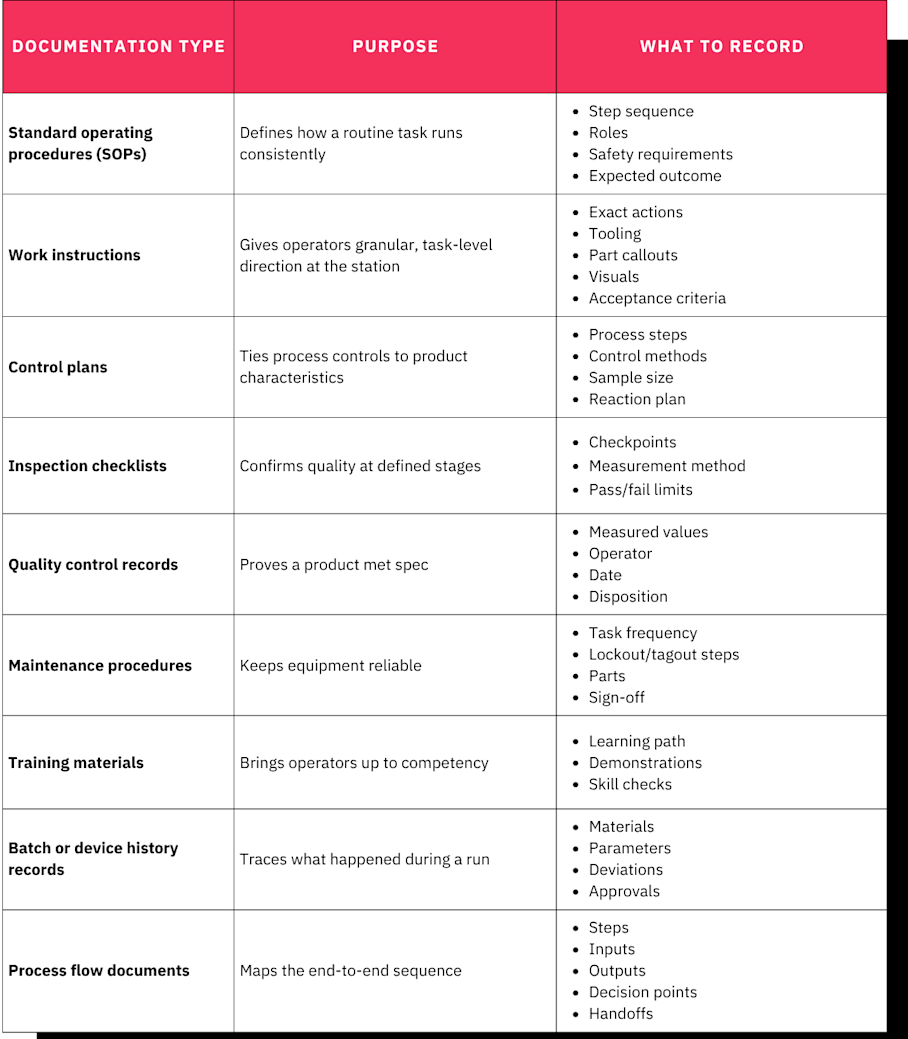
All manufacturing process documentation should reflect the process as it's actually run today. A procedure that describes an idealized line nobody follows anymore is worse than useless, because it creates false confidence.
Even when procedures are kept up to date in traditional systems like files and manuals, one element often goes missing: spatial context. The records rarely show where each step and check physically happens and what else it relates to on the shop floor.
Picture a work instruction that lists every torque value, the fastener sequence, and the inspection tolerance in perfect order. On paper it is complete, but a new operator standing at the cell still might not be able to tell which of three nearly identical stations the instruction governs, where the fixture sits, or which panel to open first. Making it specific to real-world spaces and accessible at the point of need is crucial.
Good documentation not only improves individual procedures, but contributes to overall manufacturing process optimization:
Process consistency across shifts and sites: Every operator runs the step the same way, whether it's first shift in Ohio or third shift in Monterrey.
Product quality: Clear parameters and inspection criteria catch defects before they ship.
Worker safety: Hazards, PPE, and restricted zones are called out where the work happens.
Faster training: New hires ramp up against a real reference instead of shadowing whoever's free.
Reduced operational and compliance risk: Traceable, current records hold up when an auditor or a corrective action comes calling.
When documentation reflects the current floor, those outcomes hold up under pressure.
The 6-step framework for manufacturing process documentation
Treat the following six steps as a cycle, not a one-time project. The framework works the same for a single cell or for standardizing across dozens of lines and sites.
1. Capture the real shop-floor environment
Good documentation starts from an accurate record of the actual workstation. That means the layout, equipment placement, clearances, material flow, signage, safety zones, and how operators move through the space.
A static set of 2D photos and a hand-drawn layout can only show you fragments. Instead, use a 3D model of the line or cell that shows the whole space in context. Digital twins capture real-world spaces in full context and can be accessed by any team member, serving as an "as-built and as-run" source of truth for a line, a cell, or a whole plant.
When recording the space, make sure to capture the following details, which will be important for thorough process documentation:
Equipment and asset positions
Workstation configuration
Tool and fixture placement
WIP and material staging locations
Aisle widths and clearances
Guarding and safety zones
Utility drops and control panels
Existing signage
The Pro3 camera captures the full shop floor with centimeter-level accuracy and presents it as a single, navigable Matterport digital twin. With the space captured, you have a reference for planning procedures, layouts, ergonomics, and line-balancing remotely. Pull distances, clearances, and dimensions using the built-in measuring tools, so there’s no need to interrupt production by measuring the workspace by hand.
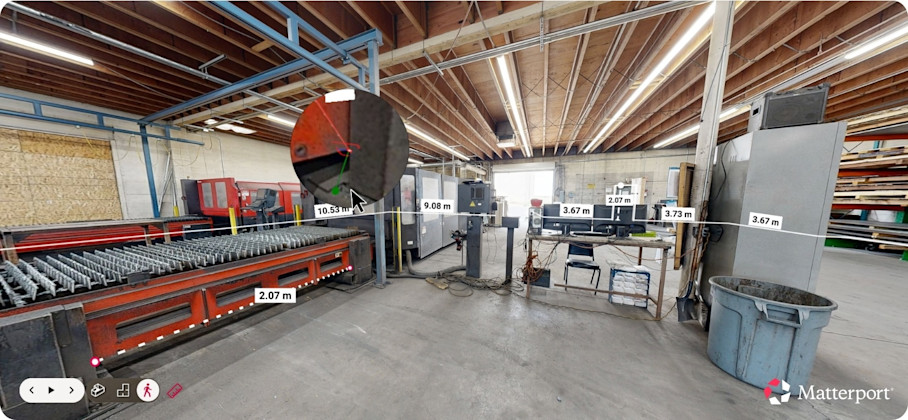
Siemens uses this method to perform comprehensive review and visual analyses of assembly line design setup and optimization remotely.
2. Observe the process and map the workflow
With the environment captured, translate it into a process map. Sequence the steps in order and identify the inputs and outputs at each one. Then mark the decision points, handoffs, and inspection stages where the process branches or gets checked.
The richest detail will come from the people who run the line. Interview experienced operators and subject matter experts by walking them through an immersive digital twin to surface real adjustments, checks, and troubleshooting moves. These are best remembered using visual prompts, and might not otherwise make it into written procedures.
Take care to capture any parameters, tolerances, and failure modes at each step while you watch the process run. Recording them live beats reconstructing them from memory weeks later.
3. Draft instructions and link them to locations and assets
Next, translate the workflow map into SOPs and work instructions, carrying over all points captured while observing the process. Use a consistent structure across documents and write in plain language an operator can follow under time pressure. Spell out roles so there's no confusion about who does what. Manufacturing or process engineers typically own this drafting work.
Then anchor those documents to the floor. Attach SOP steps, work instructions, and safety callouts to the exact workstation or piece of equipment they describe using Tags, so the documentation lives in spatial context. Include any relevant spec sheets, manuals, PDFs, and videos to enrich the process documentation further.
Make each pin specific to the point it governs. For example, attach:
Torque spec and fastening sequence to the assembly station
Lockout/tagout procedures to a machine's control panel
A changeover video to a die press
Calibration records to test fixtures
Predictive maintenance tasks to the QC bench
An operator standing at any of those points sees the one document that applies there, not a folder of everything.
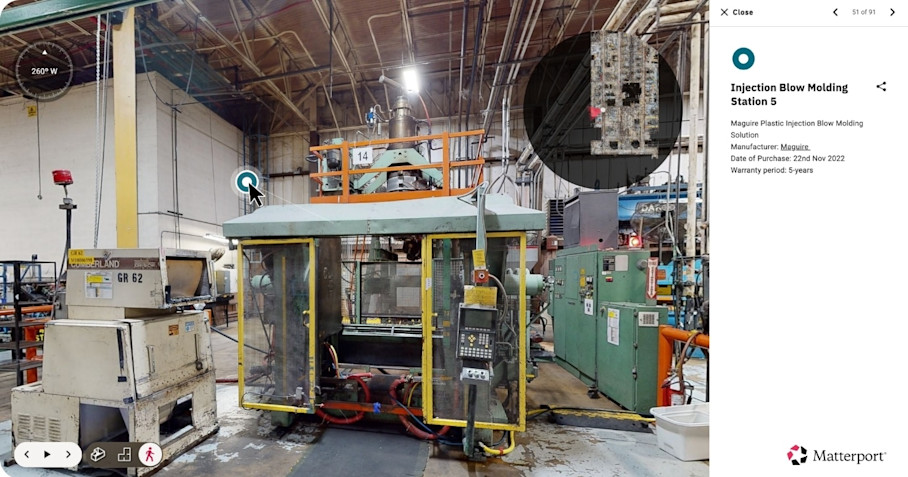
Now, rather than hunting for the right PDF file and then mapping it to the right location, operators can find the same step pinned to the exact machine inside the digital twin, right where the work happens. Digital twins live in the cloud, so the current version will reach any authorized device across shifts and sites.
4. Validate on the floor, approve, and publish
Validate the document drafts with a real test. Have an operator who did not help write the document perform the process using only the instructions, and log every question, hesitation, and workaround.
Confirm the following before publishing any process documentation:
Step sequence accuracy
Whether spatial references match what the operator actually sees
Tooling and part callouts
Inspection criteria clarity
Whether safety steps are performed as written
Once validated, the document can move through a defined approval path: process owner review, quality sign-off, EHS review where the work is safety-critical, and an assigned effective date and revision number before release.
Keep the review stage from turning into an email chain of redlines by using Notes to mention colleagues, share files, and leave location-specific threads pinned to the actual station. Engineering, quality, and EHS can then resolve comments in context instead of guessing from a description.
5. Train operators with real-world documentation
Manufacturing training can vary based on which operator is available to facilitate. That produces inconsistent results, and it loses hard-won knowledge to retirement and turnover.
Turn published process documentation into training that new hires, cross-trained operators, and contractors can all follow the same way. The goal is to preserve how experienced operators actually run, adjust, inspect, and troubleshoot.
Pinned videos and equipment-specific notes turn flat documents into reusable process paths that a newer operator can walk. Build a sequenced walkthrough of the process as a Guided Tour, so the written steps map to the physical path an operator follows, step-by-step. A trainee moves through the cell in the right order, seeing each step where it happens. Learning processes in context, and knowing where to access them again, makes the information easier to absorb.
SEACOMP reduced travel costs by roughly $250,000 per year for employees and customers, using digital twins to improve knowledge retention and drive better adoption of the process as written.
6. Maintain documentation and keep it current through change
Process documentation goes stale the moment the product, materials, or floor changes. Treat any physical plant or process change as an automatic trigger for a documentation update, including:
Equipment install, move, or removal
Cell rebalancing
Tooling or fixture changes
New product introduction
Layout or material flow changes
A safety incident or near miss
CAPA closure
Parameter or spec revisions
Pair those triggers with a review cadence tied to risk. Run a mandatory review at every change trigger, any time there's a process-related audit finding, or in response to a customer quality notice, regardless of the calendar. Run quarterly reviews on high-change or safety-critical cells, and run annual reviews on stable processes. Manufacturers should review all SOPs at least once a year to reflect current best practices. Documents without owners get lost, so assign an owner to every process.
When planning a process documentation update, compare two captures of the same cell before and after a reconfiguration Side-by-Side (public beta), so the team can see exactly what moved and which instructions need attention. From there, update the affected SOPs and re-apply the relevant Tags and Notes to the new capture.
Teams only need to rescan and update the reconfigured portion of a larger plant, then merge the space with the existing master digital twin. That keeps documentation current without a full facility rescan or a production shutdown.
Process document control that holds up in an audit
Disciplined documentation pays off most clearly during audits and investigations, when thorough evidence has to be produced quickly, and when gaps become expensive.
Auditors and quality systems expect a few things every time:
Traceability from requirement to record
Inspection evidence
Clear links between procedures and the physical process
Regulated industries add specific evidence requirements too. Pharmaceutical makers operate under FDA rules mandating documented procedures for every production stage, and food manufacturers align to HACCP. Heavy-machinery facilities incorporate OSHA lockout/tagout standards, while aerospace and automotive suppliers work within detailed supplier quality and audit standards.
A technically correct SOP still fails an audit if no one can prove which revision was in effect, who approved it, or who was trained on it. Alongside accurate content, make sure to apply the following control practices:
Store all documents in a single centralized repository so there are no competing copies
Use revision numbering and version history to prove what changed and when
Define a document owner per process so someone is accountable for accuracy
Implement a formal change-request and approval workflow so no unreviewed edits reach the floor
Schedule review cycles so documents are checked before they drift
Control access permissions so editing access is limited to owners and workers can see the instructions they need
Automatically archive superseded revisions so old versions leave the floor but stay traceable
Using a visual repository like a digital twin makes documents more accessible to all stakeholders. Operations, maintenance, engineering, and safety teams have a shared reference to review processes and document best practices without being on-site. Meanwhile, an auditor can walk a virtual line and review pinned inspection points and records instead of scheduling a site visit. Role-based permissions and customized Views let every collaborator access and focus on only the information that’s relevant to them.
Audit-ready documentation is a byproduct of running the framework above well, not a separate scramble at renewal time.
Turning manufacturing process documentation into an operational asset
Digital twins keep manufacturing process documentation tied to the real shop floor. With a visual, spatially anchored, centrally controlled record, process documents and production lines are far less likely to drift apart.
Instead of static PDFs, shared folders, and 2D photos, workers have access to documentation they can actually trust, right at the point of use. Documentation stops being a compliance chore and becomes an operational asset that scales with the plant.
Get in touch with our team


