


 Sign In
Hotel Room Maintenance Inspection Checklist: A Practical Template for Repairs
A maintenance inspection of a hotel room seems simple until something your staff examined this morning stops working anyway. A room gets a quick check, returns to inventory, and three days later it's out of service again. The thermostat showed a number, the faucet turned on, and both earned a checkmark, but neither was tested against a clear, repeatable standard.
Each overlooked issue leads to more trips, downtime, and bad reviews. A structured inspection prevents callbacks, but only when every item carries a defined pass/fail standard, a severity level, and a documented result, not just a box to tick.
This guide gives you a sequential checklist to run in a single walkthrough. Every item comes with pass/fail criteria, guidance on what to fix first, and a documentation format that plugs straight into your work orders and maintenance records.
Turning inspection checkpoints into actionable tasks
To make your checklist actionable, you need to define a framework covering three things:
Measurable pass/fail criteria
A documentation format that keeps each finding in context
Severity rankings that help decide what to fix first
Establishing pass/fail standards
A vague task like “inspect the thermostat” leaves space for technicians to interpret differently. One decides a slow-warming unit is fine, while the other writes it up. Fix that by defining a threshold anyone on your team can test the same way. For example:
Thermostat reaches its set temperature within 15 minutes
Every outlet holds a plug without it sagging or falling out
Sink drains fully within 10 seconds
Deadbolt throws and retracts without force
A specific threshold is more repeatable across technicians, shifts, and properties, reducing the inconsistencies. It also defines a clear line between a defect and normal wear.
For example, a dripping faucet is a defect, while a slightly dulled finish on a faucet belongs on the room’s cosmetic list. That distinction will also help technicians prioritize the order of work later.
Documenting maintenance findings
Unclear maintenance reports like “bathroom needs work” don’t tell supervisors what needs to be done. Neither does a photo of the job site that’s disconnected from notes or context.
Stop losing findings in the space between a photo app and a work order by ensuring that every logged issue captures the same standardized fields:
Room number: Points the repair to a specific location, not a floor
Asset or item: Names the exact fixture so parts and specs are ready
Issue type: Groups recurring faults for pattern tracking
Severity: Sets the response deadline and guides prioritization
Photo or visual proof: Lets a second person judge severity without a site visit
Assigned person: Fixes ownership so nothing sits unclaimed
Due date: Creates an accountable deadline
Completion status: Flags what’s still open and what’s finished
Reinspection result: Confirms the fix held before the work order closes
Mobile inspection forms with required photo fields are a good baseline. However, a photo in a camera roll loses the most important information about the repair: its exact spot in the room.
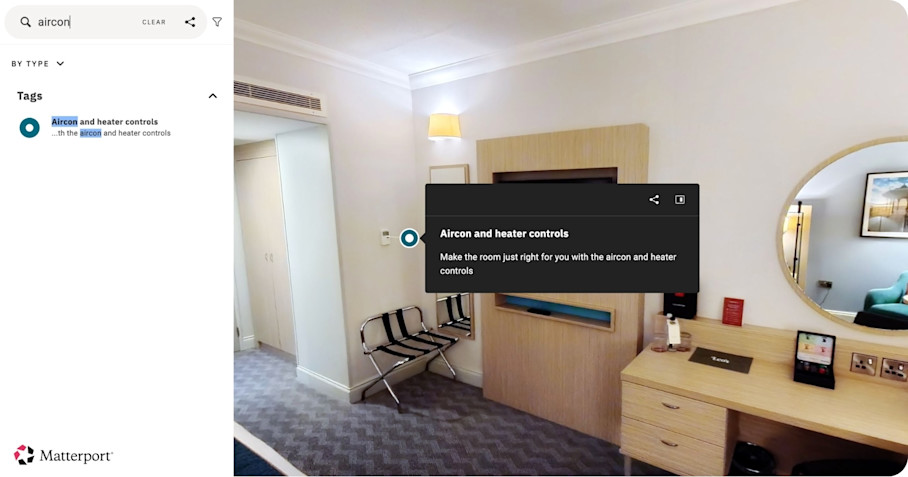
Logging the same finding inside a digital twin pins the issue to the precise location in a full 3D model. You can place Tags at a fixture’s exact location to give teams information like the equipment manual, warranty, and service history, making the “Asset or item” field richer. That way, room numbers, assets, severity, and photos stay together in a single place instead of being scattered across multiple tools.
Keeping files in context like this helps supervisors sort, assign, and verify work instead of chasing details. Digital twins integrate with CMMS work order systems, so you can easily keep track of tasks end-to-end. Whoever picks up the work order will have the spec sheet on hand without having to call the office.
Assigning severity rankings to maintenance issues
Technicians should be able to assign one of four severity tiers on the spot:
Severity tier | What it is | Examples | Response expectation |
|---|---|---|---|
Emergency | Life-safety or room-closing issues | - Dead smoke detector - Exposed wiring - No hot water - A broken lock | Immediately take the room out of service |
Urgent | Guest-impacting issues, but not unsafe | - PTAC that won't cool - A clogged toilet - A dead TV | Resolve before the next check-in |
Standard | Cosmetic or minor function | - Chipped paint - A slow drain - A loose cabinet hinge | Schedule within the week or stay depending on disruption |
Scheduled | Preventive replacements | - Filter changes - Caulk refresh - Batteries | Batch into planned maintenance |
Allocating a severity level when documenting findings in a digital twin speeds up prioritization without a supervisor having to work through the backlog.
Hotel room maintenance inspection checklist
Run this hotel room maintenance inspection checklist as one continuous walkthrough in physical order, starting at the corridor door and working inward. This way, an inspector will never skip a zone or need to backtrack to something they missed.
Each inspection point below pairs with a pass/fail standard and the severity tier it usually lands in.
Entry door, locks, and security hardware
The entry zone protects security and creates the visitors’ first impression.
What to Inspect | Pass Conditions | Typical Severity |
|---|---|---|
Deadbolt and latch | - Throws and retracts smoothly - Engages fully | Emergency A lock that won't secure leaves the room unusable. |
Door closer | - Closes and latches on its own, without a push | Urgent An unlatched door undercuts security, but the lock still works. |
Peephole | - Has a clear, unobstructed view | Standard A blocked view is a minor security shortfall. |
Safety latch or swing bar | - Secures firmly to its bracket | Urgent A failed secondary lock lets guests down; the deadbolt still holds. |
Electronic lock | - Reads a test key on the first tap - Battery indicator is healthy | Emergency A reader that won't admit a key takes the room offline. |
Weatherstripping and threshold | - No daylight gaps around the frame | Scheduled Gaps affect comfort and energy, not safety. |
This area can produce a number of emergency-tier findings, like a broken lock or a dead electronic reader, requiring you to flag immediately.
Sleeping area, walls, floors, and windows
These are the surfaces and fixtures a guest touches, sees, and sleeps on. Small defects in this section cause quiet dissatisfaction that only shows up in reviews.
What to Inspect | Pass Conditions | Typical Severity |
|---|---|---|
Bed frame and headboard | - Secure - No wobble or squeak under pressure | Urgent Wobble or noise disrupts the core amenity guests come for. |
Nightstands and case goods | - Drawers glide - No broken joints or loose pulls | Standard Sticking drawers or loose pulls are minor functions. |
Walls and ceiling | - No stains, cracks, peeling paint, or water marks | Standard Most marks are cosmetic but water marks jump to Emergency. |
Flooring or carpet | - No lifting seams, burns, or trip hazards | Urgent A trip hazard carries injury and liability risk. |
Windows | - Open, close, and lock - No cracked panes or failed seals | Urgent A window that won't lock is a security gap. |
Curtains and blackout drapes | - Slide fully - No torn hooks - No gaps that leak light | Urgent Light leaks disrupt sleep and draw reviews. |
Treat any water staining on a wall or ceiling as a possible active leak, requiring immediate escalation. Moisture behind the surface can cause mold issues if not addressed promptly, leading to potential health issues and costly mold remediation.
Climate control: HVAC, PTAC, thermostat, and vents
When a guest reports climate control issues, they become an emergency fix. Catch them beforehand to prevent ad-hoc repairs and complaints.
What to Inspect | Pass Conditions | Typical Severity |
|---|---|---|
Thermostat | - Reaches its set temperature within a defined window | Urgent A room off temperature triggers complaints on arrival. |
PTAC or HVAC unit | - Heats and cools on demand - No rattle or excessive noise | Urgent A unit that won't heat or cool fails the stay. |
Air filter | - Clean - Within its replacement interval | Scheduled Filters are a planned, recurring replacement. |
Supply and return vents | - Unobstructed - No heavy dust buildup | Standard Light obstruction or dust is a minor airflow issue. |
Condensate drain | - Clean - No pooling water or musty smell | Urgent A clog leads to water damage and odor. |
An unfamiliar unit slows down the technician and the repair. Save time by attaching the equipment spec sheet and service history to the fixture inside the room record. This way, the technician doesn’t have to hunt down which HVAC model or filter is needed, because the manual is already pinned to the unit.
Bathroom: plumbing, fixtures, and surfaces
The bathroom concentrates plumbing, moisture, and hard surfaces, making it a frequent source of both urgent leaks and slow cosmetic decay.
What to Inspect | Pass Conditions | Typical Severity |
|---|---|---|
Sink and shower drains | - Drain fully within a set number of seconds | Urgent A slow drain is a visible, guest-impacting fault. |
Faucets and showerhead | - Steady flow - No drips - Hot water within a defined time | Urgent Drips waste water and delayed hot water fails the fixture. |
Toilet | - Flushes completely - Refills without running - No rocking base | Urgent A toilet that won't flush or seat properly disrupts the stay. |
Caulk and grout | - Intact - No mold or open gaps | Standard Failing seals are cosmetic but active mold can escalate. |
Exhaust fan | - Pulls air - Runs quietly with no rattle | Standard Weak airflow is a minor moisture issue. |
Under-sink and supply lines | - Dry - No active leaks or corrosion | Emergency An active supply leak floods and closes the room. |
Towel bars and grab bars | - Secure to the wall | Urgent A loose grab bar is a fall risk. |
Treat any active leak or standing water as an urgent-to-emergency task, and photograph it on the spot to create visual proof.
Electrical, lighting, and safety systems
Some electrical and life-safety checks relate to comfort issues, but many of them have legal and safety requirements that can close a room instantly.
What to Inspect | Pass Conditions | Typical Severity |
|---|---|---|
Outlets | - Hold plugs securely - GFCI outlets trip and reset in wet areas | Emergency A failed GFCI in a wet area is a shock hazard. |
Switches | - Operate every fixture they control | Standard A dead switch is a minor function loss. |
Lighting | - All bulbs work at the correct color temperature and brightness | Standard Off-color bulbs are cosmetic. |
Smoke and CO detectors | - Test button sounds - Are within battery or replacement date | Emergency A dead life-safety device closes the room. |
Emergency lighting and exit signage | - Illuminate on test | Emergency Dark egress paths violate code. |
Sprinkler heads, if present | - Unobstructed and undamaged | Emergency A blocked or damaged head defeats fire suppression. |
A missing or dead life-safety device is an automatic emergency finding that closes the room.
In-room technology and amenities
Issues with in-room technology and amenities usually don’t threaten safety, but they impact guest satisfaction and increase the number of guest reports.
What to Inspect | Pass Conditions | Typical Severity |
|---|---|---|
TV | - Powers on - Lands on the correct input - Remote works | Urgent A dead TV is a common, resolve-before-arrival complaint. |
Phone | - Dial tone present - Front desk connects | Urgent No dial tone cuts the room's line to the front desk and help. |
Wi-Fi | - Connects - Loads at expected speed | Urgent Guests expect working, quick internet on arrival. |
Coffee maker | - Heats - Dispenses a full cup | Standard A failed amenity is a minor inconvenience and a replacement should be sufficient. |
Minibar or mini-fridge | - Holds temperature - Door seals are closed | Standard A temperature fault is minor unless stocked goods spoil. |
Safe | - Locks and unlocks - Resets to a new code | Urgent A safe that won't lock leaves valuables unsecured. |
USB and power parts | - Charges a test device | Standard Other outlets usually cover the gap. |
Clock and alarm | - Shows accurate time - Alarm fires | Standard A wrong time or dead alarm is a minor annoyance. |
By following a checklist in this order, you’ll ensure that a single pass from the corridor door to the nightstand captures every system in the room without a single backtrack.
Closing the loop on hotel room maintenance repairs
A finished checklist is only half of the job. To improve a property, you need to keep track of the implemented fixes and changes. Instead of working from a pile of scattered work, digital twins give you a visible pattern for verifying the work and tracking the root causes.
The loop runs across three stages:
Capture and setup. A baseline capture stands up the model, and maintenance teams can find every instance of an asset type due for service across all rooms, rather than checking them one at a time. Matterport’s Capture Services can deliver a digital twin in as little as 24 to 48 hours, while Space Search handles the asset lookup for tagged items.
Logging and dispatching. A flagged Tag becomes a work order through CMMS and API integrations without rekeying, and a technician can use Measuring tools to scope the job accurately inside the model instead of making a return visit.
Verifying and reviewing. A repair isn't finished until someone confirms it held. Tie a reinspection result back to the original Tag, with a fresh photo against the same standard the finding failed, so the work order closes on evidence instead of a technician's say-so. Remote walkthroughs let a regional facilities director approve scope, coordinate vendors, and confirm repairs from anywhere. Comparing two capture dates Side-by-Side (public beta) surfaces gradual wear before it becomes an emergency.
With a measurable pass/fail standard on every item, and findings that are documented, ranked, and reinspected, nothing gets left as a judgment call or a note that goes nowhere.
Get started with Matterport for Travel & Hospitality


