


 Accedi
8 Best Virtual Tour Software for Real Estate (2026)
Buyers today expect to walk through a property before they walk through the door. When a listing includes a virtual tour, the people who do schedule a showing tend to arrive further along in their decision. They've already vetted the layout, the flow between rooms, and whether the space fits what they need.
The bestvirtual tour software for real estate does more than create immersive viewing experiences. The strongest platforms also help agents behind the scenes, generating marketing assets, pulling accurate measurements, and automating the repetitive work that eats into listing prep time.
This guide compares eight platforms across the features that matter most: tour quality, ease of capture, sharing and embedding, workflow tools, and pricing. Here is how they stack up.
Software | Best for | Starting price | Key features |
Matterport | Immersive 3D tours and marketing assets | $14/mo | - 3D walkthroughs - AI insights - Floor plans - MLS-ready assets |
CloudPano | White-label branding | $22.50/mo | - Custom branding - 360° tours - Multimedia hotspots |
Ricoh360 Tours | Ricoh camera users | $39/mo | - Direct Ricoh integration - Annotations - Cloud hosting |
Zillow 3D Home | Zillow listing integration | Free | - Mobile capture - Auto-publish to Zillow |
EyeSpy360 | Guided remote tours | $15/property | - Live co-viewing - Measurements - Floor plans |
3DVista | Custom creative experiences | $499 (one-time) | - Drag-and-drop editor - VR - HTML export |
Kuula | Budget-friendly 360° tours | $20/mo | - Easy 360° uploads - VR support - Custom branding |
iStaging | Virtual furniture staging | $5/mo | - AR/VR - Virtual staging - Mobile app |
Below, we break down what each tool does well and where it falls short.
Matterport: Best for immersive virtual tours and marketing assets
Listing a single property often means coordinating a photographer, ordering floor plans, writing descriptions, pulling measurements for MLS, and scheduling multiple site visits. Matterport’s virtual tour software consolidates most of that into a single scan.
The platform creates a digital twin of the property, which is an interactive, dimensionally accurate 3D model. From that one capture, it generates the property marketing assets agents typically need multiple tools to produce: a virtual tour, high-quality photographs, video walkthroughs, floor plans, and AI-powered property data.
For agents who want fewer tools and fewer trips back to the property, that consolidation is the core value.
Key features and capabilities
Immersive 3D walkthroughs: Buyers navigate the property at their own pace across first-person, dollhouse, and 2D floor plan views. Each perspective helps them understand layout and flow before booking a showing.
Schematic floor plans: Detailed 2D layouts generated from the scan, delivered in PNG, SVG, and PDF. Ready for MLS listings, print brochures, and client presentations.
Notes and Tags: Pin context directly into the tour. Agents use these to highlight appliance brands, note recent renovations, or flag appealing features, so buyers can self-qualify before the first viewing.
Automated Measuring: Measure rooms, walls, and ceiling heights directly in the 3D model. Useful for renovation planning and accurate MLS entries without a return visit.
Defurnish tool: Strip furniture from the model with a click, letting buyers see the bare layout or imagine their own setup.
Property Intelligence: AI-generated property descriptions, automatic room identification, and space measurements pulled from the scan. Reduces the manual work of writing listing copy.
Flexible capture: Scan with your own device, the Matterport Pro3 camera, or book professional Capture Services in 200+ cities if you would rather not scan yourself.
MLS-ready output and integrations: Export photos, floor plans, videos, and shareable links. Connect with major listing portals for direct syndication.
Pros and cons
Pros:
Capture accuracy is what separates Matterport's immersive experience from panorama-based alternatives. Because the 3D model is dimensionally precise, every asset it produces — tours, photos, floor plans, descriptions — reflects the actual property rather than an approximation.
The platform connects to common real estate workflows. Assets export in MLS-ready formats, Property Intelligence automates listing copy and spatial data, and scans can feed into CAD tools or renovation estimates.
One capture replaces multiple site visits and standalone tools, which reduces the time and coordination cost per listing.
Cons:
The best 3D results come from a dedicated Matterport camera, which adds an upfront hardware cost. Smartphone capture is available for basic scans, and Capture Services offer a hands-off alternative.
Tours require an active cloud subscription to stay live. The upside is that hosting includes automatic updates, team collaboration, and centralized storage, but if you cancel, tours go offline.
Matterport’s pricing starts at $14/month for basic use, with add-ons for exportable assets and advanced features. Professional scanning and enterprise options are available for larger teams.
CloudPano: Best for white-labelled virtual tours
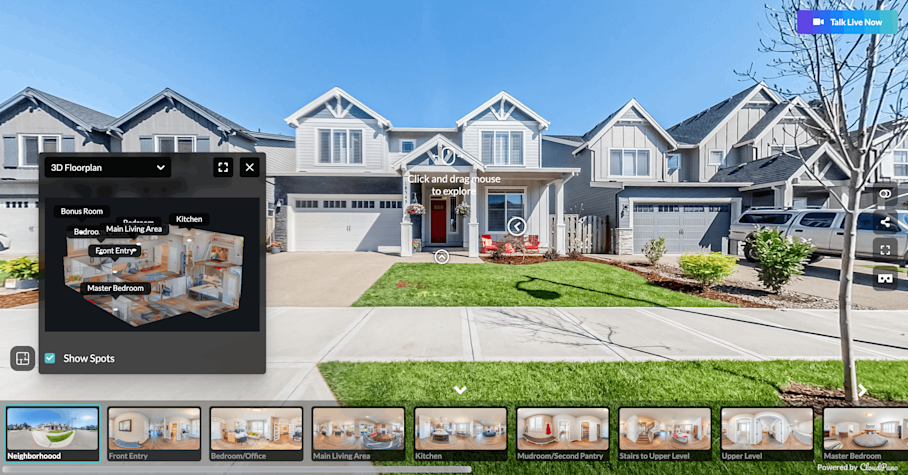
Image source
Brokerages and teams that want tours to look like they come from their own brand, not a third-party platform, will appreciate CloudPano. You control the logos, colors, and domain, so every tour reinforces your identity with clients.
Key features and capabilities
White-label branding: Apply your logo, brand colors, and custom domain to every tour.
Interactive 360° tours: Navigate between rooms with clickable hotspots.
Embeddable tours: Drop tours into your website or social channels with a code snippet.
Hotspots and annotations: Call out specific features or add supplementary information at any point in the tour.
Multimedia support: Embed video, audio, or photo galleries within the tour experience.
Pros and cons
Pros:
Full white-label control, including custom domains, which is uncommon at this price point.
Quick setup. Most agents can build and publish a tour in under an hour.
Flexible sharing across websites, social media, and direct links.
Cons:
Tours are 360° panoramas stitched together, not true 3D scans, so they lack the dimensional accuracy and measurement tools of a LiDAR-based virtual tour.
No spatial analytics or property data generation. If you need room measurements or AI-powered listing descriptions, you will need a separate tool.
No API, which limits integration with CRM systems or custom workflows.
Pricing
Plans start at $22.50/month and are billed annually. Higher tiers add analytics and advanced media features. A pay-per-tour option is available starting at $10.
Ricoh360 Tours: Best for Ricoh hardware users
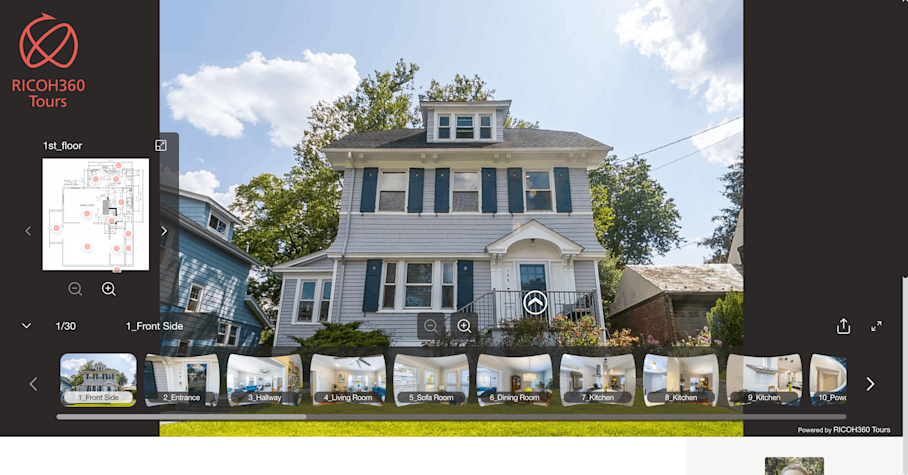
Image source
Agents who already own a Ricoh Theta camera can go from walking into a property to having a published tour in about 20 minutes. Ricoh360 Tours connects directly to the camera through its mobile app, handles stitching and hosting automatically, and keeps all your tours in the cloud with no upload limits.
Key features and capabilities
Direct Ricoh Theta integration: The mobile app connects to the camera, so capture and upload happen in a few taps.
Cloud hosting with no tour limits: All paid plans include unlimited active tours and unlimited image hosting.
Annotations and hotspots: Add labels, links, and navigation points.
AI virtual staging: Furnish vacant rooms with AI-generated furniture for listing photos.
Mobile and web viewing: Tours work on any device, no app required for viewers.
Pros and cons
Pros:
Very fast capture-to-publish workflow if you already have a Ricoh Theta.
Unlimited tours and hosting on paid plans, so costs stay predictable as your listing volume grows.
AI staging and floor plan add-ons extend the platform beyond basic tours.
Cons:
No dollhouse view or room-level measurement tools.
Floor plans are a paid add-on and are less detailed than what dedicated digital twin platforms produce.
The platform works with smartphones but is optimized for Ricoh Theta hardware. Agents using other cameras may find the workflow less seamless.
Analytics and reporting are limited, with no live chat support option.
Pricing
Pro plans start at $45/month ($39/month billed annually) with unlimited active tours. Business plans at $69/month ($59/month annually) add AI-powered 2D image cropping. Floor plans are a paid add-on. Ricoh Theta cameras are sold separately.
Zillow 3D Home: Best for easy Zillow listing integration

If Zillow is your primary listing channel and you want to add virtual tours with zero upfront cost, Zillow 3D Home is the fastest path. The mobile app captures a 360° tour with your phone and publishes it directly to your Zillow listing. No separate hosting, no extra software.
Key features and capabilities
Mobile panoramic capture: Shoot 360° photos with your smartphone or a compatible 360° camera. No dedicated hardware required.
Auto-publish to Zillow and Trulia: Tours go live on your listing automatically once you finish capturing.
Interactive floor plans: The app generates a basic floor plan that links photos to room positions, though layouts are not dimensionally accurate.
Room-to-room navigation: Buyers move between rooms using hotspot links within the tour.
Off-platform sharing: Share tours via link or embed code on MLS, social media, and your own website.
Pros and cons
Free, with no subscription or hardware costs.
Tours publish directly to Zillow and Trulia, which can improve your listing's visibility and search ranking on the platform.
Setup takes minutes. If you can take a photo, you can create a tour.
Tours can be shared via link or embed code on MLS, social media, and your website.
Cons:
Tours are stitched panoramas, not true 3D. No dollhouse view, room measurements, or spatial data.
Image quality is noticeably lower than dedicated platforms, especially in low-light rooms.
Very limited editing options after a tour is published.
Minimal customization and branding. The tour experience is Zillow's, not yours.
Pricing
The app is free for DIY tours. Professional capture services through Zillow partners are available for a fee based on property size and location.
EyeSpy360: Best for guided remote tours
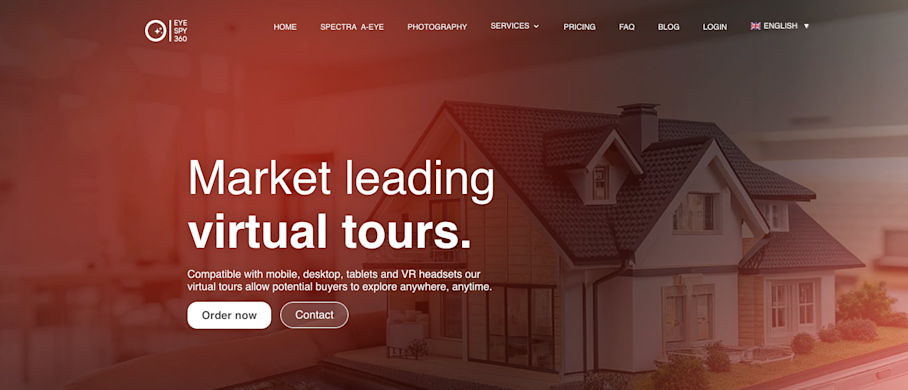
Most virtual tour software is self-guided. EyeSpy360 adds a live layer: agents can join buyers inside a tour through video chat, control the view, and answer questions in real time. For out-of-town buyers, international investors, or anyone who cannot visit in person, this turns a passive viewing into an interactive showing.
Key features and capabilities
Live guided tours (EyeSpyLIVE): Host real-time video walkthroughs where you control navigation while buyers watch and ask questions.
360° virtual tours: Panoramic tours with hotspot navigation for self-guided viewing.
Hotspots and multimedia: Embed videos, images, or text at specific points in the tour.
Floor plans and measurement overlays: Give buyers a sense of room sizes and layout without visiting in person.
Embeddable links: Share tours on websites and listing portals.
Pros and cons
Pros:
The live co-viewing feature fills a gap that most tour platforms leave open, useful for agents who work with remote buyers regularly.
Browser-based, so buyers do not need to download anything to join a session.
Multilingual AI avatars (EyeSpyPLAY) let you offer pre-recorded guided tours at scale.
Cons:
Tour quality depends heavily on your camera and panoramic captures. Users report noticeable quality differences between budget 360° cameras and professional equipment.
The platform has added 3D model and digital twin features, but these are newer and less mature than what dedicated digital twin platforms can offer.
Editing a published tour requires republishing and generating a new link, which can be disruptive if you have already shared it.
Pricing
Pay-as-you-go pricing starts at $15 per property. Add-ons for floor plans and advanced features are available.
3DVista: Best for custom creative virtual experiences
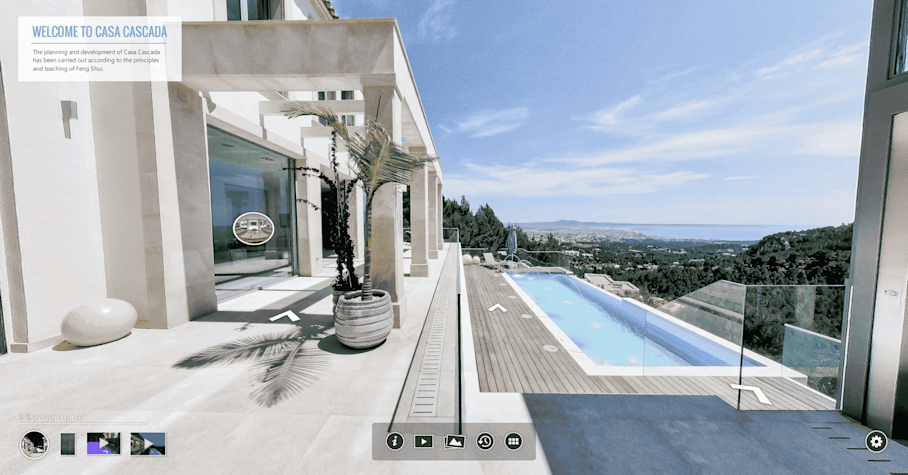
Image source
3DVista is a desktop application, not a browser tool. It gives you a level of creative control that cloud-based platforms do not offer. You can build custom navigation menus, embed video and audio at any hotspot, add 3D model overlays, and export the finished tour as a standalone HTML file to host on your own server.
Key features and capabilities
Drag-and-drop tour editor: Build and arrange tour elements visually on the desktop.
Custom navigation and menus: Design the user journey from scratch, including branded intro screens and guided paths.
Multimedia hotspots: Embed video, audio, 3D models, and interactive cards at any point in the tour.
VR compatibility: Tours can be viewed in virtual reality headsets.
HTML export and self-hosting: Export tours as standalone files with no ongoing platform dependency.
Pros and cons
Pros:
Deepest creative control of any tool on this list. If you can design it, you can probably build it in 3DVista.
One-time license fee. No recurring costs for the core software.
Self-hosting means you own your tour files and are not dependent on a third-party platform staying online.
Cons:
Steep learning curve. The interface is unlike typical web tools, and users report limited beginner tutorials. Agents without design or technical experience will need significant ramp-up time.
No built-in AI tools, room measurements, or property data generation. You are paying for creative flexibility, not workflow automation.
Some newer features are only available through the paid cloud hosting plan, which adds ongoing costs on top of the one-time license.
Pricing
One-time license fee of $499 for Virtual Tour Pro. Cloud hosting is optional at $99/year. Add-on packages are available for branded mobile apps and photo stitching software.
Kuula: Best for lightweight and budget-friendly virtual tours
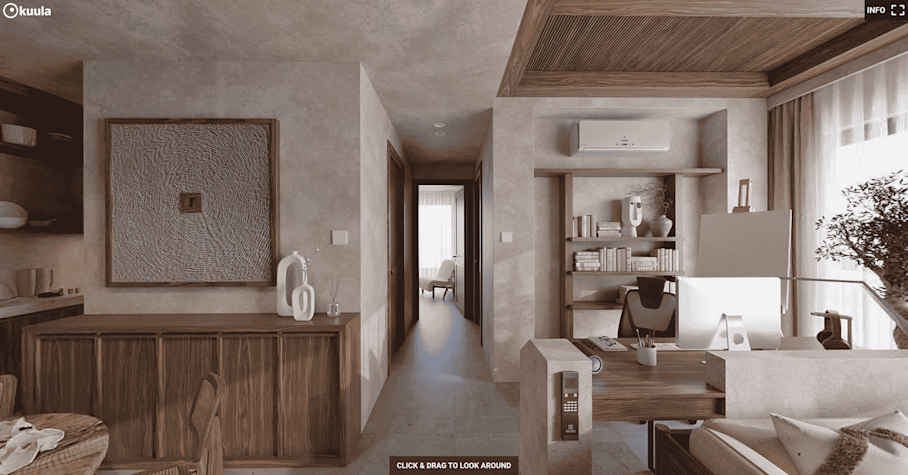
Image source
Kuula does one thing really well: getting 360° tours online quickly at a low price. There is no 3D modeling, no AI features, and no complex post-production. You upload your panoramas, link them together, add hotspots, and publish.
Key features and capabilities
Bulk 360° uploads: Drag and drop panoramas from multiple folders at once. Pro users can upload images up to 32K resolution.
Interactive tour builder: Link scenes, add hotspots, and create walkthrough paths with a browser-based editor.
Custom branding: Add your logo and brand colors on Pro and Business tiers.
Responsive embeds: Tours display well on desktop, mobile, and VR headsets.
Floor plan integration: Upload and link interactive floor plans to tour scenes.
Pros and cons
Pros:
Very low learning curve. Most users are building tours within minutes of signing up.
Affordable, with transparent pricing and no hidden costs. The free tier lets you test before committing.
Consistently high user ratings for customer support responsiveness.
Cons:
No 3D depth. Tours are panorama-based, so buyers get a 360° view from fixed positions rather than the free-roaming navigation of a digital twin.
Limited analytics and no AI-powered features. If you need measurements, property descriptions, or spatial data, you will need a separate tool.
Pricing
Pro plans start at $20/month billed annually. Business plans with custom domains, team collaboration, and advanced analytics are available at a higher tier. A free plan with basic features is also available.
iStaging: Best for virtual furniture staging

Empty rooms photograph poorly and leave buyers guessing about scale and layout. iStaging solves this by layering AI-generated furniture into 360° tours, so agents can present a furnished version of a vacant property without hiring a staging company.
Key features and capabilities
AI virtual staging: Place realistic furniture and decor into 360° images. Useful for vacant listings or properties with outdated interiors.
AR overlays: Buyers can use augmented reality on their phone to visualize design options during an in-person visit.
360° tours: Panoramic capture and viewing with hotspot navigation.
Mobile-first capture: Shoot with a smartphone and an optional fisheye lens attachment. Edit and publish from the app.
Cloud-based editing and VR support: No desktop software required. Tours are viewable on VR headsets.
Pros and cons
Pros:
The lowest entry price on this list at $5/month, which makes it accessible for agents who want to test virtual staging without a big commitment.
Mobile-first workflow means you can capture, stage, and publish from your phone.
The AR feature adds a useful in-person complement to the virtual tour.
Cons:
Primarily a staging and visual marketing tool. No dollhouse view, spatial measurements, or in-depth analytics.
Tour quality is limited by what a smartphone can capture. For the best results, you will likely need to purchase iStaging's optional rotator and fisheye lens, which adds to the cost.
Floor plan accuracy varies between captures, so it is not reliable for listings where precise dimensions matter.
No MLS integrations or direct listing portal connections and sharing requires manual linking.
Pricing
Pay-by-usage plans start at $5/month for three active tours. Higher-tier plans for virtual spaces and enterprise staging are available up to $390/month.
Choosing the right virtual tour software
With so many options available, the “best” virtual tour software for real estate really comes down to how you plan to use it. It’s important to match a platform to your workflow, budget, and listing goals.
Here’s a quick checklist you can use to evaluate virtual tour tools:
1. Capture type: How is the space created? Panorama tools are fast and affordable but limit navigation and accuracy. If you need floor plans, spatial data, or renovation-level accuracy, narrow your search to true 3D capture platforms.
2. Output depth: What assets does one capture produce? Look at what you get from one capture. Some tools only produce a tour, while others can also generate photos, videos, floor plans, and property data. The more assets that come from a single capture, the fewer tools and site visits you’ll need.
3. Workflow fit: How does it integrate into your listing process? Choose software that matches how you already work. Consider capture speed, device compatibility, integrations, and how easily you can publish and share tours. The right choice should remove friction, not create new tasks.
4. Buyer experience: How immersive and useful is the tour? Higher-quality tours help buyers understand layout and flow, which often leads to more qualified showings. Look for smooth navigation and qualification-supporting features like measurements, interactive tags, or guided viewings.
5. Total cost Factor in hardware requirements for your 360 real estate camera, hosting limits, add-ons, and per-tour fees — not just the base price. The most cost-effective tool is usually the one that replaces multiple separate services.
If your goal is to create multiple marketing assets from a single, accurate capture, platforms like Matterport are designed specifically for that.
Get in touch with our team

