


 Sign In
5 Types of Remote Safety Walkthrough Tools (with Examples)
Every safety inspection used to require boots on the ground. Someone had to drive to the site, walk the space, and document hazards by hand, often days or weeks after a concern was first raised. In high-risk or hard-to-reach environments, that delay is where hazards escalate, and safety leaders can’t be everywhere at once.
A growing category of technology now lets safety officers and compliance teams assess spaces in detail without being physically present. Remote safety walkthrough tools mean that a hazard flagged in the morning can be reviewed by an off-site expert the same afternoon.
This article covers the different types of remote safety walkthrough tools and how each one supports inspections, hazard identification, compliance audits, and training.
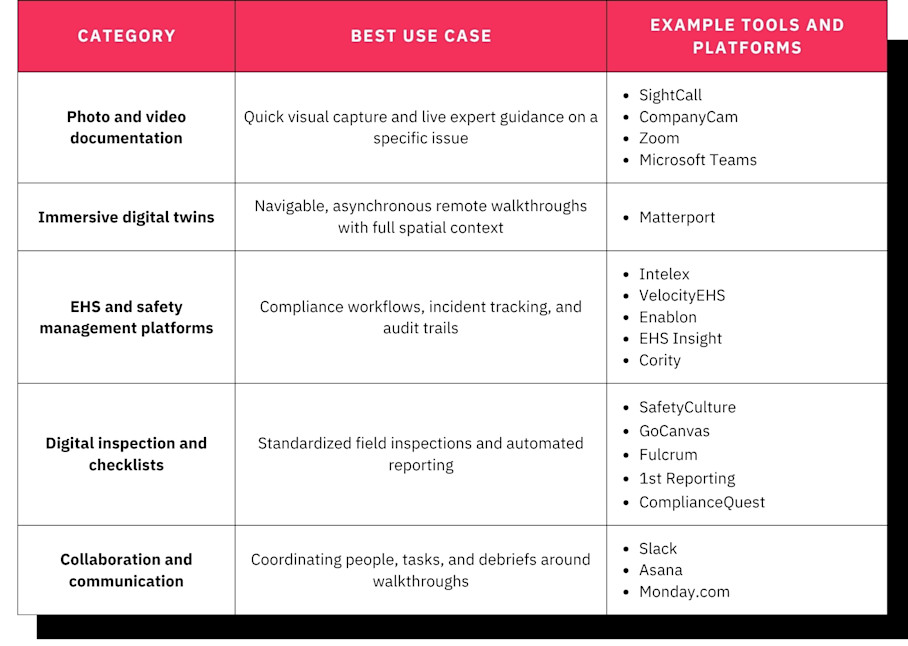
Note: The tools on this list are organized by category and use case, not ranked. Most safety teams benefit from combining tools across categories rather than choosing one over another.
1. Photo and video documentation tools
Many safety walkthroughs still rely on photos, video recordings, or live video calls to document site conditions remotely. These formats are familiar, and thanks to smartphone technology, most team members will already have a capable camera in their pockets.
Photo and video documentation approaches range from simple shared photo folders and email attachments to more structured walkthroughs, where a field worker might walk a remote expert through a site using a smartphone camera on a live call.
Photo and video tool examples
Examples of platforms used for remote safety walkthroughs include:
SightCall, for AR-assisted remote video
CompanyCam, for photo documentation built for field teams
Zoom or Microsoft Teams, for live video walkthroughs
Capabilities
This approach may seem dated compared to some of the tools we’ll explore later, but solutions in this area provide a number of beneficial features, including:
Live video streaming: A remote expert can see conditions in real time as a field worker moves through the site.
Photo annotation and markup: Reviewers circle, label, and comment on specific hazards in an image.
Assisted remote guidance: AR overlays let an expert point to exactly what the field worker should check.
Timestamped documentation: Each photo or clip carries a date and time for the record.
Cloud storage: Media is stored in a central database so teams can retrieve it later.
These features make photos and videos the fastest way to get eyes on a remote condition.
How to use photos and videos for remote safety walkthroughs
Photos and videos have a low barrier to entry. There’s rarely any specialized hardware required and most teams already understand the format with little to no training, so a new inspector can contribute from day one.
However, limitations show up quickly:
Photos lack spatial context and can mislead without reference points
Live video calls happen once and are difficult to revisit with the same level of detail
Shared photo folders can easily become disorganized
It’s hard to connect an individual image to its exact location within a facility
Live video and AR tools are most useful for requesting immediate, real-time expert opinions on specific issues. Even so, they are the least capable option on this list for building a durable, reviewable record.
To get more from photos and videos, aim to:
Record sessions whenever possible so findings can be reviewed later
Annotate photos before sharing to flag hazards clearly
Store all media in a structured system rather than scattered folders
For recurring inspections or audits, pair photos and video with a more persistent documentation approach, like the one listed below, so findings do not get lost.
2. Immersive digital twins
Digital twin platforms capture facilities using 3D scanning tools like 360 cameras, LiDAR, or smartphones and process the data into an interactive, walkable model that anyone can navigate from a browser or mobile device. This is the most complete remote site experience available, replacing static photos and one-time video calls with navigable, dimensionally accurate replicas of physical spaces.
The key differentiator is spatial context. Unlike photos or video clips, a digital twin lets the viewer understand exactly where a hazard sits relative to equipment, exits, pathways, and other reference points. Stakeholders revisit captured spaces asynchronously, on their own schedule, rather than depending on a single live video call that cannot be replayed with full spatial fidelity.
Digital twin examples
Matterport’s digital twin platform is one of the most popular for remote safety walkthroughs. It has been used to capture a range of environments a safety walkthrough might cover: offices, warehouses, construction sites, retail floors, hotels, and large industrial facilities.
Capabilities
Matterport’s broad capabilities map closely to remote safety work:
Hazard tagging: Tags pin annotations, notes, links, photos, and video to exact locations, so flags and corrective actions are tied to the spot where the hazard exists.
In-model measurements: Automated Measurements lets reviewers confirm egress widths and equipment clearances directly from the model.
Guided walkthrough routes: Guided Tours turn a captured facility into a structured inspection or training path with captions.
Collaboration tools: Notes support threaded, in-model collaboration with stakeholder mentions and file sharing.
Cloud-based sharing and access controls: Role-based permissions and Views let operators, consultants, or contractors each see the specific information relevant to their role.
Integrations: Connections with EHS and facilities management platforms route findings into existing systems.
VR support: Teams can explore captured facilities in VR via Meta Quest for immersive training.
These features build up to a single navigable record that supports inspection, communication, and safety training from one place.
How to use digital twins for remote safety walkthroughs
Digital twins present an array of benefits for EHS teams:
Full spatial context for every finding
Asynchronous access that ends the dependence on live calls
Corrective-action tracking through tagged annotations
A permanent visual record for audits and incident investigations
Digital twins do require an initial scan of each facility, so they suit relatively stable environments better than rapidly changing job sites. Teams should establish a recapture cadence for spaces that change often. For high-risk environments where sending internal staff to scan a space creates its own safety concern, Matterport’s Capture Services dispatches vetted technicians who handle the on-site capture. The safety team receives the finished twin without anyone from the organization entering the hazardous zone.
To get the most from digital twins in safety walkthrough workflows, teams should:
Use digital twins as the primary walkthrough tool for asynchronous remote access with detailed context.
Scan high-risk areas so remote experts can assess hazards without entering the space.
Tag every finding directly in the model so corrective actions stay tied to their exact location.
Create immersive training resources with Guided Tours and VR.
Integrate with an EHS platform to formalize workflows and close the loop on remediation.
Integrate inspection findings with emergency response plans and training resources to turn your safety records into a live operational asset.
Of all the tools in this list, digital twins offer the most complete picture, and they don't have to work alone. Pair them with the other tools in this list to combine spatial context and workflow benefits with the immediacy and reach of every other tool in your kit.
3. EHS and safety management platforms
EHS (Environment, Health and Safety) platforms are built specifically for managing safety programs, tracking compliance, and organizing inspection data across an organization.
They centralize the parts of a safety program that need a system of record, including:
Incident tracking
Regulatory compliance
Corrective action workflows
Risk assessments
Audit trails
EHS platform examples
Well-known platforms in this category include:
Intelex, an integrated EHS platform with quality management
VelocityEHS, for chemical management and ergonomics depth
Enablon, for enterprise-scale facilities in regulated industries
EHS Insight, a fast, mid-market, offline-first mobile app
Cority, for the deepest industrial hygiene and occupational health management modules
Capabilities
EHS platform capabilities focus on running the safety program as a system of record. The majority of platforms will provide:
Incident management: Log, investigate, and track workplace incidents from report to resolution.
Corrective and preventive actions (CAPA): Assign fixes, set deadlines, and confirm completion.
Hazard analysis: Assess and rank risks across processes and sites.
Audit and compliance tracking: Keep records aligned with regulatory requirements.
Mobile field data capture: Complete inspections and log observations from the field.
Reporting and analytics: Surface trends and produce reports for leadership and regulators.
Mobile apps: Field inspectors can complete checklists, log observations, and assign follow-up tasks.
These capabilities make EHS platforms the backbone of a formal safety program.
How to use EHS platforms for remote safety walkthroughs
EHS platforms are the only tool on this list purpose-built for safety workflows, so they offer:
Very strong compliance and audit-trail capabilities
Centralized data across multiple sites
Alignment with regulatory frameworks like OSHA
The limitation for remote walkthroughs specifically is that most EHS platforms rely on forms, checklists, and attached photos. Inspectors record what they observe, but remote reviewers cannot independently navigate the space to verify findings or discover issues the inspector may have missed.
To get the most from this category, teams should:
Use EHS platforms as the system of record for compliance data, corrective actions, and audit trail.
Supplement with a digital twin so structured compliance data pairs with full spatial context, letting remote stakeholders verify conditions independently rather than relying only on written observations and attached photos.
Paired this way, an EHS platform can manage the workflow while the digital twin supplies the context it lacks.
4. Digital inspection and checklist tools
Digital inspection tools digitize the inspection process itself, replacing paper forms with mobile-friendly templates, photo capture, and automated reporting.
Field teams complete standardized checklists on a mobile device, attach photos, flag issues, and generate reports automatically. Because every inspector follows the same checklist and findings land in a central system, consistency improves across sites and shifts.
Digital inspection and checklist tool examples
Some popular tools that provide this functionality include:
SafetyCulture, a widely used mobile inspection app with a large library of checklist templates
GoCanvas, a mobile forms platform with customizable inspection and reporting apps
Fulcrum, for AI-driven field data collection
1st Reporting, a mobile incident and inspection reporting app
ComplianceQuest, a quality and EHS management suite that connects with your CRM
Capabilities
Checklist tools offer features that help to standardize what inspectors capture in the field:
Customizable checklist templates: Build inspection forms that match each site and regulation.
Photo and media attachment: Document findings with images tied to checklist items.
Issue flagging and escalation: Route problems to the right owner immediately.
Automated report generation: Produce inspection reports without manual formatting.
Offline mode: Complete inspections in areas with no connectivity.
Trend analysis: Track recurring issues across inspections over time.
These capabilities make field inspections faster, more consistent, and easier to act on.
How to use digital checklists for remote safety walkthroughs
These apps are typically fast to deploy and allow teams to roll out consistent inspection programs quickly. They:
are easy for field teams to adopt
provide ready-made, standardized inspection formats
generate automatic reports
Digital checklist tools are excellent for structuring the inspection workflow, but they usually don’t provide the visual channel for a virtual inspection, so another remote tool is required to provide that. Findings are commonly documented as individual photos attached to checklist items, but this strips away the spatial context of where the issue exists within the facility.
To get the most from digital checklists, teams should:
Use checklist tools to standardize what inspectors capture at every site and ensure nothing is skipped.
Link completed inspections to a digital twin so remote reviewers have both the structured data and the visual evidence they need.
Combined with a spatial record, digital checklists give reviewers both the what and the where.
5. Collaboration and communication tools
There are a number of general-purpose collaboration platforms that help teams coordinate and complement safety activities remotely, even though the tools were not designed for safety walkthroughs. Safety teams use them to:
Discuss findings
Share documentation
Coordinate corrective actions across distributed sites
Collaboration and communication platform examples
A few common examples cover different coordination needs:
Slack, for channel-based messaging with deep third-party app integrations
Asana, with task and project management for assigning and tracking corrective actions
Monday.com, with flexible work-management boards for coordinating inspections and follow-ups
Capabilities
Collaboration tools focus on coordinating the people and tasks around a walkthrough. Their defining capabilities include:
Real-time messaging and channels: Keep conversations organized by site, team, or topic.
Video conferencing: Meet live to review findings and align on next steps.
Task and project management: Assign corrective actions and track them to completion.
File sharing and document management: Distribute reports, photos, and procedures.
Integration with other tools: Connect to the EHS, checklist, and walkthrough systems for additional context and synced workflows.
These features make collaboration tools strong at coordinating people, even if they are weak at capturing conditions.
How to use collaboration platforms for remote safety walkthroughs
Most organizations already use these tools, so they’re convenient solutions that you likely won’t have to implement from scratch. Even if you are choosing a collaboration platform for the first time, adoption is rarely a hurdle, because they:
Support both real-time and asynchronous communication
Integrate with other business systems
Are built with accessibility and activation in mind
These tools support real-time communication, but they do not provide the visual or spatial context that safety walkthroughs require. Findings discussed in chat threads or video calls can be hard to trace back to specific locations, documentation scatters across channels, and there is no built-in way to tie an observation to its physical context within a facility. Collaboration tools work best as a complement to purpose-built safety and walkthrough platforms rather than a standalone solution.
To sync communication and collaboration platforms with remote safety workflows, teams should:
Use them to coordinate the people and processes around walkthroughs, including scheduling inspections, assigning corrective actions, and hosting debrief calls.
Integrate them with the team's other platforms so walkthrough findings surface directly in the channels where decisions are made, instead of forcing team members to switch between disconnected systems.
Wired into the rest of the stack, collaboration tools keep the process moving.
How to choose your remote safety walkthrough tools
When evaluating tools for your remote safety walkthrough suite, EHS managers should weigh a few key criteria:
Spatial context: Do remote reviewers understand exactly where a finding is located within the facility, or are they relying on isolated photos and written descriptions?
Asynchronous access: Can stakeholders revisit a captured space on their own schedule, or does the tool depend on a single live session?
Corrective action support: Are findings easy to connect to owners, deadlines, and evidence of completion, or does the tool stop at observation?
Training and onboarding: Do the tools support hazard recognition, emergency planning, pre-task planning, and keeping training materials current as sites change?
Multi-site scalability: Will the tools standardize inspections across many locations and give leadership visibility into safety conditions across the portfolio?
Integration with existing systems: Does the stack connect with the EHS, CMMS, or facilities management platforms the team already uses?
Most teams get the best results by combining tools across categories. Choose a digital twin platform for spatial documentation and remote walkthroughs, an EHS platform for compliance workflows and corrective action tracking, and collaboration tools for real-time coordination. Matched to these criteria, that combination covers both the record and the workflow.
Ready to build a remote walkthrough foundation that keeps people out of harm's way?
Get in touch with our team


