


 Sign In
Best Practices for Tenant Documentation Compliance & Record Keeping
Key takeaways
Building a centralized, searchable tenant documentation system helps reduce legal risk, improve audit readiness, and make records easy to retrieve.
Standardize document capture, organization, access controls, and retention policies across every property to ensure consistency as your portfolio grows.
Digital twins can connect leases, inspection reports, photos, and other documentation directly to the physical unit, creating stronger, location-based evidence.
Leverage Matterport features such as Tags, Attachments, Side-by-Side comparisons, Property Intelligence, and Measuring tools to streamline inspections and maintenance, and reduce security deposit disputes.
Strong tenant documentation management starts with one goal: complete, searchable, defensible records for every unit, from lease execution through move-out. When retrieval is fast and evidence holds up, property managers can resolve disputes on the facts, pass audits without scrambling, and protect their portfolios from avoidable exposure.
A number of seemingly insignificant risks can create legal and financial exposure. A single missing move-in report can cost more than the deposit it was meant to protect.
This guide covers which records to keep, how to centralize and secure them, and best practices for staying audit-ready across a portfolio.
Essential tenant documentation
Tenant documentation management is the practice of capturing, organizing, securing, and retrieving every record tied to a tenant, a unit, and a property across the full lease lifecycle. It spans the moment an applicant submits their paperwork through the final move-out reconciliation. In practice, it stretches well beyond that timeline, since records often need to be produced months or years after a tenancy ends. The goal is not simply to store files but to keep each one findable, verifiable, and ready to stand as evidence when someone asks for it.
The following document types should be captured for every tenant:
Leases and rental agreements: The binding contract between landlord and tenant, created at lease signing and updated at renewal. These define terms, responsibilities, and remedies.
Tenant applications and IDs: Screening records, identification, and contact information collected during the application process. These support fair housing compliance and identity verification.
Move-in and move-out inspection reports: Condition records created at the start and end of tenancy. These are the foundation for deposit decisions and the records most likely to be challenged, so they require extra rigor.
Maintenance records and work orders: Documentation of requests, repairs, and vendor work throughout the tenancy. These show responsiveness and protect against liability claims.
Invoices, receipts, and compliance documents: Financial records and regulatory filings tied to the unit or tenant. These support audits and owner reporting.
Insurance certificates and legal notices: Proof of coverage and formal communications such as lease violation notices or renewal offers. These document compliance and protect against claims.
These documents do more than satisfy filing requirements. There are a number of use cases across stakeholders:
They reduce legal risk for landlords by establishing a clear paper trail.
They standardize property management practices across staff and properties.
They create operational efficiency at scale for portfolio managers, so audits, owner requests, and disputes do not require a hunt across systems.
When the full document set is captured consistently, teams spend less time chasing files and more time managing properties.
Where tenancy records go missing
Fragmented rental documentation creates risk slowly. Often, nothing looks broken until a dispute or audit forces you to find a specific file. Suddenly, you're paying for the gaps in staff hours, lost cases, and settlements you shouldn't have owed.
The most common places records go missing include:
Email threads: Approvals and tenant agreements buried in inboxes that no one can search when a dispute breaks out. The record exists, but effectively it's gone.
Paper files: Physical folders lost to staff turnover, office moves, or a filing cabinet no one inherited. When the person who knew the system leaves, so does the knowledge.
Photos on personal phones: Inspection images stranded on a device that walks out the door with a departing employee. The one record most likely to be challenged is the one most likely to vanish.
Spreadsheets and shared drives: Tracking files with no version control, so nobody knows which copy is current. Two people edit two versions, and both are wrong.
Property management software: Platforms that store leases and payments but not inspection media or scanned notices, leaving half the file somewhere else.
Each failure point creates a specific risk: a missing inspection photo that cannot support a deduction, a lease amendment that no one can find, or a maintenance record that contradicts a tenant's claim.
How to centralize rental documents
Storing records correctly is just as important as what is stored. A complete file in a disorganized system is not much better than a missing one.
Centralizing rental documents delivers a number of operational payoffs:
Faster retrieval during disputes, audits, and owner requests: When records are indexed and searchable, teams find what they need in seconds rather than hours.
Better collaboration across leasing, maintenance, and regional teams: One system means one version of the truth, with no conflicting copies.
Fewer missing or incomplete tenant files: A single system of record makes gaps visible before they become problems.
More consistent recordkeeping when staff turn over: New team members follow the same standards and find files in the same place.
The following sections break down how to build a centralized system for tenant and rental documentation.
Establish a single system of record
Start with a written documentation standard. Specify:
Which records are mandatory
Who is responsible for capturing them
When they are captured
The naming and filing conventions to follow
When leasing staff, maintenance teams, and regional managers all capture the same records the same way at each stage, files stay consistent.
Next, consolidate the files currently spread across email, shared drives, and software into one indexed, searchable location. That system will become the authoritative source for every tenant file, and no one will need to guess which platform holds the file they need.
There are a number of options, including shared cloud storage, property management platforms, or dedicated document management systems. Each of these organizes documents by tenant or by file type. But the records most likely to be challenged (like inspection reports, condition photos, damage claims) aren't really about a file or a tenant. They're about a place. Digital twins, 3D unit or property models, organize the record around the physical space they represent.
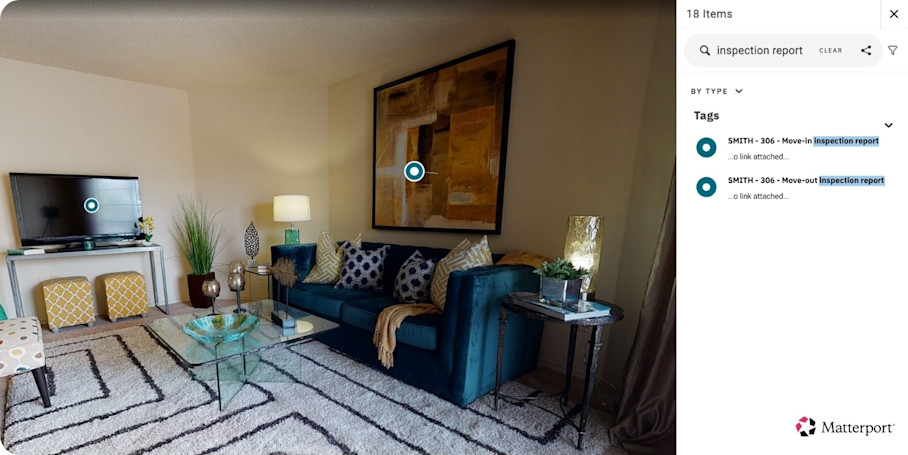
Matterport’s digital twins bind a unit's paperwork to its condition: leases and inspection reports can be embedded directly in the model with Tags and Attachments. Instead of filing a document in a folder and hoping the next person connects it to the right room, you pin it to the exact spot it references. For example:
A move-in inspection report attached to a Tag at the unit's entry, so the whole condition record opens from inside the space it documents.
A photo of pre-existing carpet damage pinned to that spot on the floor, timestamped and located, rather than sitting in a camera roll with no context.
An appliance's warranty or service history tagged to the appliance itself, so maintenance and move-out staff find it without searching a separate system.
A signed acknowledgment of a repair placed at the location of the work, tying the paperwork to the physical evidence it concerns.
Property Intelligence can also extract building data automatically, pulling measurements, square footage, and room labels so you're not entering that information by hand for every unit.
Most importantly, choose a system with version control so there is one authoritative, current version of each record. Teams should never work from conflicting or outdated copies scattered across email, drives, and devices. By relying on a single digital twin per unit, there will be no need to manage updates manually because everything is timestamped.
Organize documents so they're easy to retrieve
How you organize files inside your system of record determines whether anyone can find them under pressure. A consistent organizing framework will make retrieval fast.
Group your tenant documents at the top level based on which types of queries are most common:
By tenant: Best when pulling a complete file for a specific individual, such as during a dispute or move-out.
By unit: Best for property-level audits or when tracking condition across lease terms.
By property: Best for multi-property portfolios where records need to roll up for owner reporting.
By lease term: Best for tracking renewals, expirations, and compliance over time.
By vendor: Best for maintenance and contractor records tied to work orders.
By document category: Best when comparing a specific document type across units, such as all insurance certificates.
For most residential portfolios, grouping by unit, with tenant and document type nested beneath it, holds up best, because the unit is the one anchor that doesn't change when a tenant moves out, and condition records are the ones most likely to be challenged.
Whatever structure you choose, apply it with a consistent folder and naming structure so team members can locate any file they need without guessing what it could be saved under. A naming convention like [Property]_[Unit]_[DocumentType]_[Date] removes ambiguity.
Even with well-named folders and files, staff shouldn’t have to scroll through them to pick out what they need. Most document management systems will come with a search capability to get them to the right file in seconds.
Navigating a digital twin in an immersive walkthrough or using Space Search makes finding documents more intuitive. Documents attached to the specific asset they concern are easier to locate than files buried in a folder hierarchy. When handling a security deposit dispute, a manager can navigate to the unit, review the visual record, and pull the attached inspection report in one place. This approach reduces retrieval time and keeps evidence tied to context.
Enable secure access for tenants and property managers
Tenant records carry sensitive personal data: identification, financial information, and legal documents. That data carries legal obligations under privacy and fair-housing rules, plus the tenant should trust that the information they handed over won't circulate further than it has to. If a whole office signs in as one user, there's no way to limit what anyone sees and no way to know who saw it, so access control is essential.
Key access-control practices include:
Role-based permissions by team function: Leasing staff access applications and leases; maintenance teams access work orders and inspection records; regional managers access portfolio-wide reporting.
Restricted access to IDs and financial records: Sensitive documents should require elevated permissions, not be visible to everyone with system access.
Audit trails showing who viewed or changed a record: Logs demonstrate diligence and support compliance reviews by showing exactly who accessed what and when.
Shareable, cloud-based digital twins with roles and permissions let owners, maintenance teams, insurers, or legal counsel securely review the documentation relevant to them. Views let you frame that access in a custom version of a digital twin, so different stakeholders benefit from the visibility:
Regional managers review conditions and documentation across multiple properties without traveling to each site.
Owners receive reporting and updates without site visits.
Vendors coordinate maintenance and scope repairs from the digital record.
Tenants get faster question resolution when managers can pull records immediately.
No one gains the run of the tenant file or access to irrelevant spaces, and blurring protects sensitive personal information in the space from viewers. A well-configured access layer protects private data while keeping the right records available to the right people.
Unify documentation across a rental portfolio
Individual properties shouldn't behave like isolated islands. Ideally, you want your portfolio to read as one connected system, so leadership can look across every unit without stitching together files property by property.
Use these steps to apply consistency across your rental portfolio:
Apply one structure everywhere: Use the same folder, naming, and tagging conventions across every property so records stay comparable.
Connect existing tools: Integrate digital twins with property maintenance, management, and accounting systems so records flow into the central system instead of living in separate platforms.
Consolidate legacy records: Fold old paper and spreadsheet files into the same structure as you onboard each property.
Once records share one structure, leadership can benchmark units against each other, see at a glance which properties have complete documentation and which have gaps, and assemble what an audit needs without pulling files property by property. Because the structure is defined once and applied everywhere, a new property or acquisition plugs into the existing system instead of triggering a rebuild.
4 best practices for compliant and defensible tenant documentation
A signed lease is unambiguous, and it rarely causes trouble. Compliance issues and disputes almost always arise elsewhere: over wear and tear, damage, and the exact condition of a unit at a given moment. The four practices below help you build a defensible position with tenant documentation so you’re protected when those questions come up.
1. Capture unit condition at every milestone
Create a time-stamped visual record at every key moment:
Lease signing
Move-in
Routine inspections
Repairs
Move-out
Pair each capture with a signed condition checklist so both parties agree on the baseline before anyone's memory can drift. Document the initial condition of the unit with detailed photos and a signed move-in checklist to establish that baseline.
Digital twins raise the bar on this record because they show the whole unit as it actually was, not a handful of framed shots that conveniently miss the problem areas. Any stakeholder can revisit the exact condition later without being on-site or relying on recollection. That makes the record hard to dispute. When a compliance question or a deposit challenge arises, you're pointing to a walkable record of the space instead of arguing over what a blurry photo does or doesn't show.
2. Compare condition to settle wear-and-tear questions
Comparing a move-in record against a move-out record gives you a clear, well-documented basis for every deduction, which is exactly what regulators and courts look for. A landlord with a detailed move-in checklist, visual evidence, and receipts is far more likely to win, and without that evidence courts may favor tenants.
Examine Side-by-Side (public beta) views of the move-in and move-out digital twins together, then document the specific differences that justify each deduction. Existing damage, completed repairs, appliance details, or inspection notes can be tagged in the relevant location for reference. Context stays attached rather than living in a separate note that might get lost.
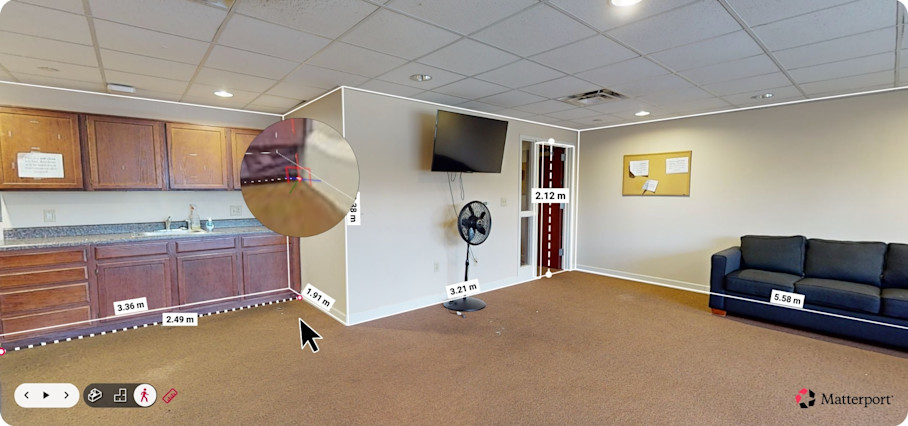
Once you’ve confirmed a required repair, use Measuring tools to capture room dimensions or the area affected by damage. This is useful for scoping repairs and estimating costs without a return visit to the unit. This gives you a defensible, itemized basis for any deposit balance you withhold.
3. Automate document reminders and alerts
As a portfolio grows, it’s more difficult for staff to keep on top of tenant documentation updates. Automate reminders and alerts for deadlines and renewals to reduce reliance on staff memory.
Expiration tracking: Flag insurance certificates and leases before they lapse.
Renewal and inspection reminders: Prompt the right person to act on time, every time.
Workflows and approvals: Route new documents for sign-off so nothing gets filed incomplete.
Missing-document notifications: Surface incomplete files automatically, so gaps get caught early instead of during a dispute.
Your files will stay complete as you scale, rather than degrading every time a new property comes online or a key employee moves on.
4. Set a clear retention policy
Retention requirements vary by jurisdiction, and timelines differ from one state or locality to the next. Teams should confirm the rules that apply to each property and standardize documented timelines across the portfolio for audit readiness. Define:
How long each record type is kept
How it is archived
When it is securely disposed of
Retention should be a policy, not a habit or a default setting no one remembers choosing. A written retention policy protects against both over-retention (storing sensitive data longer than necessary) and under-retention (disposing of records that may be needed for a dispute or audit).
Build a documentation system that protects your tenants and your property portfolio
Complete, searchable, defensible records reduce risk, speed retrieval, and support fair, evidence-based decisions from lease signing through move-out. The system does not need to be complicated. It needs to be consistent.
PlanOmatic created Matterport digital twins for more than 400,000 single-family rental properties and used remote due diligence to eliminate cross-country assessment trips. The same visual record captured once supports leasing, inspections, maintenance, and dispute resolution without repeated site visits or lost files.
Get in touch with our team


