


 Accedi
Virtual Inspections 101: Definition, Types, Benefits & Challenges
Virtual Inspections: How Digital Twins Boosts Efficiency


Key takeaways
Virtual inspections let stakeholders assess a site’s condition remotely from imagery or a live feed, stripping out the travel, scheduling delays, and cost of an on-site visit while leaving behind a dated, auditable record.
Beyond saving time and money, virtual inspections narrow disputes by giving every party the same documented record of the same space on the same date, instead of competing recollections.
Matterport digital twins serve multiple reviewers and workflows from a single walkthrough and stand up to many measurement and code checks that less precise methods can’t support.
Historically, assessing the condition of a space required physical presence: scheduling a site visit, traveling to the location, and conducting a walkthrough. Any question that surfaced later stalled the decision behind it until someone could travel back out.
A virtual inspection eliminates that requirement. Stakeholders can assess the condition of a site, facility, or property remotely within minutes, through captured imagery, video, or a live feed. The approach reduces travel and establishes an auditable record of a space’s condition at a specific point in time.
This guide outlines the fundamentals of virtual inspections, including evaluation considerations like the technologies and processes to put in place for adoption.
What is a virtual inspection?
A virtual inspection is the remote assessment of a space’s condition, conducted without the reviewing party physically present. The key difference is that the person evaluating the space is off-site, working from imagery or a live feed rather than standing in the room. That remote model supports inspections from property condition surveys and damage claims to compliance audits, warranty checks, and construction progress monitoring.
Assessments range in depth depending on the format, from live video calls and photo uploads to 360° captures and 3D models.
Benefits of virtual inspections
While on-site inspections allow surveyors to thoroughly assess a property with their own eyes, this process takes a significant amount of “windshield time.” Commuting between jobsites, coordinating schedules, and compiling reports makes in-person inspections slow and expensive. Inspecting remotely removes much of that overhead, and the advantages compound across cost, time, safety, and the quality of the record itself.
Faster processing and increased productivity
A virtual inspection separates two roles that a traditional inspection combines: whoever captures the space is not necessarily the person who reviews it. Site staff, a contractor, or a technician may record the space, while inspectors, adjusters, auditors, and vendors assess the capture remotely. A specialized reviewer’s time can be applied across many locations rather than consumed by travel to each one.
It also strips out the scheduling overhead that slows traditional inspections: aligning multiple calendars, then waiting for the inspector to arrive on the day. When the reviewer works remotely, those conflicts largely disappear, and findings move into processing sooner. Faster findings lead to faster approvals because the sign-offs that gate a sale, claim, or permit no longer wait on travel and calendar alignment.
Lower inspection costs
An on-site inspection carries costs well beyond the assessment itself: the inspector’s travel time, mileage and vehicle wear, along with meals or overnight stays in the case of distant sites. Inspecting remotely eliminates most of that cost.
A remote assessment also takes less time to conduct than an on-site visit, so a surveyor can fit more inspections into the same work week, leading to more output for the same labor cost. When travel disappears, so do the ancillary expenses that come with it. Between the shorter assessment times and the eliminated trips, owners and managers increasingly pay for the inspection itself rather than the logistics of reaching the site.
Accessible document storage
Traditional inspections generate a steady accumulation of paper. Inspection reports, follow-ups documenting repairs, receipts, and supporting records pile up across every assessment, and your filing cabinet can quickly start to overflow.
However, with virtual inspections, much (if not all) of this crucial facilities documentation can be managed in the cloud. That means you can keep all your reports, receipts, and documents relevant to complete inspections securely saved. Digitized versions of these records make it easier to find what you need when you need it. Retrieving a specific record takes a search rather than a dig through storage.
Easier collaboration
Cloud-stored documentation is also far simpler to share. Instead of circulating physical copies or email attachments that fork into conflicting versions, teams can grant access to a single file, or an entire folder, in a click. Everyone works from the same current record, so there’s no question of who has the latest report or whether a repair note made it into the right file.
Different departments, outside inspectors, residents, and city staff reviewing permit applications can collaborate on docs and access them from anywhere, without waiting on a mailed copy or a scheduled handoff. Permissions can be scoped to the situation, too: read-only access for one party, full editing for another, so the right people contribute without the document sprawl that comes from passing files around.
Dispute reduction
Many inspections exist to settle a question of fact: was the damage there before the tenant moved in, did the work meet code at the time of sign-off, what condition was the roof in when the policy renewed. The most comprehensive virtual inspections provide a complete record of the space as it stood on a known date. Because it documents the full environment consistently rather than selectively, it’s far harder to contest than a recollection or a written note.
The inspector who assesses the space and the code officials, insurers, and auditors who review it afterward all work from the same record. Instead of each party relying on its own partial account, they evaluate the same evidence of the same space on the same date, which narrows the room for disagreement before it starts.
The challenges of getting started with virtual inspections
Virtual inspections carry real advantages, but adopting them isn’t without obstacles. A few common concerns to consider before rolling the process out across a portfolio include:
Accuracy: A remote assessment is only as reliable as the visual method behind it, and those methods differ widely in how faithfully they represent a space. A less precise inspection method may be suitable for routine documentation, while a more rigorous and dimensionally accurate one should be used for measurement-critical work.
Connectivity: Jobsites and remote facilities often lack reliable internet, which makes a live video walkthrough unworkable. For these sites, work asynchronously instead; record the space on-site, upload once a connection is available, and review later. Ideally, you should use a method that lets site notes be logged during the walkthrough without a signal, so nothing is lost before review.
Physical access: As discussed previously, some conditions can’t be assessed remotely. Fold a targeted on-site visit into the remote workflow to handle tasks that can only be done in person, and combine those results with the rest of the inspection so the full picture lives in one place.
Communication: When one person records the space and another reviews it later, the context behind what was captured (why a note was flagged, what a reviewer still needs to see) can get lost in the handoff. Give the person on-site a clear, standardized way to flag observations as they go, so the reviewer inherits the reasoning along with the record rather than just the images.
Fortunately, the right technology and process can help owners and managers overcome many of these barriers.
Virtual inspection technologies
Virtual inspections can be run using a range of technologies. Each captures a different level of detail, which determines how reliably the inspection can confirm a condition. Some methods let you see a space, while others let you measure it. The technologies below are ordered from least to most spatial detail.
Live video connects a remote reviewer with someone on-site over a video call: the on-site person walks the space while the reviewer directs the view, asks questions, and flags areas of interest in real time.
Photo and video uploads separate recording from review. Site staff capture the space on their own schedule and upload the files, which a reviewer examines afterward without needing to be present or connected at the same time.
3D digital twins are the most comprehensive, scanning the space into a navigable model a reviewer can move through freely and, with the right capture hardware, measure directly.
Choosing the right one comes down to the stakes of the inspection. The table below compares how the three perform against key factors.
Live video | Photo & video uploads | 3D digital twins | |
|---|---|---|---|
Spatial detail | Low: A single moving viewpoint | Moderate: Fixed angles, gaps between frames | High: The full space, navigable |
Measurable | No | No | Yes, when captured with LiDAR |
Connectivity needed | Stable connection on-site | At upload only | At upload only |
Persistent record | Only if recorded | Yes | Yes |
Review timing | Live, synchronous | Asynchronous | Asynchronous |
Communication | Intent exchanged live | Relies on shot lists and tagged notes | Reviewer explores independently |
Best suited to | Quick confirmations, preliminary walkthroughs | Routine documentation of known areas | Measurement-critical and code/clearance checks |
Of the three options, digital twins offer the most flexibility, since a single capture can serve a variety of workflows and stakeholders.
One person records the space, and reviewers with different needs can each pull data from the same model: one confirming a condition, another taking a measurement, a third returning weeks later to inspect something no one thought to flag at the time.
Much of that range comes down to how the twin is captured. The most capable are built with LiDAR cameras, which measure depth directly. That makes the resulting model dependable for dimensional work: a reviewer can pull clearances, verify spacing, and check conditions against code from the model itself, with no return trip to the site.
Matterport’s Pro3 LiDAR camera captures at an accuracy of ±20mm at 10m, making it particularly well-suited to measurement-critical inspections where sign-off is based on a clearance or a code requirement rather than a visual judgment.
The 5-step virtual inspection process
Whatever format an inspection takes, from a live call to an upload or a 3D capture, every method moves through the same sequence of steps.
1. Inspection scope and scheduling
Start by setting the scope with the client or property contact: which rooms, systems, and individual items the inspection needs to cover. Having the scope settled up front ensures there are no missed items that force a second visit.
Before committing to a remote format, confirm in writing that all parties that are relevant to the inspection will accept a virtual inspection for this purpose, since not every review type qualifies. That might include an authority with jurisdiction, an insurer, a lender, or the client.
Then, identify the specific person on-site who will run the stream or operate the capture device, and schedule the session.
2. Site and device preparation
A short preparation pass on-site sets up a smooth virtual inspection. Before the session:
Check connectivity: Test signal strength in every area on the scope list, especially basements and shielded rooms where it tends to drop.
Ready the device: Charge batteries, clear storage, and silence notifications ahead of any live call.
Light the space: Open blinds and switch on task lighting in dark mechanical spaces so detail is visible.
Open key areas: Unlock panels, ceiling hatches, and equipment rooms in advance rather than mid-session.
Expose labels and documents: Keep nameplates, permits, and service tags unobstructed and legible for the camera.
Run this check the day before, not minutes before the session starts, so there is time to fix a weak signal or a blocked area.
3. Capture of site conditions
With the site prepared, the inspection moves to recording the space itself. Walk each area in scope and document its condition for review. This happens in one of two ways:
For a live capture method, such as a video stream, the reviewer directs the camera in real time, calling out where to point and when to move closer.
In asynchronous capture, the on-site team records everything first and review happens later, on the reviewer’s schedule.
Either way, follow a consistent path through each space, sweeping the perimeter and making sure each listed item is captured in full. The footage or visuals should be easy to follow, covering the area around the listed items so there is full context.
Capturing a digital twin in 3D is the most thorough method and, considering the level of detail, it is also among the easiest to produce. A single walkthrough captures the entire space with high-quality imagery rather than a chosen set of frames, so nothing has to be anticipated in advance. If a question comes up later, the answer is already in the record.
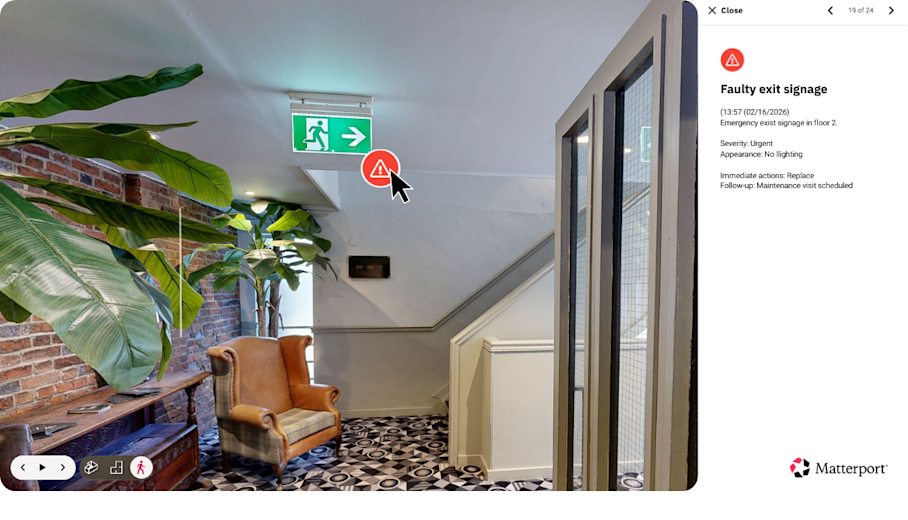
With a Matterport digital twin, the person capturing on-site can flag their own observations in Field Tags while the scan is being carried out, with no connection required. They might note a cracked fitting or an obstructed access panel, so the reviewer can see where to look closer once the model reaches their desk. The more completely a space is captured, the fewer follow-up requests come back.
4. Remote review
In a live session, the reviewer assesses the space as it’s walked, raising questions on the spot. With recorded media, reviewers work through the resources at their own pace, zooming into details and requesting additional angles wherever something reads as unclear.
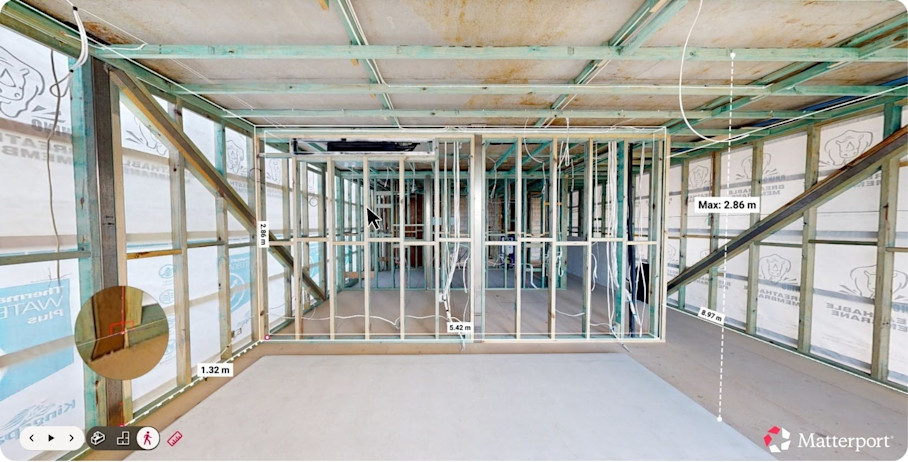
Working from a 3D digital twin extends what they can do without involving the site team again. Automated Measurements are generated by default following the scan for an accurate baseline of the space. Additional clearances and dimensions can be checked directly in Measurement Mode instead of asking someone on-site to run a tape measure.
For progress or condition inspections that have to document change, digital twin captures taken at different stages can be aligned Side-by-Side (Public Beta) so shifts are easy to spot. Because so much can be verified from the record alone, a reviewer can clear more items in a single session than an on-site visit usually allows.
5. Finding documentation
A virtual inspection typically produces a documentation set that includes:
A written report with pass, fail, or corrective-action notes
Annotated photos and screenshots
Video recordings of any live sessions
Reviewer notes tied to specific items
Digital records stored with their dates and locations
When the inspection is done via digital twin, that documentation becomes more actionable still: pinning each finding, corrective-action note, and supporting file to a Tag in the relevant spot exposes an issue clearly rather than burying it in a report. Findings linked to an exact location are far easier for the next person to act on, because there’s no guessing where the problem is.
In more structured workflows, those findings don’t have to stay in the inspection record. Integrations and APIs can be connected so location-linked issues in digital twins feed directly into other systems, becoming an RFI or punch-list item in a construction management platform, or a claim task in an insurance workflow. The finding moves straight into the process meant to resolve it, without being re-keyed by hand.
5 types of virtual inspections
Virtual inspections are used across a wide range of fields, but most applications fall into five broad categories. Each applies a remote review to a different kind of decision.
1. Virtual site inspections for construction projects
Between milestones, owners, engineers, and lenders review progress, workmanship, and installed systems without traveling to the jobsite.
Timing is the most important consideration to make for this type of virtual inspection. Capturing work such as an MEP rough-in, structural connections, or waterproofing preserves a record of the work done before it’s enclosed.
A digital twin also carries findings through to resolution. An issue flagged during review is logged against its exact location and routed to the trade or contractor responsible. Once the work is redone, a follow-up capture can confirm the fix and close the item without a dedicated return trip.
2. Virtual code and building inspections
Some authorities now accept virtual inspections for routine work that doesn’t require hands-on testing, such as water heater replacements, plumbing rough-in, minor alterations, and similar low-risk items.
Acceptance isn’t universal: each jurisdiction sets its own rules, so confirm with the local building department before scheduling a remote review. Where it’s permitted, the capture stands as a record of exactly what the inspector reviewed, on the date they reviewed it.
Takenaka Corporation captured roughly 1,000 locations as Matterport digital twins for remote surveying and inspection of its facilities, cutting the associated travel and labor.
3. Virtual insurance and claims inspections
Insurers rely on virtual inspections at several points in a policy’s life, including:
Underwriting inspections: Assess a property’s risk and document its condition before coverage is written.
Renewal and condition surveys: Confirm an insured property is being maintained and flag new hazards that could affect continued coverage.
Post-loss claim inspections: Record the extent of damage after a fire, storm, water, or liability loss so an adjuster can evaluate the claim.
Pre-loss baseline captures: Document a property in sound condition, creating a reference point to compare against if a loss occurs later.
Virtual inspections for post-loss claims are widely endorsed. Damaged sites are often dangerous and a virtual inspection lets an adjuster assess the scene in full without setting foot in a hazardous space. It’s also faster: the moment a property is documented, the claim can be evaluated, instead of waiting on an adjuster to reach a site that a disaster may have made hard to access at all.
4. Virtual lending and appraisal inspections
Lenders and appraisers use virtual inspections to confirm a property’s condition, layout, and the completion of financed improvements. New construction draws, renovation loans, and refinancing are among the decisions that rely on these workflows.
Accuracy is important for these inspections, because spatial data is relevant to how an appraiser values a property or how a lender advances a loan amount against that valuation. If the measurements are off, so is the valuation and the sum lent against it. Any virtual inspection that facilitates a lending decision should be captured with a method that measures reliably, such as a digital twin, not one that only shows the space.
5. Virtual tenant inspections
Residential properties call for inspections at several points, and a virtual walkthrough fits most of them:
Pre-purchase review: Supports a buyer’s or owner’s own assessment of a home, though any legally required checks still go to a licensed inspector on-site.
Move-in inspections: Record a unit’s condition at the start of a tenancy as the agreed reference point.
Mid-lease and maintenance inspections: Check on upkeep, document repair needs, or confirm completed work between tenancies.
Move-out inspections: Capture the unit’s condition at lease end to compare against the move-in record.
The bookend workflows are particularly suited to virtual inspections. Setting a move-in capture against a move-out capture gives both parties one consistent reference for deposit and damage discussions, leaving far less room for argument over who’s responsible for what.
Bring virtual inspections to your portfolio
Virtual inspections cut the time and travel that on-site visits demand, and they leave behind a dated record a team can return to whenever a question comes up later.
How much that record can establish depends on the capture method: a live call confirms what’s visible, while a measurable 3D digital twin stands up to clearance and code checks.
Get in touch with our team

