


 Sign In
Retail Facilities Management: Best Practices for Multi-Store Teams
Retail facilities management is a logistics problem disguised as a maintenance problem at scale. Every store in your portfolio has its own building, its own equipment, and its own staff. When something breaks, the fix depends on the context that rarely travels with the ticket.
It's a pattern that repeats across retail portfolios on a weekly, if not daily, basis. Yet, it's a perfectly avoidable one. If facilities management programs are based on a visual record of every location, teams have the necessary context to triage remotely, scope vendors accurately, and plan capital work from actual site conditions.
This article breaks down how to build that foundation across a multi-store portfolio.
What is retail facilities management?
Facilities management for retail is the practice of maintaining and optimizing a store's physical environment to keep it safe and on-brand for customers and staff. It covers everything from general housekeeping and security to energy-efficient operations, all designed to create a seamless shopping experience while controlling costs.
Here's what typically falls under the retail facilities management umbrella:
Store appearance and cleanliness: Daily upkeep of floors, displays, restrooms, and common areas.
HVAC, refrigeration, and plumbing systems: Climate control and water systems keep customers comfortable and inventory safe. For grocery and food-service retailers, refrigeration is a revenue-critical asset.
General repairs and reactive maintenance: Fixing what breaks, from a jammed door to a leaky pipe. The goal of facilities management is to minimize how often this category dominates the workload.
Signage, lighting, and display installations: Interior and exterior signage, lighting fixtures, and promotional displays need regular maintenance to keep the brand looking sharp.
Equipment servicing and lifecycle tracking: Point-of-sale systems, escalators, security gates, and other store equipment all require scheduled servicing and eventual replacement planning.
Facilities management doesn't just keep stores operational. The benefits of efficient programs also show up in:
Compliance and safety: A structured program keeps fire codes, food safety requirements, and regulatory documentation on schedule.
Lower reactive costs: Preventive maintenance programs tend to cost less over time than reactive ones. Emergency work carries premiums that scheduled maintenance avoids, such as rush parts, after-hours labor, and extended downtime.
Seasonal readiness: Retail runs on a seasonal calendar. A structured program builds in the planning cycles that keep HVAC, displays, and store prep across every location on schedule rather than last-minute.
Consistent customer experience: A store that's poorly maintained sends a message to customers, and not a positive one. Broken fixtures, inconsistent lighting, and equipment failures affect how a brand is perceived and whether shoppers return.
What makes facility management harder across a distributed retail portfolio
Managing a distributed retail portfolio is a fundamentally different problem from managing one store. For one, store layouts, equipment age, and construction quality vary by location. A store built years ago and acquired through a franchise conversion will have different systems and conditions than a flagship opened last year.
There's also the issue of field reporting. Regional managers and store staff are the eyes on the ground, but the structure and quality of their documentation can differ significantly.
In addition, remote decision-making is hampered by missing context. Without a shared visual record of each location, scoping and triaging issues remotely means either dispatching someone to see it firsthand or making decisions with incomplete information.
The challenge is maintaining every store in a portfolio to the same standard, simultaneously, even when teams that have never set foot in most of them.
5 best practices for retail facilities management
The following strategies address the most common friction points facing distributed retail facilities management teams. Each one is repeatable and designed for portfolio-scale operations.
1. Create standardized store documentation
Most retail facilities’ programs have a CMMS to log and track work orders. What that system can't do is show you the space. A work order that says "leak near the break room" tells you nothing about proximity to electrical panels, ceiling type, or access constraints; and that missing context is where delays, wrong dispatches, and change orders originate.
Digital twins can be used to document each store digitally, with every asset, deficiency, and note pinned to its exact location. Immersive and dimensionally accurate, these 3D models capture a physical space down to the inch and make it accessible from any device, at any time. They enable your team to work from the same spatial reference, whether they're in the store or hundreds of miles away.
The value of that reference depends on what you capture. At a minimum, a useful store baseline covers:
Sales floor and customer-facing areas
Back-of-house, receiving, and storage
Electrical and mechanical rooms
Restrooms and break rooms
Key equipment zones (HVAC units, refrigeration, POS)
It's best practice to set a refresh cadence to keep records current. Aim to recapture the spaces after any remodel, post-incident (fire, flood, or major equipment failure), and on an annual or biannual cycle for routine condition checks. An outdated digital twin is worse than no digital twin because it creates false confidence in conditions that don't exist anymore.
Apex Imaging Services uses Matterport to create a digital twin of every store across multi-site retail portfolios. Their client list includes brands like Starbucks, Home Depot, 7-Eleven, Fresh Market, and Chipotle, with portfolios ranging from 25 to 25,000 locations. Apex COO Dan Cardona credits Matterport with increased bid accuracy and a "much faster speed to market with rollout programs.”
2. Triage and scope issues remotely with full site context
Faster, more accurate remote triage depends on giving every stakeholder the same spatial reference. If the facilities management team, the vendor, and the store manager are all looking at the same 3D model, the back-and-forth shrinks because nothing is left to interpretation.
With retail digital twins, a remote triage workflow can look like this:
Submit the issue using a standard intake form. Include the location, affected zone, equipment type, and urgency level.
Use Floor Plans, Views , and 3D walkthroughs to verify the location and surrounding context. Navigate to the tagged zone and assess what's nearby, i.e., electrical panels, plumbing access, and egress paths.
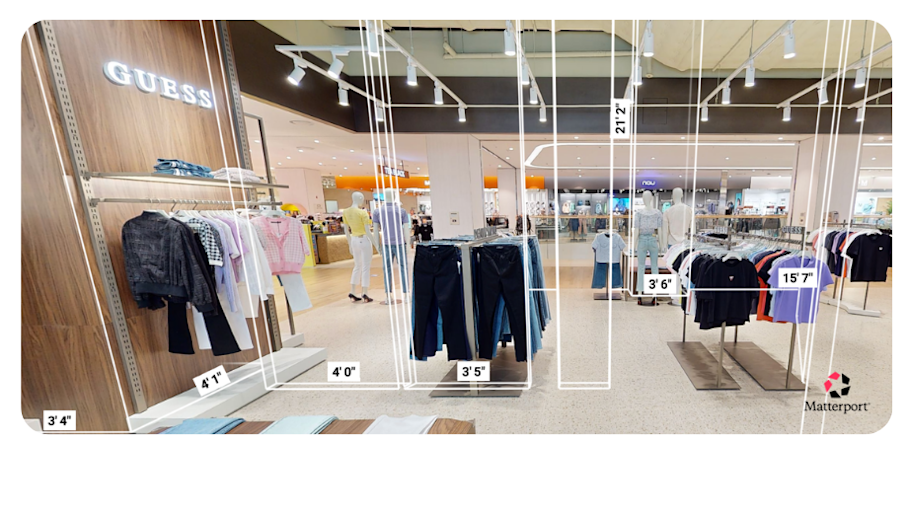
Confirm dimensions and access constraints with Automated Measuring. Check ceiling heights, doorway clearances, and distances between fixtures without sending anyone to the site.
Define the trade, materials, and scope. Based on what you can see and measure, determine whether it's an HVAC tech, a plumber, or a general contractor. Then specify the materials they'll need.
Approve the dispatch with a Note documenting the decision. Pin a conversation in the digital twin at the exact issue location so the vendor, store manager, and your records all reflect the same conclusion.
This process replaces the clarifying phone calls, the repeat visits to collect measurements, and the regional managers acting as on-site proxies because nobody else can see the space. For teams that already rely on a CMMS, Matterport integrates directly through APIs, so digital twin references, pinned notes, and spatial context sync alongside the work order rather than living in a separate system.
RPM Pizza, the largest Domino's franchisee in the U.S. with roughly 175 locations, relies on Matterport as a tool for ongoing collaboration. When an individual store has computer problems, that store's digital twin can easily be accessed. Knowing precisely where to find the equipment in question helps troubleshoot the issue on the spot.
The same logic applies to HVAC failures, plumbing issues, and any other equipment ticket where seeing the surrounding space accelerates the diagnosis.
3. Improve vendor scoping and verify completed work without repeat visits
Change orders in retail facilities management trace back to two sources: unknown existing conditions and missing measurements. Both are largely preventable when the vendor has the right visual and dimensional context before showing up.
You can package a vendor scope from the digital twin by:
Sharing a link to the exact area. Send the vendor a direct link to the affected zone in the 3D model.
Pinning constraints and specs with Tags. Mark the issue location, nearby utilities, and any access restrictions using embedded Tags with photos, attachments, or technical details.
Including measurements via Automated Measuring. Capture ceiling heights, fixture clearances, and aisle widths so the vendor can pre-order materials cut to spec.
Defining operating constraints. Specify after-hours access windows, ceiling type (drop vs. hard lid), staging areas for equipment, and any store-specific rules.
When vendors arrive after already walking the space virtually, they come prepared. Bid variance drops because every bidder is working from the same spatial baseline, while first-visit fix rates climb because techs aren't discovering unknown conditions on day one.
For post-work verification, the same tools close the loop:
Side-by-side before/after documentation: Time-stamped digital twins captured before and after the work create an incontrovertible visual record. If there's a dispute over scope completion, the evidence is photorealistic and dimensionally accurate.
Completion notes in Tags: Log updated serial numbers, new maintenance instructions, and warranty details directly in the model. The next person who opens this store's twin sees the latest information pinned to the exact asset.
Over time, this becomes the standard procedure for every job: scope from the twin, dispatch with context, verify against the record, and update.
4. Plan upgrades and refreshes from as-built plans
A single store scan serves two teams. Facilities use it for day-to-day maintenance context, and space planning uses it as an as-built baseline for refresh and remodel projects. That dual value makes the investment in documentation pay for itself faster.
When repair issues and deferred maintenance are logged in the digital twin over time, leadership can compare store conditions across the portfolio and prioritize upgrades based on evidence rather than anecdote. Schematic floor plans and Measurement Mode validate fixture fit, aisle clearances, and equipment placement without additional walkthroughs.
For remodels that require engineering-level detail, Matterport's BIM file add-on generates LOD 200 as-built models in RVT, IFC, and DWG formats, delivered in as few as two business days. These files connect directly to project workflows through integrations with Procore and Autodesk Construction Cloud, giving architects, engineers, and general contractors a common model to build from.
RPM Pizza, for example, adopted Matterport to expedite the simultaneous redesign and renovation of 30 stores in just six months. Using Matterport digital twins, the company cut the time to initiate these projects in half by enabling virtual site visits and 3D collaboration.
5. Build portfolio consistency that survives staff turnover
In distributed facilities management, the knowledge problem is a turnover problem. Every manager departure, vendor rotation, or territory change erodes the institutional knowledge of specific stores. When that knowledge lives in the model rather than in someone’s head, it persists regardless of who’s in the role.
There are three main capabilities that make this stick:
Guided Tours for repeatable walkthroughs: You can create standardized virtual walkthroughs for onboarding new store managers, orienting vendors to a specific location, or conducting brand standards audits. Every person sees the same sequence and the same context.
Centralized, permissioned access: Every store's digital twin lives in one library, accessible from any device. When a new district manager takes over, they don't start from zero; they inherit a visual record of every location they're responsible for, with all the tagged notes and historical context intact. Views control what each stakeholder group can see, so vendors get what's relevant to their scope and corporate sees the portfolio-level picture.
KPIs that reflect portfolio health: Track time-to-triage, first-time fix rate, change order rate, and avoidable site visits. These metrics tell you whether your documentation and remote workflows are working at scale.
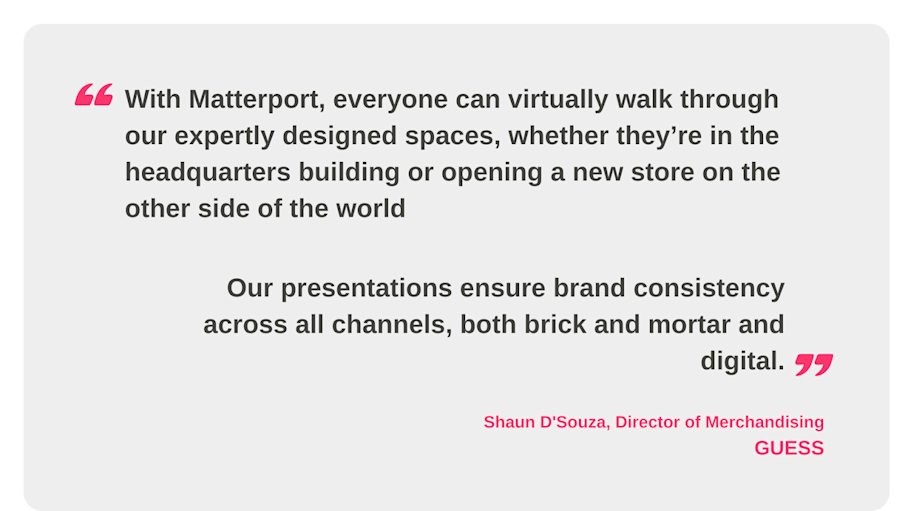
GUESS, the global fashion brand and retailer, adopted Matterport to ensure brand consistency across its stores. The HQ team configures new layouts and displays in a mock store at its corporate headquarters. Then, it captures a digital twin of the sample space and shares it with store managers globally.
Turn every store into a manageable asset with Matterport
The retail facilities management programs that hold up across large portfolios treat documentation as infrastructure rather than overhead. If every location has an accurate, accessible visual record, triage is faster, vendors arrive prepared, and capital decisions rest on actual conditions. That expands what distributed facilities management teams can do without adding headcount or sending people to stores unnecessarily.
Book a demo to learn more about how Matterport fits alongside your CMMS and vendor process.