


 Sign In
Retail Layout Optimization: How to Design Better Stores With Digital Twins
Project changes during retail construction are some of the most expensive problems in the business. Midstream design modifications trigger rework, wasted materials, and schedule delays that compound across every trade. For a retailer managing 200+ locations, that kind of variance on even a fraction of stores adds up to thousands, if not millions, in unplanned spend.
Many of these overruns trace back to the same root cause: decisions were made using inaccurate or outdated spatial data. In these cases, the solution isn't a better designer or a bigger budget. It's a better baseline.
This article walks through a practical workflow for getting there. You'll learn how to assess store conditions remotely, generate accurate floor plans, and validate layout proposals before committing to physical changes.
What is retail layout optimization?
Retail layout optimization is the practice of arranging fixtures, pathways, and sightlines to improve how customers move through a store, engage with products, and buy. It's driven by brand intent on one side, and hard spatial constraints on the other.
An optimized retail store layout delivers several benefits:
More purchases. Customers find what they need faster and encounter fewer friction points along the path to purchase.
Higher transaction volume. Strategic product adjacencies and exposure to more categories encourage add-on purchases.
Lower operational costs. Staff move faster, restocking is more predictable, and energy use better reflects actual foot traffic.
Stronger brand consistency. Repeatable layouts translate brand standards across locations without drift.
You need metrics to track these outcomes. Some are diagnostic and reveal what's broken in the current layout before you propose any changes. Others are performance metrics that tell you whether your changes worked:
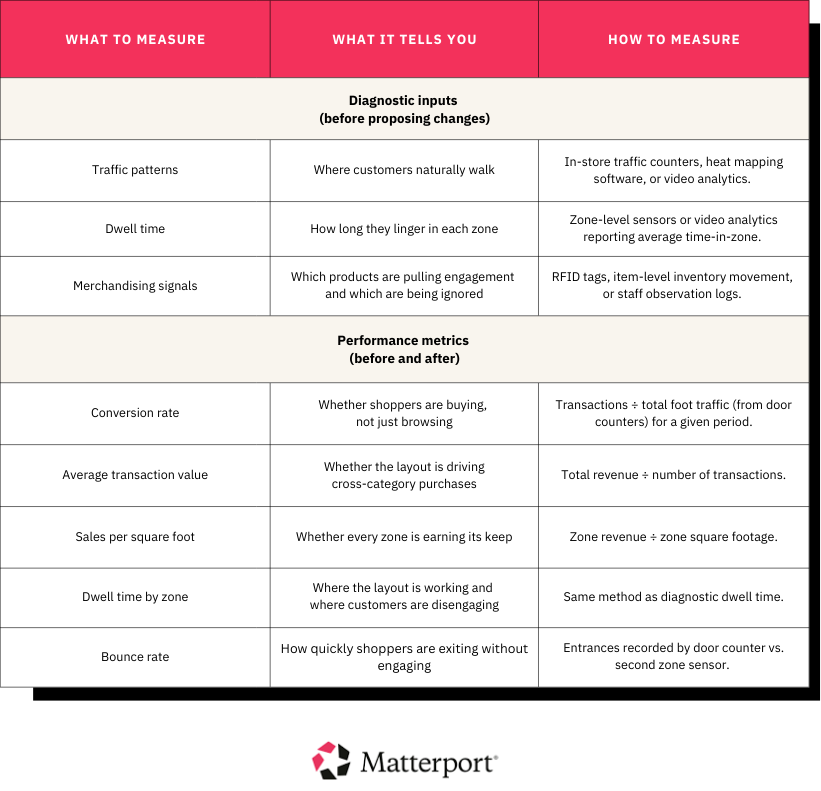
Without a baseline on both, there's no way to know whether a layout change impacted performance or simply moved furniture around.
Why retail layout optimization projects stall
Most stalled retail layout optimization projects aren't design failures, but spatial data failures. Obsolete or inconsistent documentation causes decisions to go wrong before anyone even has the chance to enter a store.
Below are the most common breakdowns in retail layout optimization projects:
As-built drawings are outdated or missing. Many stores have been remodeled two or three times since the original plans were drawn. Original PDFs may reflect a shell condition that hasn't existed for years.
Manual measurements introduce errors that compound downstream. A tape measure in the hands of someone rushing through a site visit produces numbers that are close, but not close enough. A half-inch error on an aisle width might seem trivial until it means a fixture order doesn't fit on install day.
Layout concepts are rarely validated against real spatial constraints before sign-off. Design teams often build proposals from idealized floor plans and only find that the concept doesn't work at a specific location once they're on-site.
Stakeholders review proposals from different, inconsistent reference points. The VP of real estate sees a 2D CAD drawing, while the merchandising director looks at a mood board. If stakeholders aren’t evaluating the same space, misalignment will later surface as change orders.
Site visits are the default resolution for unanswered spatial questions. When a dimension is in doubt or a photo doesn't capture enough context, someone has to travel to the site. For a portfolio made up of hundreds of stores, those trips add up, both in cost and in weeks lost from the project timeline.
Inconsistent documentation across locations undermines portfolio-wide rollouts. If every store's baseline lives in a different format, standardizing a fixture package or brand refresh across the fleet means starting from scratch at each location.
All of these problems can be fixed with a shareable, always-accessible spatial record of every store, which a 3D digital twin provides.
A digital twin is a photorealistic, dimensionally accurate replica of a physical space. It's navigable from any device, measurable without a site visit, and annotatable by every team that touches the project. The following sections show you how to put these capabilities to work.
4 retail layout optimization strategies
The four strategies below cover both sides of retail layout optimization: the planning that prevents surprises and the execution that keeps rollouts on track.
1. Build a measurable spatial baseline before proposing changes
Every layout decision depends on accurate as-built documentation. When the baseline is wrong or missing, general contractor (GC) bids carry more contingency, approvals stall, and the first real check on the design often takes place on install day.
Errors typically originate from three places:
Outdated CAD files: Original construction documents rarely survive multiple improvements intact. Column grids shift, walls move, and utilities are rerouted without anyone updating the drawings.
Manual tape-measure notes: Field measurements taken by different people on different days produce inconsistent data sets that are hard to reconcile into a single plan.
Landlord-provided drawings: These often depict the base building shell rather than the current tenant condition. Interior partitions, back-of-house modifications, and equipment added over time are rarely included.
Digital twins replace this patchwork with a single scan that captures the full interior of a store as a photorealistic, navigable 3D model.
Teams can verify aisle widths, fixture spacing, and clearance dimensions remotely using Automated Measuring in Matterport digital twins. From that same model, they can also order schematic floor plans to replace inaccurate drawings or export point clouds and CAD files directly into design tools like Autodesk Revit.
The result is a baseline that everyone trusts, works from, and can reference at any point in the project.
2. Stress-test layout modifications with a visual reference point
Skipping spatial validation before approving a layout proposal often leads to surprises during construction. To catch those problems early, stress-test each proposal against real spatial constraints.
Here's how that plays out as a practical sequence:
Map business goals to layout moves: Start with what you're trying to achieve: higher conversion, more space for a new category, faster checkout throughput. Each goal translates to a specific spatial change, whether that's wider power aisles, relocated fitting rooms, or a consolidated cash-wrap.
Validate those moves against dimensions and constraints from the digital twin: Walk the proposed changes against the 3D model. Does the new endcap plan leave enough clearance for ADA compliance? Will the relocated demo station block sightlines from the entrance? The digital twin helps you answer these questions without a site visit.
Compare options using a simple rubric: Score each layout variant against the business goals, spatial feasibility, and estimated cost. If everyone evaluates options from the same visual reference, the debates will move faster.
Matterport's Defurnish feature accelerates this concept-testing phase by digitally removing existing fixtures from the 3D model. It creates a blank-canvas view of the raw space, letting design teams evaluate alternative arrangements without physical resets or demo work. It's a low-risk way to explore multiple configurations before committing to one.
Accurate floor plans and measurements pulled from the scan also reduce quoting surprises. When a GC bids from verified dimensions rather than a redlined PDF, the estimate holds up and change orders go down.
RPM Pizza, the largest Domino's franchisee in the U.S., adopted Matterport to expedite the simultaneous redesign and renovation of 30 stores in just six months, a process that would typically take twice as long.
The company needed to redesign store layouts and upgrade equipment to increase food prep efficiency. Digital twins let facilities managers assess each store remotely, cut the bidding process, and verify that new equipment would fit before ordering it.
3. Align stakeholders and secure approvals without extra site visits
Retail layout decisions don't sit with any single department. Getting from concept to construction requires alignment across corporate real estate, visual merchandising, store operations, AEC partners, and executive leadership.
If those teams work from different documents, or different mental models of the same space, approvals drag. When that happens, rework usually follows.
A shared digital twin with in-context annotations gives every team the same visual reference for faster sign-off. Remote reviews can then follow a structured process:
Async review: Each team walks the digital twin on their own schedule, using Notes and Tags to flag constraints and leave directives pinned to the relevant location in the model.
Structured comments on shared Views: Tailored Views control what each stakeholder group sees. The merchandising team can focus on fixture zones and sightlines, while the construction manager reviews structural elements and utility access. Comments stay organized instead of spread across email threads.
Live decision meeting: With async feedback already captured in the model, the live session can focus on unresolved items only. Teams navigate the digital twin together, review tagged issues, and make decisions with full spatial context on screen.
Sign-off: The approved layout is documented inside the annotated digital twin, complete with measurements, constraints, and side-by-side before/after views for context.
By the time the team reaches sign-off, the annotated model already contains what leadership needs to evaluate the capital expenditure: verified dimensions, visual comparisons, and a decision log. That's a stronger approval package than a slide deck assembled after the fact.
4. Roll out across the portfolio without losing accuracy or speed
Scaling layout optimization from one store to hundreds requires standardized documentation and a pre-construction validation step.
Consistent digital twins surface problems at two distinct stages:
During planning, a digital twin might reveal that a prototype fixture package designed for one store format won't fit a second location due to different column spacing before materials are ordered.
During construction and implementation, a post-install scan could confirm that the built condition matches the approved plan or flag deviations while the GC is still on-site and fixes are less expensive.
For portfolio-scale programs, Matterport Capture Services eliminate the need to build an internal scanning team. Vetted local technicians can be scheduled on demand in 700+ cities, with finished digital twins delivered in as fast as 24–48 hours. Corporate teams can kick off baseline documentation across dozens of stores at once without shipping hardware or coordinating internal travel.
Digital twins aren't just a construction tool, though. After build-out, teams can use the same capture for merchandising updates, seasonal resets, and remote brand audits.
GUESS, for example, adopted Matterport digital twins to ensure brand consistency across its global store portfolio. Merchandisers set up example displays in a mock store at corporate headquarters and capture them to set instructions for stores globally. Since 2017, the fashion retailer has realized a 200% increase in productivity by replacing 2D merchandising directives with digital twins.
Better layouts start with better baselines
Retail layout optimization is a spatial accuracy problem first and a design problem second. Every strategy we covered depends on having a reliable, measurable record of the store as it exists today.
Teams that start with that kind of baseline make faster decisions and drive fewer change orders. They also scale with more consistency across locations. Teams that don't end up rediscovering the same problems at every store, absorbing the same rework costs, and losing weeks to avoidable site visits.
If you want to see how a dimensionally accurate digital twin changes the way layout decisions are made, book a demo with our team.


