


 Sign In
8 Ways To Use 3D Scanning Platforms for Immersive Employee Training [+Tools]
Key takeaways
The best immersive employee training starts with a 3D scan. Environment-scale digital twins facilitate site-wide onboarding, safety, and SOP training, while object-scale scanners excel at creating detailed equipment models for procedural simulations.
3D scanning platforms support a variety of immersive employee programs, from interactive SOP walkthroughs and remote onboarding to emergency drills and contractor inductions, so teams can train in the real workplace instead of on passive slides.
Matterport is the strongest all-around platform for facility-scale immersive training. Guided Tours, Tags, role-based permissions, and browser-based access make it easy to build structured, repeatable learning experiences without specialized technical skills.
Classroom sessions, slide decks, and static manuals ask employees to sit still and absorb. Most of it fades fast, because passive learning rarely sticks. Alternatively, immersive employee training puts staff inside a realistic version of their workplace, where they can move through the space at their own pace and see exactly where a task happens. People remember what they do far more than what they read, and the closer a session feels to the real job, the more of it employees carry onto the floor.
3D scanning platforms make this possible. They capture real environments, like offices, warehouses, plants, and job sites, turning them into navigable digital replicas where employees can explore, practice, and make decisions in the actual space instead of reading about it.
This guide compares the top 3D scanning platforms for immersive employee training, and through eight practical training use cases with tool recommendations for each.
Tool types for 3D immersive training
There are two main types of 3D scanning that benefit learning and development teams:
Environment-scale 3D scans capture entire facilities, floors, and worksites for facility-wide orientation and training.
Object-scale 3D scans capture individual equipment, parts, and assemblies for detailed procedural simulations.
Understanding where a platform sits helps L&D teams match the right capture method to each training goal.
Environment-scale 3D scanning platforms
Environment-scale platforms produce 3D digital twins that serve as the foundation for facility-level immersive training. They capture entire facilities, floors, or worksites and turn them into navigable environments employees move through. Training then happens in the context of the actual space rather than an abstract diagram.
Many digital twin platforms enable learning programs, but they vary widely in capability. Most combine some of the following:
High-quality 3D capture
Interactive digital twins
Contextual learning tools
Guided training experiences
Collaboration and accessibility
Scalability and integrations
The list below covers some of the top 3D scanning platforms for employee training via digital twins.
Matterport
Matterport is the strongest fit for formal onboarding and operational training, with features built specifically for guided experiences. Where other tools drop trainees into a space to look around, Matterport structures the experience, turning a passive walkthrough into a repeatable lesson that teaches the same thing to everyone, every time.
Features
Curated Guided Tours
Tags & Attachments embed instructions and media to relevant locations
Custom Views for digital twins, each with its own start position, tags, and labels that serve different roles or training tracks
Notes where employees and staff can ask questions or leave callouts
Dollhouse View & Schematic Floor Plans provide different 3D perspectives of the whole space so trainees can build a mental map before stepping onto the floor
Measurement tools give trainees accurate spatial reference for planning and equipment-specific tasks
Space Search where trainees can find the exact station or procedure without walking the whole tour
Shareable links so anyone new can access the training on demand, on any device
Integrations & API/SDK pair walkthroughs with LMS and workflow tools
Roles & Permissions restrict access to sensitive areas so content can be reused across roles
NavVis
NavVis hardware provides a high-fidelity training foundation where precision is essential. POIs support reference-style learning, but there's no native guided-tour or learning-path feature. You'll need to build detailed structure elsewhere.
Features
Survey-grade capture hardware produces a highly detailed environment trainees can trust for precision tasks, though this comes at a premium cost
Content management system for geo-tagged information so procedures and reference material are attached to relevant locations
Mark and measure tool for taking, organizing, and sharing point-to-point measurements
Search for points of interest across sites so trainees can find a specific asset or procedure fast
Role-based access control restricts sensitive areas
Integrations connect training to other systems
Prevu3D
Prevu3D is strong for industrial safety and SOP training inside the model, especially for high-risk environments. It is built around operations and engineering and capable of supporting training, but that is not its core design.
Features
Points of interest that attach parameters and documentation to equipment in the model
Real-time remote collaboration where a trainer can walk a remote group through a site live
Integrations that tie training to the maintenance and operations systems in use
Cupix
Cupix is a good fit for orientation and layout familiarization in construction and facilities. It's annotation tools support light guided instruction, but know that Cupix is exploration-first with no structured learning-path layer.
Features
Interactive media enriches walkthroughs with content and instructions at specific points in the space
Dollhouse view and virtual walkthroughs that help familiarize new staff or contractors with a layout before they arrive
Measurements give trainees accurate spatial reference and design context
iGuide
iGuide is a real-estate-first solution, with the lightest detail of the group. It's live, host-led sessions are useful, but it i is limited for self-paced or structured operational training.
Features
Tags with rich media link text, photo, video, and graphics with instructional content to specific locations
Real-time guided tours where a host controls navigation and participants follow for live, instructor-led training sessions delivered remotely
Embedded video clips in the viewer pair a walkthrough with demonstration footage
Mobile access so trainees can reference the space anywhere
The verdict
A scan alone does not produce a suitable training environment, so guided walkthroughs, in-context annotation, easy sharing, and non-technical capture are some of the most important features to look for if you want to seamlessly turn a space into an immersive training environment. Matterport digital twins, in particular, offer a comprehensive solution.
Object-scale 3D scanning platforms
Object-scale platforms capture individual pieces of equipment, machinery, parts, or assemblies as high-fidelity, CAD-grade 3D models. They focus on fine detail rather than whole rooms, which makes them ideal for close study of a specific machine.
Their capabilities typically include:
Fine-detail scanning
CAD and simulation compatibility
Rapid capture and processing
Measurement and inspection features
The list below covers some of the top object-scale scanners that provide the foundation for immersive procedure training.
Creaform Peel
Creaform Peel is best suited to capturing individual parts for detailed, part-level training content. A tethered design ties it to a fixed scanning station rather than the plant floor.
Features
Full-color capture records surface texture with geometry, so models look like the real part trainees will handle.
Beginner-friendly capture with haptic vibration cues and guided workflows so non-specialists can capture scans.
Exports include common mesh and CAD formats that drop into training, AR, or VR tools
Peel OS cleans and processes scans into a usable model
Artec
Artec is a more premium, versatile option, with cable-free capture that reaches equipment on the floor or in tight spaces where tethered scanner can't.
Full-color capture maps texture onto geometry for recognizable, true-to-life models
Scans without cables or a PC so equipment can be captured right where it sits on the floor
Flexible capture range handles anything from a small mechanical part to a full room or vehicle, so one scanner captures both a specific piece of equipment and the workspace around it
Artec Studio processes scans
Artec Cloud can embed a model in an interactive 3D Player for viewing, rotation, and zoom
The verdict
It’s important to note that these won’t function as a training platform alone. They produce detailed digital assets of specific equipment and parts that become the raw material for training content, rather than ready-to-use training experiences. Their output typically has to be paired with a VR simulator, a game engine, a 3D authoring tool, or an LMS to build and deliver the actual training.
8 immersive training programs you can build on 3D scans
Once a space or object exists as a navigable scan, it acts as a reusable base for programs that would be costly, risky, or impossible to run in the physical environment. L&D teams can build any of the eight immersive training programs below directly on top of a 3D scan, without pulling people onto the floor or waiting for equipment to free up.
1. Interactive SOP walkthroughs
An interactive SOP walkthrough turns a standard operating procedure into a clickable visual guide inside the space. Each step is pinned to the exact location where it happens, so employees follow the process in the order they will perform it. That spatial context is hard to reproduce in a written document.
Embed tags to attach the written SOP, a demo video, or safety notes at the point of need. This will enable, for example, a warehouse team to walk a pick-and-pack flow station by station, or a lab team to follow a sample-handling procedure bench by bench. Learners see the instruction exactly where the action takes place.
Best tools for interactive SOP walkthroughs
For a procedure that plays out across a space, Matterport's Tags and Attachments pin each SOP step in the right context. A technician clicks a location and finds the written steps, a short demo video, and any safety notes attached to that spot.
Prevu3D's annotations and asset-linked documentation help teams connect SOPs to specific equipment and locations. Both approaches keep the procedure tied to the physical space, which makes the walkthrough far easier to follow than a static checklist.
2. Remote onboarding
In-person onboarding is often expensive and hard-to-schedule, especially for distributed teams. Immersive remote onboarding helps distributed and global employees explore a facility from anywhere before day one. New hires arrive already oriented to their work area, common spaces, and the route between them, shortening time to productivity.
Best tools for remote onboarding
iGUIDE is a lean, low-cost fit for simple floor plans and basic orientation. Matterport's browser-based digital twins add Guided Tours and intuitive navigation, so new hires explore the workplace independently before their first day.
New hires at Siemens explore Matterport digital twins of facilities at their own pace before arriving onsite. Similarly, KLM Royal Dutch Airlines built digital twins of 104 aircraft that drove roughly 900,000 training views and cut new-aircraft familiarization for crews by 30%.
Survey-grade tools like NavVis and object scanners add friction here. Their output usually needs conversion before a new hire can explore it, which slows down a use case that depends on quick, self-serve access.
3. Equipment operation simulations
Equipment operation simulations allow employees to learn machine layouts, controls, and clearances before touching expensive or hazardous equipment. Workers build a mental model of where everything sits and how to move around it safely, reducing mistakes and risk during the first hands-on session.
Measurement tools are useful for building spatial awareness and confidence ahead of real use. With these resources, teams can study a production line or an assembly in detail from a screen.
Best tools for equipment operation simulations
Artec captures highly detailed 3D models of machinery for procedural simulations when paired with VR or simulation software. Creaform Peel produces accurate, CAD-ready equipment models for advanced maintenance and operational simulations in external platforms.
The models from these tools are not interactive drills on their own. Each one has to feed a VR simulator or an LMS to become a hands-on exercise employees can complete and repeat. Local Union 669 uses annotated Matterport digital twins to train apprentices on fire-pump systems with access to equipment manuals, videos, and photos that support in-depth studies of equipment.
4. Safety and compliance training
Safety and compliance training works best as a realistic walkthrough that highlights hazards, PPE requirements, and restricted areas in context. Employees see the real environment they work in, not a generic illustration, and realism helps the guidance stick.
Tagging hazards in context helps make safety training concrete. A learner will see the exact pinch point, the sign that should be there, and the PPE the zone requires, so the lesson connects to a place they will actually stand.
Best tools for safety and compliance training
Matterport supports the development of contextual safety resources where hazards, PPE requirements, and restricted-area guidance are pinned directly to locations with Tags. Views and role-based permissions also control who sees sensitive zones, so restricted areas stay protected while general safety content reaches everyone.
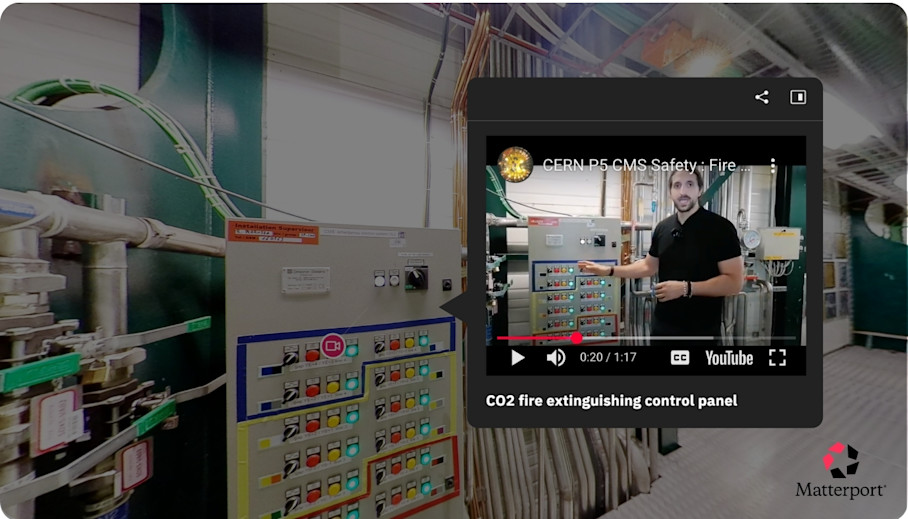
NavVis captures accurate, navigable point clouds of large facilities. Those support egress-route planning and drill scenario mapping across complex manufacturing and warehouse environments where precise geometry matters.
5. Emergency response drills
Immersive emergency response drills mean teams can practice fire evacuation, spill response, lockdown, and disaster-recovery procedures virtually without shutting down operations. People rehearse the plan without stopping production or waiting for a scheduled drill day, keeping preparedness high without the operational cost.
Repeatable virtual drills reinforce routes and roles across shifts and locations. A team can map muster points and evacuation paths inside the twin, then rerun the same drill for every crew. New shifts get identical practice, not a watered-down version.
Best tools for emergency response drills
Matterport’s repeatable Guided Tours act as effective emergency planning resources, where evacuation routes and muster points can be rerun by staff on demand without disrupting operations. Each shift follows the same standardized path, which keeps the drill consistent everywhere.
NavVis digital twins help teams visualize evacuation routes and emergency access across expansive sites. Its detailed capture suits large, complex facilities where responders need an accurate picture of every corridor and exit.
6. Maintenance orientation
Immersive maintenance orientations let technicians inspect the digital twin to locate and identify components before working onsite. They can confirm what they are dealing with and plan the job in advance, which reduces wasted trips and downtime, so the first onsite visit is productive.
Measurements and tagged manuals help prepare technicians for the specific task ahead. Before a visit, a technician can study MEP equipment, confirm clearances, and read the right manual for the unit. They’ll show up knowing what to bring and what to expect.
Best tools for maintenance orientation
Matterport pairs tagged manuals and documentation with accurate in-model measurements, so technicians can prepare for maintenance tasks before arriving onsite. NavVis is also a good fit for inspections that hinge on precise geometry, thanks to its survey-grade capture.
For close study of a single component, an object scan from Creaform Peel or Artec will give the most detail. Those CAD-grade models let a technician examine a part far more closely than a facility-scale scan allows.
7. Knowledge capture
Knowledge capture is a practice where experienced workers and subject matter experts record best practices, tips, and institutional knowledge directly inside the twin. They document how things really work using notes and tags placed on the equipment and spaces they know best, so knowledge stays attached to the place it belongs.
Loss of tribal knowledge is a common pain point, especially in industries that rely on factory-floor expertise, like manufacturing. With a digital twin, a retiring technician can annotate a machine with troubleshooting guidance, so the next person inherits the hard-won detail.
Best tools for knowledge capture
Matterport makes it easy for subject matter experts to capture tribal knowledge in place with Notes and Tags, including Field Tags added while scanning. An expert can record context in real time, right where the work happens, without a separate documentation step.
Cupix's collaborative annotations are also useful for documenting project knowledge and site-specific observations over time.
8. Contractor and visitor inductions
Immersive contractor and visitor inductions help external staff to review hazards, restricted zones, layout, and emergency procedures before arriving onsite. Outsiders learn the space and its rules in advance, so they arrive ready to work safely, reducing risk and shortening the time an escort has to spend on orientation.
Make sure to share only what each group needs so that sensitive areas are protected. For example, a contractor should see the work zone and its hazards, while a visitor might only require a view of the tour route and the exits.
Best tools for contractor and visitor inductions
Inductions hinge on secure, granular sharing, so Matterport's secure cloud sharing with role-based permissions and Views give contractors and visitors exactly what they need and nothing more. Sensitive zones stay hidden while the relevant safety content reaches the right people.
iGUIDE's easy-to-share, basic virtual walkthroughs help visitors understand layouts and key areas before arriving onsite. For a straightforward orientation, that lightweight format is quick to send and simple to open.
Turn every facility into a scalable training resource
The strongest employee training programs should layer three tools so every base is covered:
An immersive environment platform
Detailed object scans
A delivery platform
Use an environment platform such as Matterport to capture the facility and build guided, annotated walkthroughs. Use an object scanner such as Creaform Peel or Artec to capture specific equipment in CAD-grade detail. Then integrate a VR simulator or LMS to track completion.
Matterport lets L&D teams standardize onboarding, orientation, and SOP reinforcement across sites using the same guided, annotated experience everywhere. Private embedding, APIs, and integrations with LMS platforms, collaboration tools, and enterprise workflows mean immersive learning fits inside the training programs teams already run.
Get in touch with our team


