


 Sign In
6 Ways 3D Documentation Software Supports Real Estate Portfolio Management
Real estate teams manage complex portfolios but often struggle with unreliable site information. Incomplete property documentation often results in knowledge gaps. This forces teams to travel just to confirm basic details.
3D documentation software for corporate real estate bridges this gap. It turns each site into a digitally accessible file. When all stakeholders use the same source of truth, risk decreases, decisions speed up, and portfolio strategies stay on time and on budget.
This guide outlines how 3D documentation supports every level of portfolio management. You’ll walk away with a practical governance blueprint for scaling documentation across your portfolio.
1. Streamlined building maintenance
3D documentation makes building maintenance easier and helps facilities teams see what is physically on site. Maintenance delays often happen because:
Scope is unclear before dispatch: Teams cannot confirm what systems are affected, what tools are required, or how long the job will take.
Access constraints are discovered too late: Locked rooms, roof access issues, ceiling congestion, or equipment clearances are only identified after arrival.
System documentation is outdated or inconsistent: Drawings do not reflect current conditions, forcing teams to validate details manually or return at a later date.
When your site assets are documented digitally, your maintenance team always arrives prepared. Tasks can be accurately scoped in advance, making repair timelines more predictable.
How to build a standardized visual asset registry for maintenance
A visual asset registry helps with routine maintenance. It cuts down site visits and aids in training and system oversight. Start by defining what a good registry looks like across every site. At a minimum, most portfolio managers set these standards:
Fidelity of capture zones: If you’re maintaining interiors, include any built-in assets or furnishings. For manufacturing or mechanical facilities, identify complex MEP zones and use high-density capture to create detailed records.
Tag naming conventions and folder structure: Use a consistent structure to make assets globally searchable.
Required fields: Every tagged asset should include asset ID, manufacturer, model number, installation date, last service date, and warranty status.
There are several ways to create an asset registry, but the most efficient is by using digital twins, a photorealistic 3D model of a property made using 3D documentation software.
From inside a digital twin, engineers can tag each asset visually and quickly pull up inspection histories, nameplate data, training videos, and user manuals. This turns the model into a working equipment record, not just a visual reference. Everything is in one place, and integrated into maintenance management systems.
2. Better information visibility for CapEx
3D documentation improves Capital Expenditure (CapEx) by replacing best guesses with verified data. Early budgets and timelines based on facts—not assumptions—result in more predictable and favorable outcomes.
CapEx planning often slows down due to:
Unclear dimensions: Outdated or missing floor plans make it difficult to scope projects accurately, leading to inflated contingencies.
Uncertain conditions: Without visibility into ceilings, systems, and constraints, risk is priced into early budgets.
Slow surveys: Waiting for field surveys delays feasibility reviews and internal approvals.
Limited estimating inputs: Unclear layouts and conditions mean early budgets need higher contingencies, slowing capital allocation.
3D documentation software supports thorough internal capital reviews and helps planning to proceed without delay. Detailed surveys may come later. However, early budgeting, scoping, and approval cycles begin with clear visuals instead of uncertainty.
How to speed up documentation generation for CapEx visibility
Start by defining what documentation the CapEx team needs for every location. A standard CapEx handoff package includes:
Floor plans
Key dimensions and clearances
Ceiling context
Photo evidence
Issue reports
Digital twins simplify documentation generation to help CapEx teams understand on-the-ground conditions:
Measurement tools allow teams to quickly validate dimensions without scheduling a site visit or searching through outdated drawings.
3D exports such as E57 or BIM files, available through MatterPak, provide technical teams with detailed as-built data, including point clouds and 2D floor plans for deeper design coordination.
Guided tours can be shared alongside capital requests to help leadership review site conditions and validate scope before approving spend.
When documentation processes are standardized, budgeting and review cycles move faster. Digital twins also support Environmental, Social, and Governance (ESG) goals. They make it easier to cut costs and monitor results. For example, Aetos saved 4% on their energy bill and trimmed travel costs, and reduced engineer training time by 50% by implementing digital twins across their portfolio.
3. Better support for compliance and claims processes
3D documentation software can reduce the need for in-person inspections by providing consistent records. Corporate real estate teams often manage dozens or even hundreds of spaces. When documentation isn’t standardized across a portfolio, confusion about compliance alignment slows inspection and approval cycles.
Reliable digital records help you:
Prepare for inspections: Review life-safety features, signage, and access routes without disrupting operations.
Document incidents: Capture exact conditions at a specific point in time to support insurance claims and internal reporting.
Conduct life-safety reviews: Verify egress paths, fire equipment placement, and clearance requirements.
Confirm accessibility compliance: Visually check ramps, door widths, and circulation paths before audits.
Validate vendor work: Provide documented proof of completed repairs or installations.
To reduce your risk exposure, focus capture efforts on areas that are particularly important for compliance, such as egress routes, fire safety equipment, accessibility features, and high-risk or hazardous areas.
How to create audit-ready corporate real estate condition records
Capture a baseline scan of each site before and after renovations, incidents, or tenant turnover. The Matterport Pro3 camera provides dimensionally accurate data that is suitable for remote review by compliance inspectors, insurers, and restoration vendors.
“Before” records establish documented conditions that can be referenced later if damage claims, compliance questions, or lease disputes arise. “After” records reduce ambiguity for insurers and provide clear proof of damage.
Below is an example digital twin capture taken of a commercial real estate property following water damage.
4. Support for leasing readiness
3D documentation software supports leasing readiness by giving brokers, tenants, and internal teams immediate access to accurate space information. Without a clear digital record, lessors rely on old photos or repeat site visits during transitions. This delays communication with potential tenants and pushes back move-in dates.
Having a 3D replica of the building and its assets helps you:
Confirm baseline condition: Establish the documented state of the space before tenant improvements or turnover.
Verify finish standards: Check that flooring, paint, fixtures, and brand standards meet portfolio requirements.
Track punch items: Tag outstanding repairs or incomplete work directly in the space for clear follow-up.
Validate readiness: Confirm that utilities, access, and required upgrades are complete before occupancy.
For example, in an office portfolio, you can review a suite remotely to confirm that build-outs meet finish standards before releasing it to brokers. This avoids scheduling multiple walkthroughs just to verify readiness.
For industrial properties, dock conditions and equipment removal can be confirmed before approving turnover.
How to deliver a shareable corporate real estate record for leasing
When managing leasing across multi-location portfolios, consistency is key. Enforce finish and brand standards across sites and define parameters for what ready for occupancy looks like.
In the video below, you’ll see what it looks like to walk through a digital twin for a commercial property. You can tag areas and embed tours for marketing or internal review. Photos and short video clips can also be generated from the same model to support your marketing team.
Remote viewers can check the condition and readiness easily. This speeds up review cycles and cuts out unnecessary walkthroughs. More importantly, one shared record keeps leasing, facilities, and leadership in sync before a space is released or a lease is finalized.
5. Efficiency gains through remote decision making
3D documentation software delivers on-demand access to a photorealistic digital version of every site. When stakeholders cannot verify current conditions remotely, project timelines expand to accommodate on-location meetings. Coordinating travel introduces scheduling delays, adds cost, and slows momentum during time-sensitive decisions.
Remote access is especially important for portfolio management during:
Acquisitions: Teams need to assess layout, condition, and risk before approving a purchase.
Lease renewals: Condition reviews are required before negotiating terms or approving tenant improvements.
Space changes: Internal reconfigurations require validation of layout and system constraints.
Vendor scoping: Contractors need walkthroughs to understand access and existing conditions.
Executive approvals: Leadership needs proof before sign-offs.
While any type of 3D documentation improves remote collaboration, a digital twin is particularly powerful. Intuitive user controls means it’s easy to onboard non-technical members. Collaborators can also add digital Notes to specific areas to call out specific features and discuss solutions. This reduces information silos across facilities, security, IT, and finance, regardless of location.
How to enable remote collaboration for corporate real estate decisions
Organizations using digital twins for remote access have reported up to 75% fewer site visits and a 22% reduction in project duration.
Digital twins make it easier for teams and partners to collaborate without needing to be on site. Stakeholders can explore the space through a virtual tour, use Notes to ask questions directly within the model, and apply Tags to highlight key details such as equipment locations, access points, or areas requiring attention. This shared visual context helps everyone stay aligned and reduces back-and-forth.
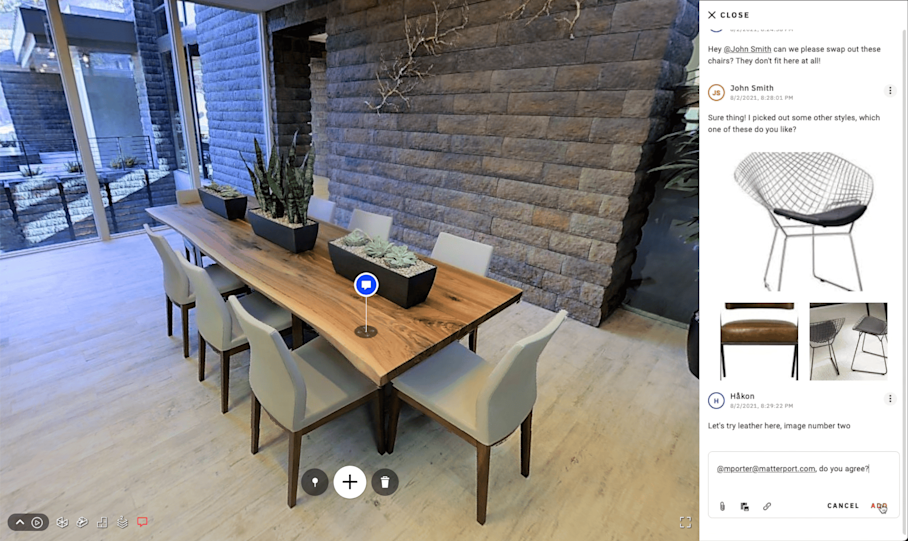
A “Note” within a digital twin is placed on a table in the conference room in which collaborators discuss chair swaps.
The impact of remote collaboration is significant, especially for multi-location sites. For example, the U.S. bank BMO used Matterport’s digital twins to capture 503 branches in just 3 months as part of a massive rebranding project. This saved them 16,000 hours of field survey work and $500,000 over 15 months.
6. Single source of truth for as-builts
3D building documentation software creates a standardized as-built visibility portfolio-wide. Anyone can check conditions and readiness for renovations without relying on outdated drawings or site visits. Over time, a centralized record helps facilities teams maintain governance and ensure standards are consistently met.
Documentation-grade as-builts should meet clear standards:
Repeatable capture standards: Every site is documented using the same methodology and required coverage areas, ensuring consistency at scale
Consistent naming conventions: Files and models follow a structured hierarchy so locations, floors, and spaces are easy to find and retrieve.
Time-stamped records: Each capture reflects a specific point in time, creating a reliable historical record for renovations, compliance reviews, and audits.
Shareable, accessible format: As-builts are stored in a format that stakeholders across facilities, IT, finance, and leadership can access without specialized software.
Accurate, shareable as-builts cut down on siloed information. They provide every team with the same view of current conditions, no matter their location.
How to build consistent, portfolio-wide documentation
Matterport digital twins provide a photorealistic, dimensionally accurate record that lives in the cloud and is available on demand.
At the portfolio level, this cloud-based approach enables consistent documentation, fast retrieval, and governance oversight across every location. Each site is captured and uploaded to a centralized platform, where teams can:
Keep documentation consistent across every property
Quickly compare spaces when planning renovations or prioritizing budgets
Share remote site access so leaders can review and approve decisions faster
Centralized, shareable models eliminate the need to track down drawings, emails, or local files. For example, a facilities manager can quickly pull up a location to confirm wall layouts before a renovation or verify equipment placement during a compliance review.
When 3D documentation becomes standardized and accessible across your portfolio, decision-making improves at every level. Looking to modernize your commercial portfolio management systems?
Get in touch with our team