


 Sign In
Construction Documentation: Types & Best Practices for Building Source of Truth


Thousands of years ago, ancient builders in the Middle East carved the first known building plans onto large stones. At a Jordanian campsite dating back around 9,000 years, one stone displays intricate engravings of desert kites, massive structures used to herd animals, with detailed drawings of layouts and proportions. These early architects relied on detailed plans to build structures that essentially lasted for generations.
Today, our ways of recording building plans have evolved significantly. But, the need for reliable construction documentation remains just as critical: to anticipate challenges, ensure accuracy, and keep every project aligned with the original design intent.
Here, we’ll explore the different types of construction documentation, share practical tips to keep projects on track, and highlight how Matterport technology can help future-proof your construction designs.
What is construction documentation?
Construction documentation is a comprehensive set of records that track a project from its initial design through to final completion and beyond. While this can include a number of different types of documents, they generally fall into two main categories:
Formal design documents (CD set): The official drawings and specifications produced during the design phase. They provide the blueprint for construction and serve as the authoritative reference for what should be built.
Field documentation: Day-to-day records that capture the project as it happens, helping teams track progress, manage changes, and resolve issues quickly.
Together, these records serve as both a detailed guide for construction and a historical record of the project, keeping everything organized and making it easier to handle challenges along the way.
Why is construction documentation important?
Construction documentation is the critical link between what designers envision and what actually gets built in the field. Without accurate, up-to-date records, even the most detailed plans can be misinterpreted, leading to delays, costly rework, and misaligned expectations.
Thorough construction documentation can be applied across a number of workflows and contributes to benefits across projects. It helps to:
Confirm work matches design intent and ensure that every build element aligns with the approved plans.
Reduce costly rework by identifying issues early and preventing expensive corrections.
Improve team coordination by keeping architects, engineers, and contractors on the same page.
Record site conditions at every stage so the project’s evolution is captured for reference and verification.
Speed RFI and change order resolution by providing the information needed to respond quickly.
Provide proof to minimize disputes by creating a clear record in case of claims or disagreements.
Ensure regulatory compliance, making inspections and approvals smoother.
Capture hidden or completed work with documentation of elements that become inaccessible once construction progresses.
Support operations and maintenance with a reference for facility management after project completion.
Add long-term value for asset management by providing a baseline for future upgrades or modifications.
By linking design intent with on-site execution, construction documentation not only prevents mistakes but also adds lasting value to the project, supporting both immediate and long-term needs.
10 types of construction documents made simple
Construction documentation is an all-encompassing term that includes many different pieces of information used throughout a project’s lifecycle. Below, we’ve covered ten of the most common documents that are involved in most projects.
1. Architectural drawings
Architectural drawings form the backbone of any building project, showing floor plans, elevations, sections, and other visual representations of the design. They help teams understand spatial relationships, materials, and aesthetics. These drawings serve as the key reference throughout construction, ensuring the built environment matches the designer’s vision.
Traditionally, creating these drawings was time-consuming and labor-intensive. Today, modern technology like Scan to BIM and digital twins uses point clouds to automate the creation of these drawings, making the process faster and more accurate, even for complex structures with non-orthogonal or curved walls. Architects and contractors are able to generate precise 3D models quickly, even for complex geometries, which reduces errors and accelerates planning.
2. Structural drawings
Structural drawings illustrate the building’s load-bearing framework, including beams, columns, foundations, and supports. They are essential for ensuring stability and safety under environmental forces like wind, snow, and occupancy loads.
These documents also guide teams in planning out-of-sequence work like late-stage equipment installations. Out-of-sequence installations can lead to serious structural issues and massively inflated costs, whether due to delays, labor disputes, or design changes. Properly interpreted structural drawings break down these scenarios and give project teams the guidance they need to build strong structures that withstand the test of time and nature.
3. Mechanical, Electrical, and Plumbing (MEP) Plans
Mechanical, electrical, and plumbing (MEP) plans detail the building’s critical systems and how they interact.
Mechanical drawings cover heating, cooling, ventilation, and fire protection.
Electrical drawings map lighting fixtures, outlets, appliances, and communication systems.
Plumbing drawings manage water supply and waste removal (plumbing) systems.
MEP plans coordinate these components ahead of construction to avoid clashes that could lead to costly delays or system breakdowns. Essentially, it helps your building run like a well-oiled machine, while also keeping an eye on environmental standards, energy efficiency, and compliance with building codes. Well-coordinated MEP plans minimize delays during installation and help future-proof the building for upgrades.
4. Specifications
Specifications define the materials, standards, and workmanship required for a project. They are one of several documents used in bidding and construction, working alongside drawings to set clear expectations, reduce ambiguity, and establish benchmarks for quality.
Specifications also play a legal role, often carrying more weight than drawings in disputes or bidding processes. For this reason, it’s important to have qualified professionals prepare these documents.
Clear, well-prepared specifications ensure contractors understand what is expected, enabling better decision-making, procurement, and compliance with performance standards.
5. Contract documents
Contract documents outline the responsibilities, deliverables, timelines, and costs for all parties involved in the project. They establish legal obligations, protect finances, and reduce misunderstandings. That said, these documents can become unenforceable in some situations, like if there’s a prior breach.
Combined with accurate field documentation, such as photos or digital twins, these records help resolve disputes and verify compliance. They are the framework for accountability, ensuring every stakeholder knows their role and obligations throughout the project lifecycle.
6. Site plans
Site plans provide an aerial view of the property, showing building placement, utilities, landscaping, and boundaries. They also capture site constraints and opportunities, such as nearby trees, slopes, or neighboring structures that could affect construction. Think of them as a sheet set of the lot.
For instance, a tree on a neighbor’s property might change how you protect or develop your own land. By highlighting these constraints and opportunities, site plans help everything fit together logically while respecting the site’s unique conditions.
Accurate site plans streamline logistics, prevent conflicts, and help teams plan for accessibility, drainage, and safety. Solutions like Matterport’s Pro 3 camera allow teams to quickly capture precise site conditions early in the planning process.
7. Permits and regulatory documents
Permits and regulatory documentation ensure the project complies with local building codes, zoning regulations, and safety standards—an especially pressing concern in a hazardous industry. These records are critical for avoiding delays, fines, and legal risks.
They also help project managers demonstrate due diligence to inspectors and stakeholders. Maintaining these documents accurately throughout the project ensures that every phase of construction meets official requirements and safety protocols.
8. As-built records
As a project wraps up, as-built records capture every final detail, including any modifications made during the build. They document exact dimensions, material usage, and system placements to serve as the definitive document of what was actually built.
These records are invaluable for facility management, future construction work, or troubleshooting issues. When renovations or repairs come up, as-built drawings reduce guesswork for contractors and owners, saving time and money.
9. Schedules
Construction schedules break down the entire project timeline. They list things like sequencing, tasks, deliveries, inspections, and dependencies like equipment setup. They help project managers allocate resources effectively, anticipate bottlenecks, and stay on track with construction milestones.
Typically, project managers track and update schedules when needed to keep resources and costs in line, especially if something unexpected comes up. With the tasks, deliverables, and dependencies mapped out, schedules keep everyone on the same page and within budget.
10. Bidding documents
Bidding documents provide contractors with the information needed to prepare proposals, including project scope, requirements, and expectations. They support fair competition and help select the most qualified team while balancing cost and quality.
Accurate bidding documents reduce the likelihood of misunderstandings, change orders, or disputes later in the project. They also give owners a clear baseline to evaluate contractor capabilities and financial stability before construction begins.
7 Best practices for managing construction documentation
Keeping track of construction documentation can feel overwhelming when multiple phases, tools, and team members are involved.
Well-maintained digital twins support the documentation process by offering a collaborative, immersive, and accessible single source of truth. This allows teams to reference accurate, visual, and data-rich models of the project without repeated site visits.
Below are seven best practices for managing construction documentation, with insights on how digital twins can support clearer communication, faster decision-making, and more efficient workflows.
1. Capture accurate site conditions early and often
Accurate site data is essential before work begins, and it’s just as important to maintain that record throughout every phase of construction. Incomplete or outdated information can lead to errors, rework, and costly delays. By regularly capturing the jobsite, teams create a reliable reference that reflects current conditions and supports informed decision-making.
Immersive digital twins provide a dimensionally-accurate 3D visual record of the site that can be revisited at any point in the project. Reality capture technology can record site conditions at every stage of the project (indoors and outdoors), allowing project teams to verify installations, compare progress against drawings and plans, and identify potential issues before they escalate. Over time, a continuous record ensures that the as-built conditions closely match the design intent.
2. Track project changes and progress over time
Maintaining a chronological record of construction milestones and updates is critical to keeping a project on track. Regularly documenting progress allows teams to confirm completed work, identify deviations from plans, and track modifications as they occur. A historical record also strengthens as-built documentation, providing an accurate account of how the project evolved over time.
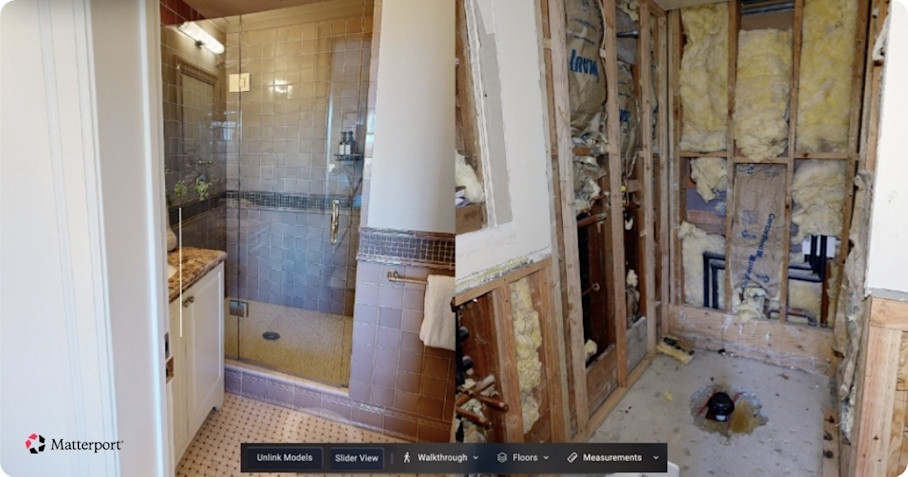
Digital twins make it easier to visualize these changes. Side-by-Side space comparisons allow teams to review different stages of the build in 3D, highlighting what has been completed and what remains. This supports scheduling, coordination, and quality control by providing a reliable, up-to-date visual record that everyone can reference, reducing misunderstandings and rework.
3. Integrate with design and CAD workflows
Once you have reliable site data, connecting it to your design and CAD workflows ensures consistent coordination across the project. Linking real-world conditions to project drawings helps confirm that field work aligns with both the original design intent and shop or fabrication drawings, reducing errors and rework.
Digital twins can be exported in formats like E57, BIM, or CAD files for integration with platforms like Autodesk Construction Cloud, AutoCAD, Revit, and more. By bridging the gap between field conditions and design models, these integrations support better planning, coordination, and verification throughout the build.
4. Document exact project measurements
Accurate measurements are essential for verifying layouts, clearances, and installations. Even small discrepancies can have a significant impact, so capturing precise dimensions early and consistently is key.
Interactive digital twins can be measured by remote users directly from the model, using tools like Automated Measuring and integrated floor plans. These features allow teams to check distances, heights, and clearances exactly without repeated site visits. By documenting exact measurements, you can update drawings and plans confidently and ensure that field work aligns with design intent throughout the project lifecycle.
5. Provide observational context for AEC stakeholders
Capturing spatial context is key to helping stakeholders understand design intent and identify potential issues. Visualizing the project in 3D allows teams to see how spaces relate to one another, making it easier to communicate effectively across disciplines.
Workers can use Tags inside digital twins to attach comments, photos, or documents directly to specific points and assets in the model, creating a centralized and searchable record of observations. Different viewing modes—like Dollhouse and Floor Plan views—help convey relationships between spaces and layouts, giving stakeholders clear insight into site conditions.
This approach also enhances the specification documentation workflow, supporting RFIs and providing traceable notes for change orders or inspections. By combining detailed visuals with contextual annotations, teams can make more informed decisions and maintain a reliable record of project observations throughout the build.
6. Centralize, share, and control construction document access
Keeping construction documentation organized in a single, accessible location is critical for efficiency, collaboration, and compliance. Records scattered across multiple systems risk miscommunication, lost files, and delays. Centralizing documentation ensures that everyone is working from the same information.
Digital twins serve as a living documentation hub, hosting records, annotations, and other details attached in context. User permissions and access controls can be defined easily, allowing stakeholders to view or interact with the model according to their role. This protects sensitive information while maintaining transparency.
A centralized approach improves collaboration on contracts and documentation, while helping teams demonstrate compliance with permits and regulatory requirements. By ensuring stakeholders can securely access accurate information when they need it, centralized documentation reduces miscommunication and keeps decisions aligned throughout the project lifecycle.
7. Preserve construction documentation for long-term asset value
Construction documentation continues to deliver value well beyond project closeout. Maintaining a permanent, visual record of the built environment gives owners and facility teams accurate reference points for maintenance, renovations, and future expansions. When conditions are clearly documented, teams can plan work with confidence and avoid costly surprises behind walls or above ceilings.
Digital twins help preserve this information as a lasting record that reflects final as-built conditions. Exportable formats ensure documentation remains accessible for future use across different platforms and workflows. This flexibility allows teams to revisit precise conditions years later and incorporate them into new designs or operational planning.
E57 Imports also provide a path to adopt digital twin workflows after construction is complete, using existing or dormant files to rebuild a comprehensive visual record. By preserving accurate documentation in accessible formats, project teams extend the value of their work beyond closeout and support ongoing asset lifecycle management—from routine maintenance to renovations and expansions.
Construction documentation sets the foundation for future-proof designs
Construction documentation connects design intent to real-world execution and preserves that knowledge for the life of the asset. When accurate records are captured from day one and maintained throughout the build, teams stay aligned, reduce rework, and make faster, more confident decisions.
By combining clear documentation with navigable digital twins, project stakeholders gain a reliable single source of truth—from initial planning through construction and into long-term operations. The result is a smoother build today and a more valuable, adaptable asset tomorrow.
Learn about using Matterport for construction documentation

