


 Sign In
8 Best 3D Documentation Tools for AEC & DCM Teams (2026)
3D documentation tools help AEC and DCM teams stay aligned throughout a project. They capture site conditions, track progress, coordinate trades, and deliver handover records using a shared visual reference instead of disconnected files.
This article covers eight widely used 3D documentation tools, each playing a different role in the workflow, and can be connected based on your team's needs. The table below shows how they compare.
Software | Best for | Key outputs |
|---|---|---|
Matterport | Immersive, collaborative 3D documentation | 3D models, floor plans, point clouds (E57/XYZ), visual as-builts |
Polycam | Fast, mobile 3D capture | Meshes, point clouds, quick as-builts |
Leica Cyclone REGISTER 360 | Survey-grade scan registration | Registered point clouds (E57, LAS, RCP) |
Autodesk ReCap Pro | Scan-to-point cloud and mesh prep | Cleaned point clouds, meshes |
Autodesk Revit | Parametric BIM modeling | BIM models, coordinated drawings |
Navisworks Manage | Multi-disciplinary coordination | Clash reports, 4D simulations |
AutoCAD | Detailed 2D/3D as-built drawings | Final as-built drawings |
ArchiCAD | Architectural BIM and handover | BIM models, IFC, BIMx deliverables |
1. Matterport: Best for immersive and collaborative 3D documentation
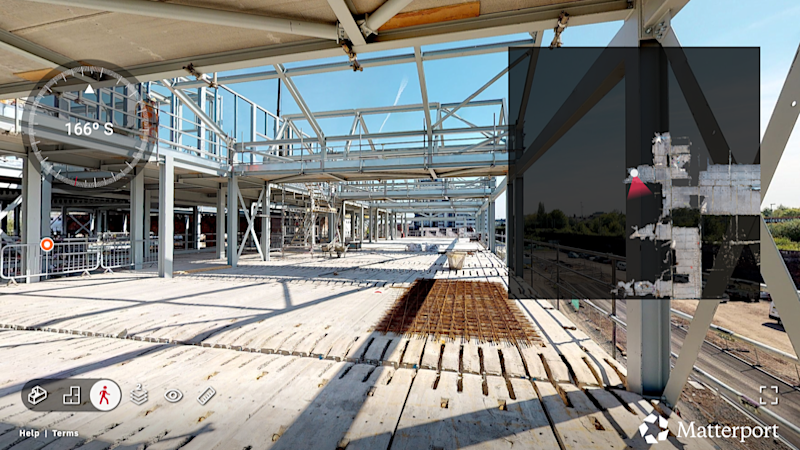
Matterport is a reality capture platform that creates immersive 3D digital twins of physical spaces. For AEC and digital construction management teams, it provides visual, 3D scans of existing conditions and in-progress work that can be shared across the project lifecycle. Teams can generate 3D walkthroughs, schematic floor plans, meshes, and point clouds with a single capture to support as-built verification, coordination, and handover.
Key features and capabilities
Digital twins: Capture real-world conditions using LiDAR- and photogrammetry-based scanning to create accurate, navigable 3D models of sites and facilities.
Immersive 3D walkthroughs: Explore spaces remotely, reducing the need for repeated site visits and improving clarity during reviews.
Automated measuring: Verify dimensions directly inside the 3D model without returning to the site.
Exports: Use point cloud, mesh, and BIM/CAD formats in downstream workflows for modeling and documentation.
Cloud-based collaboration platform: Store and share models so all stakeholders work from the same visual reference.
Tags and Notes: Attach comments, links, photos, and documents directly to physical locations for clearer communication.
Historical progress tracking: Time-stamped captures create a visual record of construction progress that supports audit and claim documentation.
Integrations: Support downstream use in tools like Autodesk ReCap, Autodesk Revit, and AutoCAD.
Where Matterport fits into the 3D documentation workflow for AEC and DCM
Matterport spans multiple stages of the documentation workflow, excelling in capture, visualization, collaboration, and handover processes. It is primarily a capture and communication tool, designed to create a shared visual baseline that teams can reference throughout a project.
While Matterport does not replace BIM authoring or survey-grade scanning, its point cloud and mesh exports enable downstream modeling in Revit or AutoCAD. This allows teams to move from visual documentation to structured models without re-measuring or re-surveying spaces.
One of Matterport’s biggest advantages is accessibility. Owners, project managers, and site teams can interact with 3D models without CAD or BIM expertise, making it easier to align stakeholders and resolve questions early.
Matterport is less accurate than survey-grade laser scanning tools used for high-tolerance engineering or fabrication. It is best suited for project-wide visibility, coordination, and consistent as-built documentation rather than millimeter-level engineering workflows.
Pricing
Matterport pricing is subscription-based with tiers designed to scale from individuals to large enterprises. Pricing varies by the number of active spaces, users, and access to advanced features such as point cloud exports and extended cloud storage.
Hardware costs should also be considered. Compatible cameras, including Matterport’s Pro-series devices, are purchased separately and can represent a meaningful upfront investment depending on capture requirements. Optional add-ons and higher-tier plans unlock advanced exports, integrations, and administrative controls for larger teams.
2. Polycam: Best for fast mobile reality capture in the field
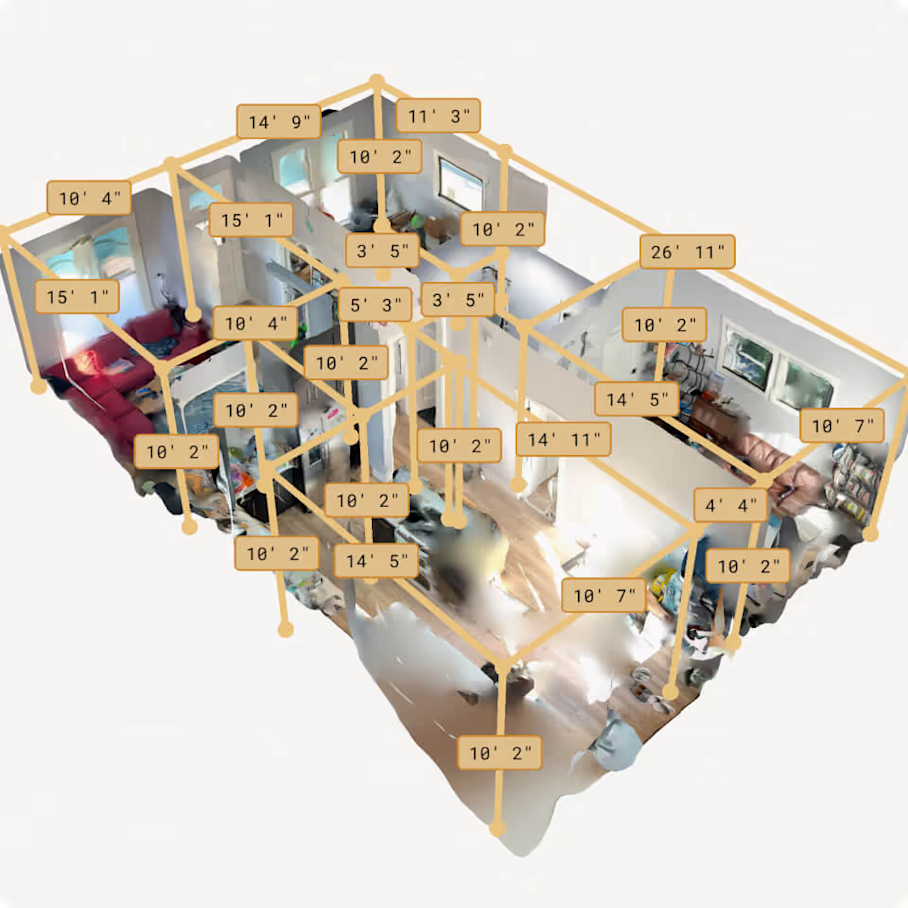
Polycam is a mobile-first 3D scanning app designed for rapid documentation using smartphones and tablets. It turns iOS and Android devices into lightweight reality capture tools, allowing field teams to quickly scan sites without specialized hardware.
Key features and capabilities
3D scanning via mobile devices: LiDAR sensors on supported iOS devices or photogrammetry on standard smartphones capture spaces directly from a phone or tablet.
Mesh and point cloud exports: Common formats for use in downstream CAD and BIM tools.
Measurements and in-app annotation: Document dimensions, conditions, or notes while still on site.
Cloud upload and sharing: Scans can be uploaded quickly to the cloud for sharing with teammates or for further processing and modeling workflows.
Where Polycam fits into the 3D documentation workflow for AEC and DCM
Polycam is well suited for fast, on-the-spot documentation of small areas, individual rooms, MEP conditions, or behind-the-wall capture before systems are concealed.
Exported meshes and point clouds can be brought into tools as starting points for modeling. In this role, Polycam often complements heavier capture tools rather than replacing them.
Its primary limitation is accuracy. Mobile LiDAR and photogrammetry are less precise than terrestrial laser scanners and dedicated reality capture hardware. Polycam is best used for small projects and early-stage or supplemental documentation.
Pricing
Polycam pricing offers a free tier that supports basic scanning and limited exports. Paid subscriptions unlock higher export limits, additional file formats, cloud features, and team collaboration tools. Pricing scales from individual professionals to business and enterprise plans, making it accessible for occasional field use as well as broader team adoption.
3. Leica Cyclone 360 REGISTER: Best for survey-grade 3D scan registration
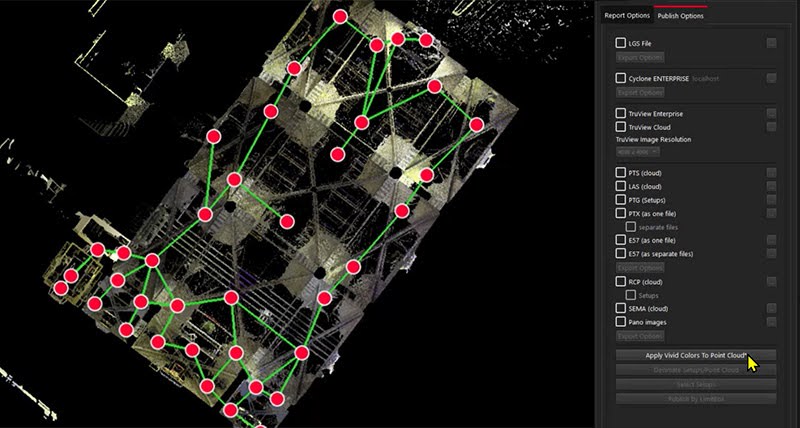
Leica Cyclone REGISTER 360 PLUS is professional software for registering and managing survey-grade laser scan data. It processes large, highly precise point clouds captured with terrestrial laser scanners into coordinated datasets for engineering and modeling.
Key features and capabilities
Scan alignment and registration: Automatically aligns scans using target-based or cloud-to-cloud methods to position point clouds in real-world coordinates.
QA/QC and error detection: Built-in quality control identifies alignment errors, gaps, or inconsistencies before data moves into modeling.
Export to BIM and CAD formats: Supports E57, LAS, RCP, and other industry-standard point cloud formats for downstream tools.
Handles large, complex datasets: Manages hundreds of scans from large sites, industrial facilities, or infrastructure projects.
Where Leica Cyclone REGISTER 360 fits into the 3D documentation workflow for AEC and DCM
Leica Cyclone REGISTER 360 uses raw laser scan data to produce registered, reliable point clouds that serve as technical baselines for engineering work.
Primary users are surveyors and engineers on projects requiring high accuracy: industrial facilities, heritage documentation, infrastructure, or engineering retrofits. Registered point clouds typically move into Revit or AutoCAD for modeling.
The tool requires trained operators, specialized scanners, and significant computing resources. It provides no browser-based walkthroughs or collaboration features, making it unsuitable for stakeholder communication.
Pricing
Leica Cyclone REGISTER 360 pricing is positioned at the enterprise end of the market. It is subscription-based and often bundled with Leica laser scanning hardware such as the RTC360 or BLK series. Costs vary based on scanner type, licensing tier, and support agreements, making it best suited for organizations that regularly perform survey-grade scanning.
4. Autodesk ReCap Pro: Best for high-precision scan-to-point cloud workflows
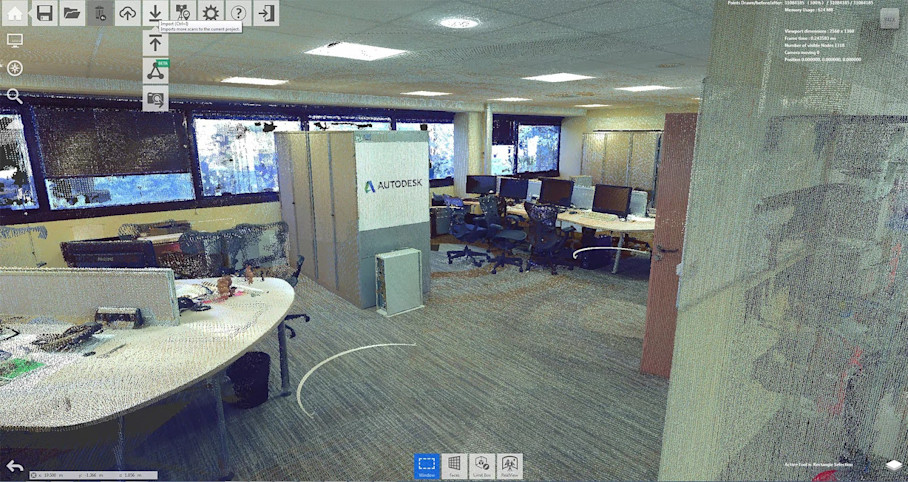
Autodesk ReCap Pro converts laser scans and photogrammetry data into 3D point clouds and meshes. It bridges raw reality capture and BIM or CAD authoring, preparing scan data before modeling begins.
Key features and capabilities
Point cloud registration and alignment: Registers multiple scans into a unified coordinate system, supporting laser scanning and photogrammetry inputs.
Noise reduction and data cleaning: Filters noise and isolates relevant areas before modeling.
Conversion to mesh models: Converts dense point clouds into mesh representations for easier use in design tools.
Direct export to BIM and CAD tools: Exports to formats compatible with Revit, AutoCAD, and other platforms.
Where Autodesk ReCap Pro fits into the 3D documentation workflow for AEC and DCM
ReCap Pro takes raw scan data from terrestrial laser scanners, mobile capture tools, or photogrammetry and produces clean, organized point clouds ready for modeling.
Users are VDC teams, BIM specialists, and designers who validate data before tracing or modeling. For teams already in the Autodesk ecosystem, ReCap Pro is often the first step after capture when scan data comes from multiple sources.
ReCap Pro does not offer immersive walkthroughs or stakeholder collaboration features. Its value is ensuring data feeding BIM models is accurate and usable.
Pricing
Autodesk ReCap Pro pricing is subscription-based and is commonly included as part of the Autodesk AEC Collection. A standalone ReCap Pro subscription is also available for teams that only need scan processing capabilities.
Autodesk also offers a free, limited version of ReCap that supports basic viewing and simple workflows, but advanced registration, cleaning, and export features require a paid subscription.
5. Autodesk Revit: Best for parametric BIM modeling and as-built documentation
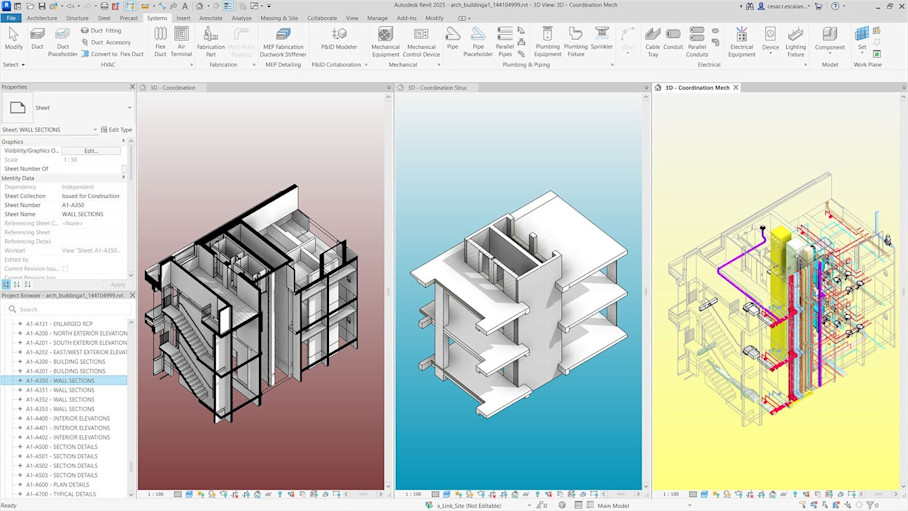
Autodesk Revit is a building information modeling (BIM) platform for creating data-rich, parametric 3D building models. In 3D documentation workflows, it converts reality capture data—typically point clouds from ReCap—into structured BIM models.
Key features and capabilities
Parametric 3D modeling: Intelligent elements whose geometry and data remain linked, so changes update consistently across views and schedules.
BIM authoring: Discipline-specific tools for architectural, structural, and MEP modeling in a coordinated environment.
Interference checking: Identifies clashes between Revit elements to resolve conflicts before broader coordination.
Annotation, tagging, and quantity takeoff: Generates drawings, tags, schedules, and quantities directly from the model.
Point cloud import: Imports point clouds from ReCap or third-party sources for scan-to-BIM workflows and as-built reconstruction.
Where Autodesk Revit fits into the 3D documentation workflow for AEC and DCM
Revit transforms processed point clouds into structured BIM models for design coordination and construction documentation.
Revit does not register scans or clean raw point clouds. Teams rely on ReCap Pro or survey software upstream to prepare data before modeling begins.
Users are architects, engineers, and BIM teams. The platform requires trained operators due to its complexity and precision-focused workflows.
Pricing
Autodesk Revit pricing is offered on a subscription basis and is most commonly licensed as part of the Autodesk AEC Collection. Pricing scales by user and contract term, making it best suited for teams that rely on BIM as a core part of their delivery process.
6. Navisworks: Best for coordinating multi-disciplinary 3D models
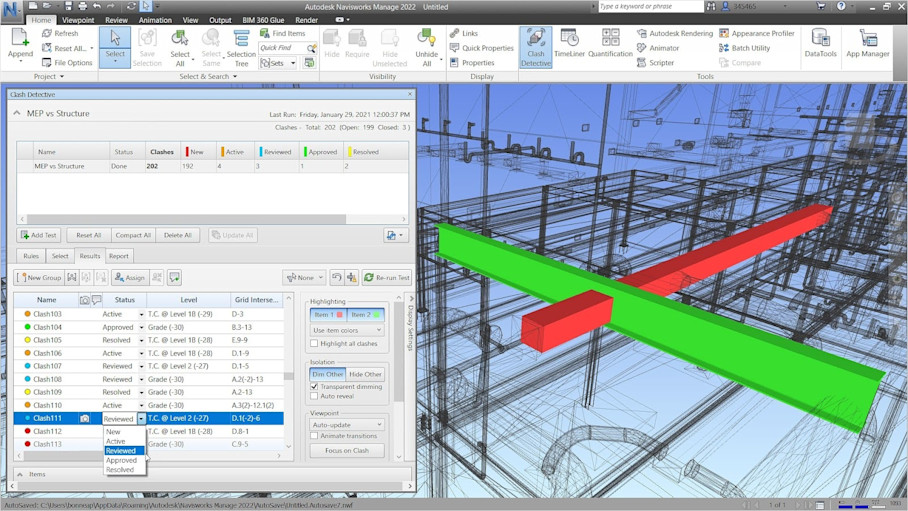
Navisworks is a model review and coordination platform that aggregates 3D models from multiple disciplines. Teams use it to identify clashes, review constructability, and simulate construction sequencing before work reaches the site.
Key features and capabilities
Full clash detection: Identifies clashes between disciplines to surface conflicts early and reduce rework.
Multi-model coordination: Combines architecture, structure, and MEP models into a single federated view.
4D simulation: Links models to schedules to simulate construction sequencing and evaluate timeline impacts.
BIM and 3D model aggregation: Aggregates models from multiple sources without requiring conversion to a single format.
Measurement and annotation tools: Measures distances and clearances, captures issues, and saves viewpoints for coordination meetings.
Broad file compatibility: Works with Revit, AutoCAD, and other common BIM formats.
Where Navisworks fits into the 3D documentation workflow for AEC and DCM
Navisworks helps BIM managers, project managers, and contractors evaluate how models from different disciplines interact before construction begins.
The platform is not used for capture or modeling. It serves as a review environment where teams detect clashes and review sequences without altering source models.
Navisworks is particularly valuable during coordination meetings and preconstruction reviews, where issues can be resolved digitally rather than in the field.
Pricing
Navisworks pricing is offered as a subscription, with two primary versions:
Navisworks Simulate, which supports model review and 4D simulation
Navisworks Manage, which adds full clash detection capabilities
Both versions are also included in some Autodesk software bundles, depending on licensing.
7. AutoCAD: Best for detailed 2D and 3D as-built drawings
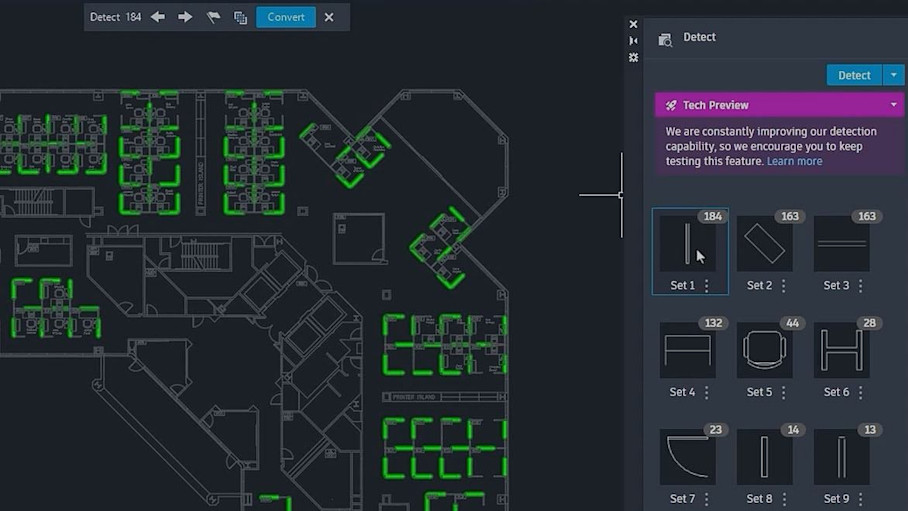
AutoCAD is a 2D and 3D drafting platform used to produce precise construction and as-built drawings. In 3D documentation workflows, it translates scanned or modeled data into formal drawings for closeout, permitting, or facility records.
Key features and capabilities
3D solids, surfaces, and meshes: Supports lightweight 3D modeling for existing conditions, equipment, or structural elements when full BIM models aren't required.
Point cloud import and referencing: References point clouds from reality capture so drafters can trace accurate as-built geometry.
Measurement and annotation tools: Enables precise measurements and adds dimensions, callouts, notes, and symbols required for documentation.
Precise drafting: Industry-standard drafting tools support high-accuracy geometry and consistent documentation standards.
Integration with ReCap: Works directly with point clouds processed in ReCap for scan-to-CAD workflows.
Where AutoCAD fits into the 3D documentation workflow for AEC and DCM
AutoCAD converts 3D scan data or BIM outputs into formal 2D drawings or simplified 3D files for owners and facilities teams.
AutoCAD complements reality capture and BIM tools by producing standardized, annotated drawings that don't require recipients to navigate full 3D environments.
The platform does not offer immersive walkthroughs, model federation, or project-wide 3D navigation. Its focus is precision and clarity for contract-grade documentation.
Pricing
AutoCAD pricing is available via subscription and can be licensed as a standalone product or as part of the Autodesk AEC Collection. The collection option bundles AutoCAD with Revit, ReCap Pro, and Navisworks, which can reduce overall licensing costs for teams using multiple Autodesk tools.
8. ArchiCAD: Best for architectural BIM modeling and documentation
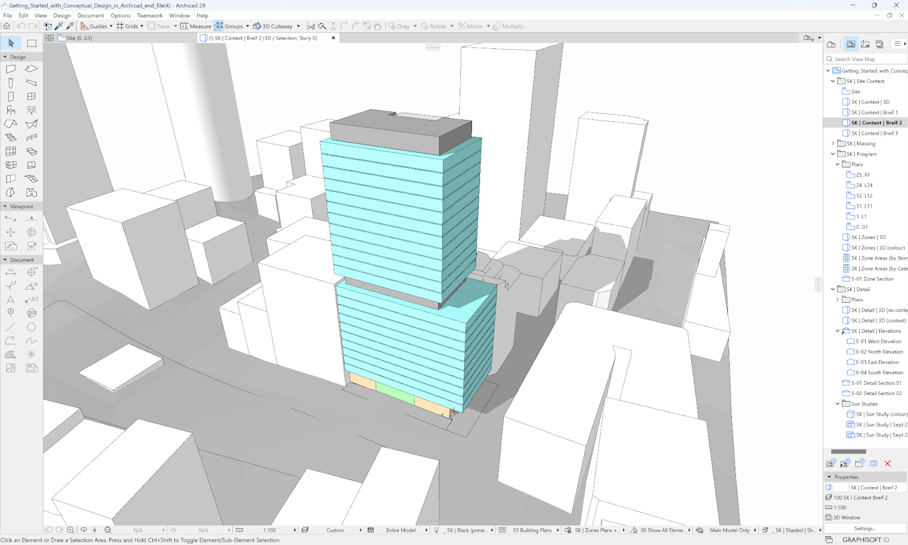
ArchiCAD is a BIM authoring platform built for architectural modeling and documentation. In 3D documentation workflows, it reconstructs as-built conditions from point clouds or carries design intent through to coordinated deliverables.
Key features and capabilities
Parametric 3D modeling for architecture: Architectural elements are modeled as intelligent objects, allowing changes to propagate automatically across plans and schedules.
Point cloud import for as-built reconstruction: Imports point clouds from reality capture tools so architects can model existing conditions against scanned data.
Clash detection: Identifies conflicts between architectural elements and consultant models for coordination.
Documentation and handover tools: Produces coordinated drawings from the BIM model and packages 3D models with 2D drawings for handover and facility use.
Export to open and industry formats: Supports IFC, CAD, and other BIM-compatible formats for coordination with consultants and downstream tools.
Where ArchiCAD fits into the 3D documentation workflow for AEC and DCM
ArchiCAD converts point cloud data or design files into architectural BIM models for coordination with other disciplines and digital handover.
Primary users are architects and BIM professionals. The platform requires familiarity with BIM standards and modeling practices, making it unsuitable for non-technical stakeholder interaction during project phases.
Pricing
ArchiCAD pricing varies by region and licensing model. Organizations can choose between subscription-based plans or perpetual licenses, with optional add-ons for collaboration, cloud services, and advanced features. Costs scale based on team size and the level of collaboration required.
Power your AEC/DCM workflows with Matterport

