


 Sign In
How to Improve Manufacturing Cybersecurity with Facility Documentation
Key takeaways
Manufacturing is the most targeted industry for cyberattacks, driven by IT and OT convergence, legacy systems, ransomware, and supply chain exposure.
Accurate, up-to-date facility documentation reduces cyber risk by mapping assets to their physical location and production dependencies, reducing blind spots and speeding incident response.
Matterport digital twins ground asset inventories in physical reality, documenting PLCs, HMIs, gateways, and access points with serial numbers, panel labels, and dependencies at their exact location.
Manufacturing is the most targeted industry for cyberattacks, according to IBM's X-Force Threat Intelligence Index. The sector ranks first for the fifth year running, at 27.7% of all incidents in 2025.
The modern factory is a sprawling digital target. Connected machinery, legacy controllers, and third-party vendor access share the same production floor, and each new connection adds another entry point. Poor visibility across production environments only widens the risk exposure.
Here, we’ll lay out best practices for reducing those blind spots, and show how mapping cyber assets to their real-world location and production dependencies strengthens manufacturing cybersecurity.
Why manufacturing is a top target for cyberattacks
Attackers select manufacturing because a stopped line creates immediate pressure to pay, making plants attractive ransomware targets. One ransomware event can stop production for days and cost millions in lost output and recovery. A stopped line or an unsafe process holds immediate physical risk, so operational technology (OT) prioritizes availability and safety over confidentiality.
Manufacturing also runs on physical processes that competitors and nation-state actors want to study. Proprietary formulas, tooling specs, and process recipes hold value long after a breach.
Several risk drivers stand out:
Ransomware that halts production lines: One Human-Machine Interface (HMI) can stop an entire production line.
Intellectual property and trade-secret theft: A breached CAD server or PLM system hands a competitor years of R&D.
Supply chain and third-party compromise: One vendor’s remote access credentials can open the door for an attacker into the plant network.
Connected factories expanding remote entry points: Each IIoT sensor or remote access panel becomes a possible way in.
Operational downtime and its financial impact: Downtime that lasts for hours causes major financial loss.
The bill goes beyond any ransom paid, compounding with idle workers, spoiled material, missed shipments, and forensic cleanup. Additionally, Industry 4.0, IoT and IIoT, cloud platforms, and automation have widened the attack surface by bridging the office network and the production line through sensors, historians, and remote access tools.
Considering all of these factors, standard IT tactics struggle on the plant floor.
Constraint | Why standard IT tactics struggle |
|---|---|
Uptime requirements | Continuous production resists reboots and downtime windows |
Safety-critical processes | Controls tie directly to physical equipment and worker safety |
Legacy systems | Older controllers cannot be easily updated or replaced |
Patching constraints | PLCs and HMIs often cannot be patched on demand |
For example, an automatic patch or forced reboot pushed on a schedule can stop production or trip a safety process when it hits an HMI running a live line. An unplanned restart can scrap a batch or force a manual safety reset.
Effective manufacturing cybersecurity requires OT-aware controls and complete visibility into both digital and physical assets. Before teams act, they have to know what each device is, where it sits, and what it controls.
5 best practices to improve manufacturing cybersecurity
Plant documentation decays due to line reconfigurations, equipment swaps, temporary fixes that become permanent, contractor work that doesn’t get recorded, and network drops added without change control.
Here’s how these five best practices form a practical sequence of documentation solutions for manufacturing cybersecurity.
1. Build and maintain complete IT and OT asset inventories
Unmonitored devices open entry points for attackers, so an accurate, continuously updated inventory of every connected device should be the foundation of every manufacturing cybersecurity program.
A useful inventory captures:
Device type and function
Firmware version
Owner or responsible team
Network connection
Physical location
Inventories go stale as equipment moves, contractors change, and documentation falls behind. Most also stop at the device name, without capturing location or which production process it supports.
That physical context can be added seamlessly using a digital twin. As a dimensionally accurate record of the plant, it shows not just what a device is but where it sits and what surrounds it. Tagging serial numbers, dependencies, and restricted areas to each asset's exact location in the digital twin documents what a device is, where it sits, and what it connects to. This way, a flagged PLC, HMI, gateway, or access point can be seen together with its surrounding area.
RemSense's virtual plant platform catalogs and geotags equipment via Matterport digital twins, including asset ID tags across complex industrial sites. In one facility, it identified 540,000 text strings and geospatially tagged every verified asset.
2. Segment IT and OT networks and isolate critical systems
Network segmentation splits the plant into zones, isolating production systems to limit an attacker's lateral movement after a breach. Practical approaches use zones and conduits to separate business IT from plant OT, but documentation rarely keeps up with how legacy equipment is physically cabled and connected, slowing down segmentation planning.
A digital twin provides that missing record. Distributed teams inspect plant conditions remotely, verifying panel labels, cable runs, and termination points in the high-resolution model.
When planning IT/OT infrastructure changes, Matterport’s Automated Measurements capture room and equipment dimensions automatically as the space is scanned, giving teams a baseline set of measurements without anyone returning to the floor. If more dimensions are needed later, measuring tools available directly inside the model help validate specific equipment locations, cable runs, panel layouts, and clearances. In case more granular detail is required, BIM file exports provide structural and MEP data for planning and validating segmentation across legacy equipment, without intrusive on-site surveys.
For example, a team isolating a packaging line's PLC into its own OT zone can open the digital twin and check the wiring against the segmentation plan. Zooming into the panel confirms the assigned switch and port from the label, and measuring the clearance to the adjacent cabinet validates the layout. By tracing the cable run through the model, teams will understand whether the run terminates on a business IT patch panel across the aisle, or if there is an undocumented drop a contractor added during a line move. If the connection bridges IT and OT, handing an attacker a path around the segmentation that the team can flag and reroute.
3. Strengthen access controls and manage third-party access
Once teams can see and segment their assets, the next question is who gets to reach them. Use layered access controls that keep the wrong people out of critical OT systems, including:
Multi-factor authentication to verify identity before anyone connects
Role-based access to tie permissions to job function
Zero-trust practices that treat every request as unverified until proven.
With these security tactics in place, a single stolen credential can no longer open the whole plant.
Third parties widen this problem. Vendors, integrators, and contractors need periodic access to specific machines and systems, but too often the access given is broader and lasts longer than the job requires. A standing vendor account with plant-wide reach is a credential an attacker can hijack. Scoping access to the specific asset and time window, then monitoring what outside parties actually touch, keeps a maintenance login from becoming a path across the network.
Using Views, administrators can curate what different stakeholders see inside a digital twin. Each group has its own view, so a contractor scheduled for one production cell opens a scene limited to that area while the operations team keeps full visibility.
When coordinating with vendors, instructions are often handled over email, text, and phone calls, where a shared spec or access detail can leak or linger long after the job ends. Instead, use Notes in digital twins to assign tasks and leave instructions tied to a specific asset. Each one is visible only to invited, logged-in collaborators, keeping conversations secure and retaining a single tracked record of the exchange.
A contractor arriving to install a new drive on a packaging line can be given a View scoped to that cell, showing the equipment, panel, and clearances they need and nothing from the rest of the plant. A Note pinned to the drive carries the install spec and marks the work complete when it's done, giving the operations team a dated record of who accessed the space and what changed, without ever granting network reach beyond the job.
4. Monitor continuously and manage vulnerabilities on legacy systems
Continuous monitoring watches converged IT and OT environments for threats and anomalies as they happen, flagging unusual traffic between zones, unexpected connections to a controller, or a device behaving outside its normal pattern. On a plant floor where a breach can cross from the office network to a live line, that early signal is often the difference between a contained incident and production interference.
Not every plant system can be freely taken offline, so vulnerability management should be risk-based: rank each vulnerability by the damage it enables and the exposure it carries, then schedule remediation into planned maintenance windows rather than forcing a reboot on a live process. A flaw on an isolated, low-value device can wait; one on a controller reachable from the business network cannot.
Tie vulnerabilities to the manufacturing process documentation and physical assets they could affect to sharpen the risk assessment. Navigate to a flagged controller in the digital twin to examine what sits around it, what shares its panel or network drop, and which line it runs. A team will be able to see where flaws sit and act immediately, without crossing the plant by foot.
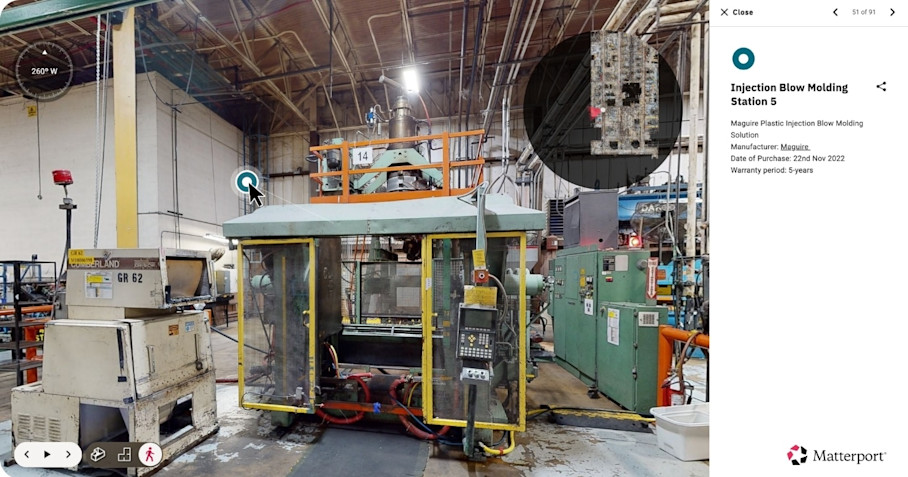
For teams that want this context inside their own tooling, Matterport's integrations, APIs & SDKs pull spatial and asset data into existing security and asset-management systems. That means a flagged device shows up alongside the equipment and processes around it, with the context a severity score alone would miss.
Consider a controller flagged with a high severity score. If that controller runs a non-critical auxiliary system, patching a lower-scored flaw on a busy production line may matter more. Tying the decision to what the device actually controls keeps limited maintenance windows aimed at real risk.
5. Train teams and build tested incident response and recovery plans
Both plant staff and security teams need training on manufacturing-specific cyber risks. Operators spot process anomalies and security teams read the network, so each only sees part of the picture. Training should cross those views, helping an operator recognize a compromised HMI as a security event rather than a glitch, and a security analyst weigh a containment step against the risk of stopping a live process.
A strong plan covers incident response, backups, and recovery built for production environments, defining who acts, how systems get isolated, and how the line comes back safely. A plan that only exists on paper fails on the day it's needed, so it has to be rehearsed.
Digital twins give teams a place to build and rehearse the plan without pulling equipment offline. Guided Tours and immersive walkthroughs let responders practice locating an affected controller, tracing access routes, and identifying nearby dependencies in the model, so the first time they navigate to a compromised device isn't during a live incident.
The same resource supports investigation after the fact: responders can pinpoint an affected device, see how it connects to its surroundings, and understand what else the intrusion could reach, all from a record of the plant as it actually stood.
JFC & Associates extended their use of digital twins for connected workflows. Personnel can tap the image of a piece of equipment in a digital twin to surface its asset data and kick off the linked workflow in Maximo. In a security use case, the pattern allows responders to move from a flagged device to the right response in a single step.
Every practice here depends on one shared need, which is accurate, current visibility into both the network and the physical plant.
Reduce cyber risk by grounding security in your plant
Manufacturing cybersecurity is stronger when OT-aware practices rest on an accurate, current record of the physical plant. Asset inventories, segmentation, access controls, vulnerability triage, and incident response all work better when teams can see exactly what each device is, where it sits, and what it controls.
Manufacturing teams that use digital twins in their cybersecurity programs find fewer surprises across converged IT and OT, respond faster when an incident hits, and can defend their production systems.
Get in touch with our team


