


 Sign In
Effective Office Occupancy Planning: A 7-Step Playbook
Before hybrid work, few organizations spent much time considering their occupancy strategy. This was a concern largely reserved for coworking spaces, trading floors, or call centers. Meanwhile, most offices ran on predictable 9-5 patterns: the building stayed full and seating charts rarely changed.
That stability has faded with the rise in hybrid and flexible working policies. Now, attendance swings wildly from day to day. Entire wings might sit empty mid-week, only to overflow on anchor days. What used to be a background operational detail can cause highly visible strains on cost and employee experience.
Occupancy planning has become a strategic priority, not a back-office function.
In this guide, we’ll walk through a practical playbook for occupancy planning, and explore the data insights that help design occupancy policies.
Occupancy planning, space planning, and occupancy management: what’s the difference?
Many teams use “occupancy planning,” “space planning,” and “occupancy management” interchangeably, creating confusion and duplicating work. Before you can optimize your occupancy, it’s essential to clarify the role each discipline plays in the lifecycle of workplace decisions.
Occupancy planning is the practice of allocating people to space based on demand forecasts, policy choices, and business scenarios. Outputs include target utilization, consolidation options, stack plans, and cost-per-seat forecasts. Occupancy planning is forward-looking.
Space planning translates occupancy inputs into physical layouts: adjacencies, floorplates, seat types, and circulation paths. Outputs include test fits and CAD/BIM plans. Space planning is design-focused.
Occupancy management handles the day-to-day: bookings, seat assignments, moves, and compliance checks. Outputs include seating charts, move tickets, and operational KPIs. Occupancy management is operations-focused.
These functions work together. Occupancy planning might decide on a 3-day hybrid model and target utilization; space planning would design the neighborhoods to support it; occupancy management is responsible for enforcing bookings and executing moves.
7 tactical steps to plan and manage office occupancy
The following seven-step playbook offers a practical framework to occupancy planning, from setting goals and gathering data to executing moves, and tracking the KPIs that matter. It’s built for teams that need to make clearer decisions and want to keep portfolios adaptable as work continues to evolve.
1. Set space goals and constraints
Before modeling any scenarios, you need a clear picture of what you’re optimizing for and what will limit your options. This will establish strategic guardrails and help to determine which tradeoffs make sense—and which don’t.
Define the outcomes you want to drive. Relevant goals often reflect shifting financial or operational pressures, such as:
Reducing cost per seat when real estate spend is outpacing headcount or revenue.
Improving utilization when hybrid patterns leave large portions of the office underused.
Creating peak-day headroom when anchor days or team schedules consistently overload certain floors.
Supporting new team structures or work models when teams need specialized environments like collaboration areas.
Most office spaces have fixed parameters that determine what’s feasible. Map your constraints to identify any limits that shape your options. For example:
Lease terms determine which sites can change quickly and which require long-term planning.
Occupancy limits and life-safety rules dictate the maximum population a floor can safely support.
Egress paths and ADA requirements set minimum circulation widths and prevent certain densification strategies.
Critical adjacencies (labs, secure areas, client-facing zones) limit where certain teams can move.
Safety and emergency response requirements, such as confined space rescue plans and evacuation routes can restrict access, occupancy, and allowable layouts in certain areas.
Understanding these boundaries prevents teams from wasting time on unrealistic scenarios.
Your constraints will be dependent on having up-to-date, high-quality spatial data. It’s a good idea to use a reliable space mapping tool like a digital twin to validate existing conditions before you get started, so you have an accurate baseline.
2. Define data sources and technology requirements
Combining multiple data streams will help to understand both how space is used today and how it might be used tomorrow.
Identify the core data sources that will inform your policies. These could include:
Real-time: Sensors, IoT devices, and desk booking systems that provide live insight into congestion, safety, and day-to-day operations.
Historical: Badge swipes, booking logs, and occupancy trends to support forecasting, policy tuning, and scenario planning.
Qualitative: Surveys and interviews that validate patterns and reveal behavioral context that raw data can miss.
This data often exists in separate systems, including IWMS/CAFM, desk booking, HRIS, and analytics platforms. Integrating them is essential because it creates a single, accurate picture of occupancy. A unified view will ensure that plans are based on the full picture rather than siloed insights, reducing the risk of conflicts.
A digital twin can serve as a central spatial hub, bringing all data streams together in one visual model that helps examine occupancy and congestion patterns in the context of the existing space.
SHoP Architects use Matterport digital twins as a reference for their own space planning at The Woolworth Building in New York. By combining live and historical sensor data inside a digital twin, they monitor environmental conditions like temperature, sound levels, and light levels to understand how the building really operates.
“Digitization has been critical to understanding the reality of the space, even though we walk through it every day.” - Geoff Bell AIA, Senior Associate at SHoP Architects
3. Baseline current occupancy and standardize space inventory
Before testing layouts or policies, you need to know exactly how space is being used right now. Document current occupancy patterns using the data sources discussed previously. This will help to understand where your limits will be. You should also outline any anticipated changes in your occupancy needs, such as a projected increase in headcount or an upcoming acquisition.
Next, take a clean, standardized inventory of space that includes the following:
Rooms
Workpoints
Capacities
Amenities
Floor plans and layouts
Precise measurements of each space
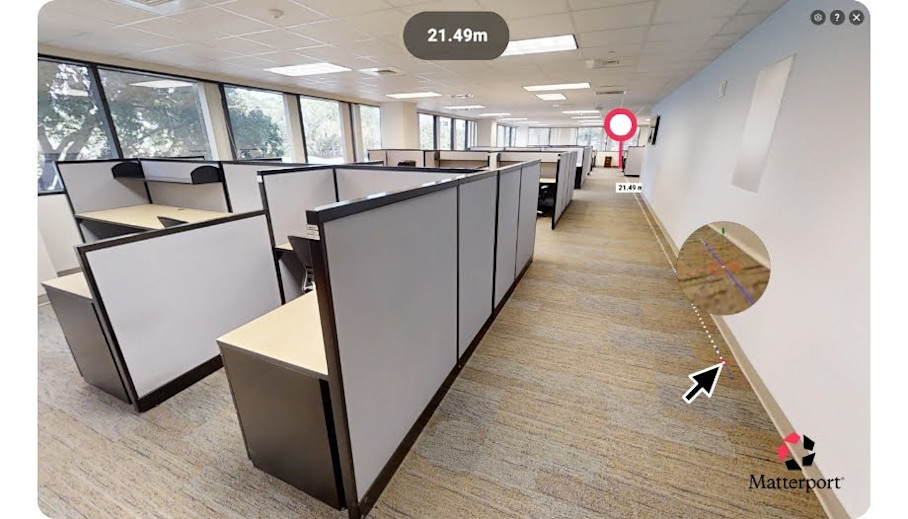
Digital twins can automatically capture much of this information for you. Automated Measuring provides highly accurate measurements that can help to scope room capacities, aisle widths, and seating densities against fire-code and egress requirements. Schematic floor plans and layout insights are also provided via AI-powered Property Intelligence.
4. Build scenarios and stack plans
Scenario modeling shows how your spaces can meet team needs over time.
Start by estimating team-by-team demand by site and floor. Remember to consider factors like:
Headcount changes. Teams may grow due to hiring initiatives or shrink during attrition. For example, a product engineering team may expand to include additional contractors during a new product launch.
Hybrid schedules. Days when employees are remote vs. in-office affect peak occupancy. A sales team may mostly work from home on Fridays but be in the office for client meetings earlier in the week.
Seasonal spikes. Certain times of year may see temporary surges in staff presence. For example, customer support teams experience higher occupancy during holiday periods or product release cycles.
Project-based surges. Cross-functional projects can temporarily require extra desks or collaboration space. For instance, marketing and design teams may need additional space during a major campaign sprint.
Recurring events. All-hands meetings, training weeks, or company-wide workshops can temporarily overload floors if not planned for.
Team-specific behaviors. Some teams may consistently need more collaboration space (creative teams) or quiet zones (legal or compliance teams), influencing layout decisions.
Create multiple test fits to experiment with solutions for your scenarios. Compare assigned vs. unassigned seating, vary collaboration zones and quiet areas, and experiment with desk-sharing ratios. Seeing options side by side will make it easier to identify bottlenecks, and uncover opportunities to use space more efficiently.
Digital twins can serve as base models for scenario testing and virtual staging. Matterport’s Defurnish tool will automatically remove existing furniture from a space, providing a blank canvas to work on testing different layouts.
Larger organizations will also want to develop stack plans. Stack planning is a data visualization process that aligns occupancy planning to cross-departmental goals. The “stack” is then displayed as a chart that provides a quick overview of activity across all units in a building.
Ideally, most occupancy decisions would be executed within the existing space using reconfigurations. However, if you find that significant renovations are required, ready-to-use CAD, BIM, and E57 exports are available from digital twins. These ensure a smooth transition, providing designers and construction teams with dimensionally accurate models for precise implementation of new layouts.
5. Create seating policies
Seating policies translate occupancy scenario planning into actionable rules that prevent crowding and support the best collaboration opportunities for workers in the office.
There are different strategies you can consider to shape how space is used:
Flexible neighborhoods: Desks are grouped by team or function rather than assigned individually.
Quiet vs. collaboration zones: Space is allocated according to work type, and may be used fluidly throughout the workday.
These strategies may still result in peak-day crowding when not well-planned. Consider implementing rules to help overcome potential issues. For example:
Headcount caps: Limit the number of employees in a zone or floor at a time.
Cross-team staggering: Shift schedules for different groups to smooth occupancy.
Booking windows: Require advance reservation for desks or rooms to avoid unexpected peaks.
Policies and rules will need to be clearly documented to ensure adoption. Resources like visual guides, maps, or virtual tours will help staff navigate changes smoothly.
6. Operationalize moves and changes
A clear process will help to execute reconfigurations efficiently. Prepare a move kit to act as a practical checklist for each change and ensure nothing is overlooked. Typical Move Kit items include:
A timeline for the reconfiguration or move
A task checklist for each step of the process
A map of dependencies between tasks (IT setup, furniture delivery, approvals)
Required approvals from CRE, IT, Security, HR, and vendors
To coordinate across multiple teams and sites, define a RACI matrix, clarifying who is Responsible, Accountable, Consulted, and Informed for every task. This prevents miscommunication and ensures smooth execution.
Notes and Tags in digital twins can be used to keep track of move progress. Assign responsibilities, track stages, and mark completed moves across multiple floors or sites. All stakeholders will be able to see the current status without needing repeated site visits to confirm progress.
7. Establish governance cadence
Occupancy planning is not a one-time effort. It requires ongoing oversight to keep space aligned with evolving business needs. Establish a clear governance cadence to ensure that decisions are timely. Pay attention to key space planning metrics, and undertake reviews at regular periods:
Monthly experience reviews: Track utilization and adherence to seating policies and identify emerging issues before they escalate.
Quarterly scenario refreshes: Update forecasts and adjust policies based on upcoming projects.
Annual strategy resets: Reassess real estate strategy, consolidation plans, and long-term space needs.
Enrich your qualitative data, like feedback from employees, with quantitative sensor data attached to a digital twin. With these insights, you can better understand factors that may impact workplace quality and map usage to the most suitable areas.
Matterport enables occupancy planning without the guesswork
Occupancy planning has moved from a back-office detail to a strategic imperative. In volatile business conditions, organizations that can continuously and quickly align their physical footprint with changing work patterns are at an advantage. The ability to test, plan, and execute occupancy scenarios in days rather than months has become a significant competitive advantage.
Whether responding to new hiring patterns, M&A events, or hybrid policy shifts, speed of spatial decision-making determines both cost control and employee experience. Traditional methods like manual measurements and disconnected data just can’t keep up.
Matterport digital twins dramatically accelerate the process of baselining, scenario testing, and operationalizing change. With dimensionally accurate visualizations and seamless data exports, leaders can move from insight to action at enterprise speed.
Get in touch with our team

