


 Sign In
Rethinking Retail Space Management with Digital Twins
Store performance isn’t about cramming as much stock as possible onto shelves. It’s about understanding how people move through aisles, where they make decisions, and what influences them in the moment.
Some retailers, like Target in the US, have become so effective at increasing basket size that shoppers make memes about hiding purchases from loved ones! But it’s not only about getting people to buy more. A good layout keeps people in the store longer, and that matters when 64% of shoppers say they’ll skip a store entirely if the layout is confusing.
The good news is, digital tools are simplifying retail space management. With user-friendly 3D planning tools like digital twins, you can scan your store and its shelves to virtually test layouts before anyone moves a single fixture. This guide will explain how you can optimize any store’s profits using effective space management strategies.
What is retail space management and why does it matter?
Retail space management is the strategy and process of optimizing your store’s layout design, product placement, and traffic flow. It connects the dots between customer behavior and sales data to increase revenue and profit.
Understanding the importance of space management in retail stores has become critical as physical locations still drive 85% of total retail sales in the U.S.
Effective retail space management delivers measurable results across every part of your business:
Increased profitability: Smarter space allocation means your highest-value products get the visibility they deserve.
Improved shopper engagement: Clear navigation and intentional sightlines make it easy for customers to explore and discover.
Stronger brand consistency: Standardized layouts and displays build a familiar brand experience across multiple locations.
Better use of data: Integrating spatial analytics helps you understand what’s working.
Sustainability and efficiency:Optimized layouts can reduce energy waste, improve foot traffic flow, and simplify retail facilities management and maintenance.
A retail space management plan ensures the space works for both your team and your shoppers. It reduces clutter, cuts wasted effort, and keeps your layout flexible as trends or seasons change.
Key elements of effective retail space management
The elements of retail space management all work together to shape how shoppers see, move, and buy. It’s the art and skill of balancing the big decisions like overall aisle layout, with the finer details of shelf product placement and grouped categories of product. When these pieces align, you build a retail environment that feels intuitive to customers and quietly drives higher sales in the background.
In the sections ahead, we’ll break down the core components: designing a layout that improves flow, allocating shelf space so products stand out, using merchandising to tell a cohesive story, and understanding how customer behavior data helps refine the experience.
Store layout and floor space optimization
Your store layout controls how customers move through the space. Optimized retail layouts reduce crowd congestion and make it easy for customers to find and buy what they want.
Retailers once relied on gut instinct and industry best practices. Now, tools like digital twins allow teams to visualize and measure space accurately, creating virtual floor plans that can be tested and refined.
Floor space management in retail requires balancing customer flow with product visibility to maximize every square foot.
Real-world application: When RPM Pizza used digital twins to rework its store design, it cut renovation time from 12 months to 6 and improved food-prep efficiency. This agility proves that better planning improves operations and performance.
Shelf space allocation and product placement
Shelf space allocation determines which brands catch customers' eyes and make it to checkout. Teams typically use planogram principles, which are visual diagrams that map out exactly where products should sit on a shelf. These include eye-level placement, the number of facings, and expected traffic patterns when designing shelf space.
Teams typically use planogram principles like eye-level placement, number of facings, and traffic when designing shelf space.
Multi-location stores now use a ‘realogram’, which is a digital twin version of the real store that shows how shelves and displays are actually set up. It gives merchandisers a verified digital view of each location, so they can confirm that every store matches the planogram without relying on photos or site visits.
Real-world application: Global fashion brand GUESS saw a 200% boost in productivity after creating a realogram of their retail stores displays using digital twin technology. They saved 5-10 hours of manual checks per week at each store, cut paper and printing by 95%, and doubled their online showroom bookings.
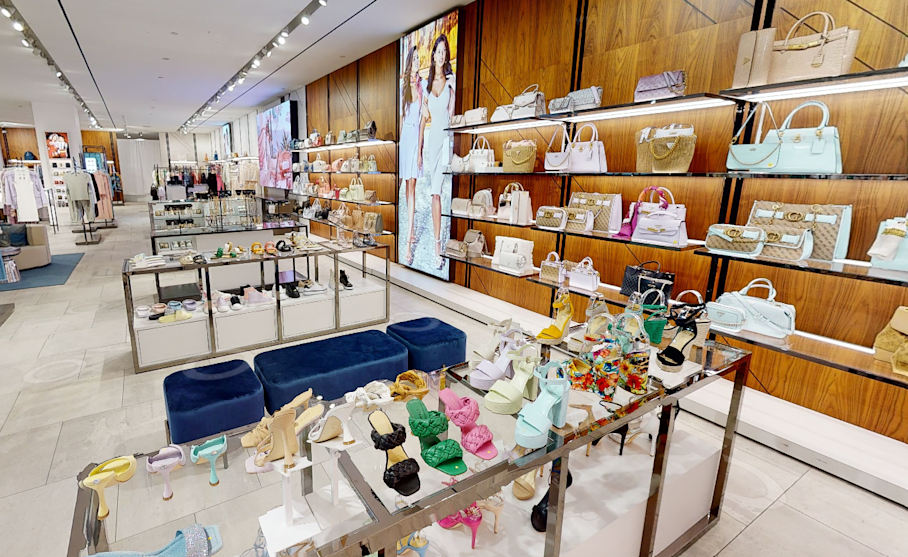
A digital twin or realogram of Guess’s in-store shelf space planning (Source)
Display and merchandising
Merchandising is how you inspire customers to browse, touch, and buy. From themed promotions to seasonal sets, display strategy plays a vital role in shaping perception and guiding attention.
Digital twins give teams a shared, accurate view of each store, which makes it easier to brief staff, align on visual standards, and roll out new designs consistently across locations.
Real-world application: When Harrods revealed its new Home & Furniture department, it used immersive 3D visuals to present the space to internal teams and external partners. These 3D visuals kept their luxury presentation uniform while reducing the need for repeated physical walkthroughs.
“We see Matterport as a tool to continue to provide unparalleled services to our customers offering a digital, human, and connected shopping experience,” –Annalise Fard, Director of Interiors, Beauty, Fine Watches and Jewellery
4 steps in the retail space management process
Retail space management is never one-and-done. It’s an ongoing cycle of collecting data, planning layouts, putting those plans into action, and then refining them based on real shopper behavior.
In the next section, we’ll walk through this process step by step, from building an accurate baseline of your space to testing new designs, executing changes consistently, and measuring what works.
Step 1: Data collection and assessment
Retail space management starts with gathering reliable data, like:
Sales performance
Customer traffic
Physical store dimensions
Product fixture placement
In smaller stores, manual audits of foot traffic and sales may be enough. But for larger retail spaces, accurate digital documentation saves time and improves precision.
Using Matterport digital twins, retailers can capture stores in exact detail and view them remotely. Tools like Automated Measuring and automated area reporting make it easy to validate planogram fit, confirm aisle spacing, and check fixture alignment directly within the scan.
Explore a retail digital twin for yourself:
This level of accuracy reduces costly planning errors before they happen and gives teams a single visual reference to work from. Once you’ve built a reliable baseline, every future layout or merchandising change becomes easier to plan and justify.
Step 2: Planning and design
Now you’ll use the data you’ve collected to make smarter planning and design decisions. These choices shape how customers move through the store, help them find products more easily, and improve overall accessibility.
Start by zoning your store. Position high-margin items in high-traffic areas, keep essentials toward the back to encourage browsing, and use wide, open aisles to prevent congestion. A clear layout keeps people moving comfortably and increases time spent in-store.
Test your ideas virtually before you make physical changes. Matterport digital twins allow retailers to visualize new layouts in full context, bringing planograms to life so teams can see how shelving, fixtures, and signage interact. Multiple views can be created to compare design options or share prototypes with vendors for feedback. When technical teams need to integrate designs, MatterPak and E57 exports connect easily to CAD or BIM workflows.
This upfront planning reduces the need for repeated site visits, speeds up approvals, and ensures every stakeholder is working from the same view, from retail store design and construction to operations.
Step 3: Implementation and execution
Document each step so teams stay aligned and avoid rework. For smaller retailers, this might mean following a simple checklist to ensure fixtures, signage, and displays match the intended layout.
For larger operations, it can involve coordinating multiple crews, vendors, and managers across different sites, with everyone working to the same set of brand standards and planograms. In both cases, consistency is the goal: customers should experience the same quality and flow no matter which store they visit.
Many retailers now create a digital “master store blueprint” which includes assets like a printed floor plan, a cloud folder of photos, or tags on a digital twin. This master blueprint gives everyone a single source of truth.
Step 4: Measurement and refinement
To measure and refine your space effectively, start by reviewing sales performance and observing how customers interact with your layout. Look at which products sell together, which displays attract attention, and where movement slows down. From there, use tools like in-store sensors or traffic counters to gather objective data about how people navigate your aisles.
When you overlay this information on a digital twin, patterns become much easier to interpret. Retailers can quickly spot hot zones, identify underused areas, and adjust product adjacencies to improve flow and conversion. Over time, this ongoing cycle of testing and adjusting helps your store stay responsive to shopper behavior and seasonal shifts.
Innovate your retail space management
Digital twins help retailers see their stores the way customers do. This makes it easier to understand how space, products, and customer movement work together. With the right tools, teams can design layouts with confidence, roll out updates consistently, and monitor how each change performs.
Get in touch with our team