


 Sign In
How to Leverage 3D Mesh Data: A Tactical Guide for AEC Teams
In 2011, we looked at the landscape of virtual representations of real spaces and saw a big hole that needed filling. Nothing on the market that called itself a "3D tour" actually let us interact with a space the way we really wanted—as if it were real.
We wanted our spaces to do more than look realistic. We wanted them to be measurable, navigable, and understandable. So, we set out to move beyond simple virtual tours, using 3D scanning technology to create digital representations of real spaces that teams can actually work with.
Matterport knits together high-resolution photographic data and dimensional data to produce information that architectural, engineering, and construction (AEC) teams can immediately apply to their workflows. And our true differentiator is the part that you don’t see: the 3D mesh data.
What is a 3D mesh?
A 3D mesh is a structured digital representation of a physical space that captures its shape, surfaces, and spatial relationships in three dimensions. Unlike visual-only representations, mesh data preserves real-world scale and geometry, making it possible to interact with a space, rather than just viewing it.
To understand why mesh matters, it helps to distinguish it from other common forms of spatial data:
Raw images capture how a space looks from specific viewpoints, but they don’t describe depth, scale, or spatial relationships.
Point clouds represent spaces as collections of discrete data points in 3D space. While accurate, they can be difficult to interpret or work with directly outside of specialized tools.
3D mesh data organizes spatial information into continuous surfaces, creating a complete, connected model of walls, floors, ceilings, and objects that can be easily visualized, measured, and integrated into workflows.
A 3D mesh is made up of three essential elements that work together to represent a space accurately:
Geometry: The network of vertices, edges, and faces that defines the shape of the space and its objects.
Textures: Visual detail mapped onto the geometry to represent surface appearance, materials, and color.
Scale: Real-world dimensions that ensure the model reflects accurate size, distance, and proportion.
Together, these components help 3D mesh data to provide a precise, accurate spatial representation.
How 3D mesh data is created
3D mesh data is generated by capturing spatial information from the physical world and processing it into a structured digital model. This process combines multiple reality capture technologies to accurately represent the space.
Common capture sources include:
LiDAR, which measures distance using laser pulses to capture precise geometry.
Photogrammetry, which uses overlapping images to reconstruct 3D surfaces.
Point cloud data, which represents spaces as collections of spatial coordinates collected by sensors.
In practice, these inputs are often used together. LiDAR-enabled cameras, such as the Matterport Pro3, combine image capture with depth data to support accurate geometry across small interiors and large, complex environments.
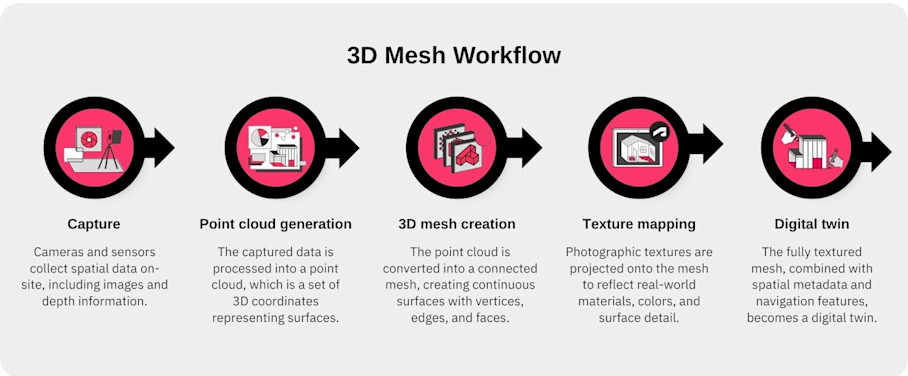
At a high level, 3D mesh creation looks like this:
Capture: Cameras and sensors collect spatial data on-site, including images and depth information.
Point cloud generation: The captured data is processed into a point cloud, which is a set of 3D coordinates representing surfaces.
3D mesh creation: The point cloud is converted into a connected mesh, creating continuous surfaces with vertices, edges, and faces.
Texture mapping: Photographic textures are projected onto the mesh to reflect real-world materials, colors, and surface detail.
Digital twin: The fully textured mesh, combined with spatial metadata and navigation features, becomes a digital twin, which is the complete, interactive 3D model that users can explore, measure, and integrate into workflows.
Much of this process is automated by platforms like Matterport, allowing teams to move quickly from capture to usable models. In some cases—such as highly complex sites or very specialized AEC workflows—additional editing, manual refinement or post-processing may be applied to meet specific accuracy or visualization requirements.
What can 3D mesh data be used for?
3D mesh data is not just for visualization. It can be exported, analyzed, and integrated into downstream workflows. Common exportable formats include:
Mesh file formats: OBJ, FBX, glTF — widely used for 3D modeling, rendering, and simulation.
Point clouds and other spatial data formats: Used for CAD, BIM, VR/AR, and other technical workflows.
Many of these formats can be exported directly from a Matterport digital twin. Teams can use these exports to bring accurate, textured 3D models into the tools they already use for design, construction, operations, or immersive experiences.
3D mesh data is versatile. It can be applied across a wide range of industries. Its ability to combine geometry, textures, and scale makes it valuable wherever understanding, measuring, or interacting with real-world spaces is important.
Industries that currently use 3D mesh data in their resources and workflows include:
Real estate: 3D mesh data is used to create fully immersive real estate virtual tours and walkthroughs, giving prospective buyers or tenants a realistic sense of a property without visiting in person. It also enables automated measurements that support property marketing assets, renovation planning, and interior design decisions.
Facilities & operations: Facilities teams use 3D mesh models for space planning and asset management. Digital twins created from mesh data provide a reliable reference for maintenance and management of factories, labs, hospitals, government buildings, and more.
Emerging technologies (AR/VR, AI, gaming): 3D mesh data supports immersive simulations and VR/AR training by providing real-world environments in digital form. Game developers and technology teams can integrate these models to create realistic, interactive experiences that replicate actual spaces at scale.
Architecture, engineering, and construction (AEC): AEC professionals use 3D mesh data for as-built documentation and to verify spaces against design plans. It helps with design validation, coordination between architects, engineers, and contractors, and enables workflows such as BIM clash detection, prefabrication validation, and progress monitoring.
Among these sectors, the AEC industry represents one of the largest and most consistent adopters of 3D mesh data. The precision, scale, and reusability of mesh models aid countless decisions throughout the project lifecycle.
Tactical applications of 3D mesh data in AEC
3D mesh data offers value at every stage of an AEC project, from initial design through construction and into ongoing operations.
Design visualization and validation
3D mesh data allows architects to visualize existing spaces in high fidelity, making it easier to understand spatial relationships, proportions, and design constraints before any physical work begins. It also enables teams to compare two 3D models to verify designs against as-built conditions, reducing costly errors and rework.
Architects and design teams apply 3D mesh data practically by:
Importing exported mesh or point clouds into BIM/CAD software to integrate real-world spatial data with design models.
Overlaying design plans on the captured model to compare proposed designs with existing conditions.
Conduct remote design reviews with stakeholders using digital twins to reduce travel and accelerate feedback.
Using AR overlays to visualize furniture, finishes, or other design elements in context for client approvals and interior planning.
Digital twins provide schematic floor plans, Dollhouse views, and "defurnished" spaces directly from the captured mesh. These views give architects and clients a shared understanding of the space and act as a foundation for design.
Engineering and construction coordination
3D mesh data gives engineers and contractors reliable representations of a construction site, making it easier to coordinate trades and reduce costly errors. It also supports clash detection, progress monitoring, and verification of pre-fabricated components, ensuring that construction aligns with design intent.
Mesh and point cloud data can be seamlessly integrated with Autodesk (AutoCAD, Revit, etc.) and other BIM tools, enabling seamless collaboration.
Engineers and construction teams apply 3D mesh data practically by:
Scanning at critical project milestones to monitor progress, reduce rework, and ensure designs are implemented correctly.
Using AR/VR simulations to train crews in safety procedures, visualize site layouts, and simulate construction sequences.
Overlaying design models on captured mesh to check alignment and detect clashes before work is performed.
Exporting mesh or point cloud data to BIM/CAD platforms for coordination, measurements, and material planning.
High-resolution 3D mesh data provides precise scale and geometry, so measurements can be used for precise engineering workflows. Studies of Matterport captures show dimensional accuracy within ±1 cm, which is considered a dependable baseline for as-built modeling. Many AEC teams use these point clouds and BIM exports to reduce manual survey work and speed up model creation.
Detailed reference models for facility handover
3D mesh–based digital twins serve as living records of building conditions, giving operations teams a reliable, up-to-date view of spaces long after construction is complete. The historic mesh data provides downstream facilities teams with an asset they can use to measure spaces, track assets, and plan renovations with confidence.
Facilities teams apply 3D mesh data practically by:
Conducting virtual walkthroughs to inspect spaces remotely for improved compliance and reduced risk.
Using Tags and Notes to enrich facility documentation and collaborate across teams.
Measuring spaces accurately within the digital twin for planning renovations, relocations, or reconfigurations.
Referencing historical snapshots to track changes over time and inform ongoing operations.
Matterport’s digital twins ultimately serve as a single source of truth. They consolidate photographic and spatial data into one easily accessible model, which is referenced for long-term operational support.
Best practices for optimizing 3D mesh data with Matterport
In AEC projects, small inaccuracies can lead to costly errors. High-quality 3D mesh is the foundation for digital twins you can trust. Follow these best practices to capture spaces with precision and maximize the value of your 3D mesh data:
Capture complete and systematic coverage: Scan each area methodically with sufficient overlap to avoid gaps or missed regions, ensuring the digital twin represents the entire space.
Optimize lighting and environmental conditions: Consistent lighting improves texture quality and mesh fidelity, while reducing errors caused by shadows, reflections, or variable conditions.
Break large sites into manageable sections: For multi-floor or complex buildings, scanning in sections simplifies processing and keeps file sizes manageable.
Use high-quality capture devices and systematic workflows: Devices like the Matterport Pro3 provide accurate depth and scale. Following structured scanning workflows ensures dimensional reliability across the site.
Export mesh or point clouds in the correct formats: Choose the right format (OBJ, FBX, glTF, or point clouds) and confirm proper scaling to integrate seamlessly with BIM, CAD, VR/AR, and other downstream platforms.
Prioritize high-detail capture only for critical areas: Focus fine detail on spaces that require precise measurements or visualization, balancing model fidelity with file size and processing efficiency.
3D mesh is not just a technical artifact. It is the foundational language that allows physical spaces to be understood, analyzed, and acted on.
Each Matterport digital twin is built from millions of spatial data points woven into a 3D textured mesh that serves as a common language between the real world and digital systems. By capturing and optimizing 3D mesh effectively, teams transform raw spatial data into genuinely actionable, reusable assets.
Power your AEC/DCM workflows with Matterport

